
Sunil Yadav
Legend
September 22, 2017
Question

Move all pages of one document to another.

  • September 22, 2017
  • 3 replies
  • 3065 views

Hi all,

Using javascript I tried to move all pages from a document to another, I found method name move

//~ var sourcePages = source_doc.pages.itemByRange(myDocFirstPage, myDocLastPage);

var sourcePages = source_doc.pages.everyItem();

sourcePages.move(LocationOptions.AFTER, destination_doc.pages.item(-1));

Error:

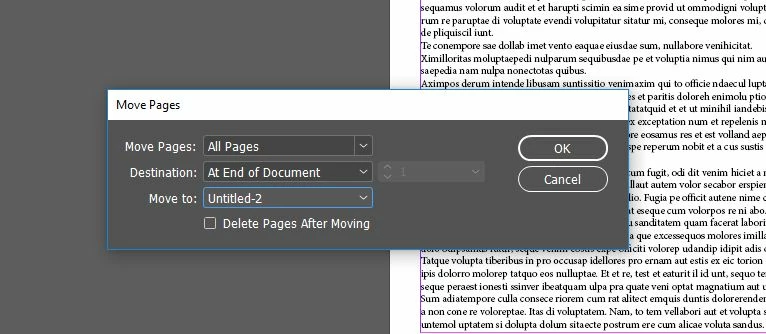
But I want to know how to use all pages method as per below snapshot.

I want to move all pages without deleting.
Thanks & Regards

Sunil Y.

This topic has been closed for replies.

3 replies

Known Participant
October 1, 2021

hey sunil 


i have facing same script problem,i want move all the spread from one indesign document to another (1 spread (2 facing page) ind document ,can you please help .It would great help .


sukriti

Anantha Prabu G
Legend
September 22, 2017

Hi,

hope its may helps to you!!!

var source_doc = app.documents.item('source_file.indd'); 

var destination_doc = app.documents.item('destination_file.indd')

var sourceSpreads = app.activeDocument.spreads.everyItem();   

sourceSpreads.duplicate(LocationOptions.AFTER, source_doc.spreads.item(-1));

Thanks,

Prabu

Design smarter, faster, and bolder with InDesign scripting.
tpk1982
Legend
September 22, 2017

Prabhu, he said he dont want to use duplicate method

tpk1982
Legend
September 22, 2017

If you dont want to delete, then instead of move use duplicate method

Sunil Yadav
Legend
September 22, 2017

But when I use duplicate method for a large file, it takes longer time to execute.

I want to use "Move pages" method.

tpk1982
Legend
September 22, 2017