
Question
Move Images from the top of the page to the bottom of the page
Hi,
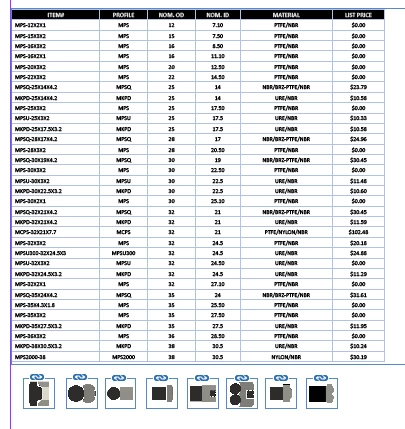
I need to move the images from the top of the page to the bottom of the page. For that, I have attached the used script for the reference. And also I have attached the expected output screenshot
x = 150;
y =37.5;
width = 480;
height = 540;
frameX = 60;
frameY =640;
frameWidth = 50;
frameHeight = 50;
var doc = app.activeDocument;
for (var i = 0; i < doc.pages.length; i++) {
  var page = doc.pages[i];
  var pageHeight = page.bounds[2] - page.bounds[0];
  var textframeheight = page.textFrames.length;
  var imageFrames = []; // Create an empty array to store image frames
  var imageNamesArray = [];
  // Loop through all text frames on the page
  for (var j = 0; j < textframeheight; j++) {
    var frame = page.textFrames[j];
  if (frame.associatedXMLElement && frame.associatedXMLElement.markupTag) {
      var markupTagName = frame.associatedXMLElement.markupTag.name;
      // Perform your action or check condition with markupTagName
     // alert(i + "_" + markupTagName);
 if (frame.associatedXMLElement.markupTag.name == 'family_name') {
     var pagedetails = page.allPageItems.length;
      for (var n = 0; n < pagedetails; n++) {
        if (page.allPageItems[n] instanceof Image) {
          var parentFrame = page.allPageItems[n].parent;
      var xmlString = ReadXMLFileDetails();
var xmlDoc = new XML(xmlString);
// Define the XPath expression
var imageTypeElement = xmlDoc.xpath("//image_type");

// Check if the image_type element exists
if (imageTypeElement != null && imageTypeElement != '') {
    // Extract values from the image_type element
    var imageNodes = imageTypeElement.children();
    var imageFiles = [];
    var splitImageFiles = [];
    var imageNamesArray = [];

    for (var img = 0; img < imageNodes.length(); img++) {
        var imageFileAttribute = imageNodes[img].attribute("IMAGE_FILE");
        if (imageFileAttribute != null && imageFileAttribute != '') {
            var imageFile = imageFileAttribute.toString();
            imageFiles.push(imageFile);
            splitImageFiles.push(imageFile.split(','));
        }
    }

    for (var spltimg = 0; spltimg < splitImageFiles.length; spltimg++) {
        if (splitImageFiles[spltimg].join(', ') != null && splitImageFiles[spltimg].join(', ') != '') {
            imageNamesArray.push(splitImageFiles[spltimg].join(', '));
        }
    }
} else {
    alert("Error: 'image_type' element not found in XML.");
}
          for (var q = 0; q< imageNamesArray.length; q++) {
            // Get the path to the image file
            var imagePath = FolderPath() + "/" + imageNamesArray[q];
            var currentFrameX = frameX +q * (frameWidth + 10);
            parentFrame.visible = true;
            parentFrame.geometricBounds = [frameY, currentFrameX, frameY + frameHeight, currentFrameX + frameWidth];
            var placedItem = parentFrame.place(File(imagePath));
            parentFrame.fit(FitOptions.proportionally);
            // n--;
          }
        }
      }
    }
}
}

  // Move the image frames to the bottom of the page
  for (var k = 0; k < imageNamesArray.length; k++) {
    var imageFrame = imageNamesArray[k];
    var imageFrameHeight = imageFrame.geometricBounds[2] - imageFrame.geometricBounds[0];
    var newY = pageHeight - imageFrameHeight;
    var newX = imageFrame.geometricBounds[1]; // Keep the same X-coordinate
    // Check if the new position is within the document boundaries
    if (newY >= page.bounds[0] && newY <= page.bounds[2]) {
      imageFrame.move(undefined, [newX, newY]);
    }
  }
}


function FolderPath()
{// Get the active document
var partBeforeImages
var doc = app.activeDocument;
for (var k = 0; k < doc.links.length; k++) {
    var link = doc.links[k];
    var filePath = link.filePath;
    var file = new File(filePath);
    var folderPath = file.parent.fsName;
     if (folderPath.indexOf("Images") !== -1) {
        // Split folderPath based on the word "Images"
        var pathParts = folderPath.split("Images");
         partBeforeImages= pathParts[0];
        var partAfterImages = pathParts[1];
    }

}

  // Log the folder path to the console
return partBeforeImages;
}

function ReadXMLFileDetails()
{

		myDoc = app.activeDocument;
		myLinks = myDoc.links;
		for (j = myLinks.length - 1; j >= 0; j--)
		{
			myName = myLinks[j].filePath;
			var ext =  myName.substring(myName.length-3,myName.length) ;
			if (ext=="xml")
			{
				var myXMLFile = File(myName);
				var myResult = myXMLFile.open("r", undefined, undefined);
				if(myResult == true)
				{
				var myXMLDefaults = myXMLFile.read();
               // alert(myXMLDefaults)
				myXMLFile.close();
				var myXMLDefaults = new XML(myXMLDefaults);
				return myXMLDefaults;
				}
		}//for
	}
}
 AdChoices