
Inspiring
February 21, 2019
Question

Move Objects Horizontally

  • February 21, 2019
  • 1 reply
  • 1216 views

Hi,

     How to use the below option to move the selected objects (multiple objects). move command is for a single object.  So I had grouped and moved. When i do that layers were changed.How to use that for multiple selection without changing layer.

app.selection.move([x,y])               //     Used this line for group/loop inside for single object

Manual Process:

     1. Selection is there for multiple objects.

     2. Object -> Transform -> Move -> Enter Horizontal Value and give enter.
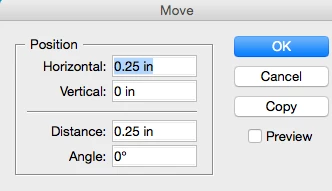
    

     Its fine with the above manual process.  When i do with groupped objects layers were changed. So if i proceed for multiple selection with for loop, objects are not visible.

Thanks,

Sudha K

This topic has been closed for replies.

1 reply

Community Expert
February 21, 2019

Loop the selection and use method move() on every item of the selection.

Note: There are two arguments available for move().

A to [x,y] argument and a by [x,y] argument.

To set the second argument give the first one the value undefined.

Details here:

Adobe InDesign CS6 (8.0) Object Model JS: Rectangle

Regards,
Uwe

Inspiring
February 21, 2019

Hi,

Check out this property in general preferences:

JavaScript: ungroupRemembersLayers = true

AppleScript: set ungroup remembers layers to true

If true, objects after ungrouping go back to their original layers

S.Hopkins

Community Expert
February 21, 2019

Hi Shirley,

Sudha is using InDesign CS6, I think.

ungroupRemembersLayers is available for InDesign CC 2014.1 and higher.

Regards,

Uwe