Participant
May 12, 2017
Question

Multicolumn text box to table?

  • May 12, 2017
  • 3 replies
  • 2087 views

Hi,

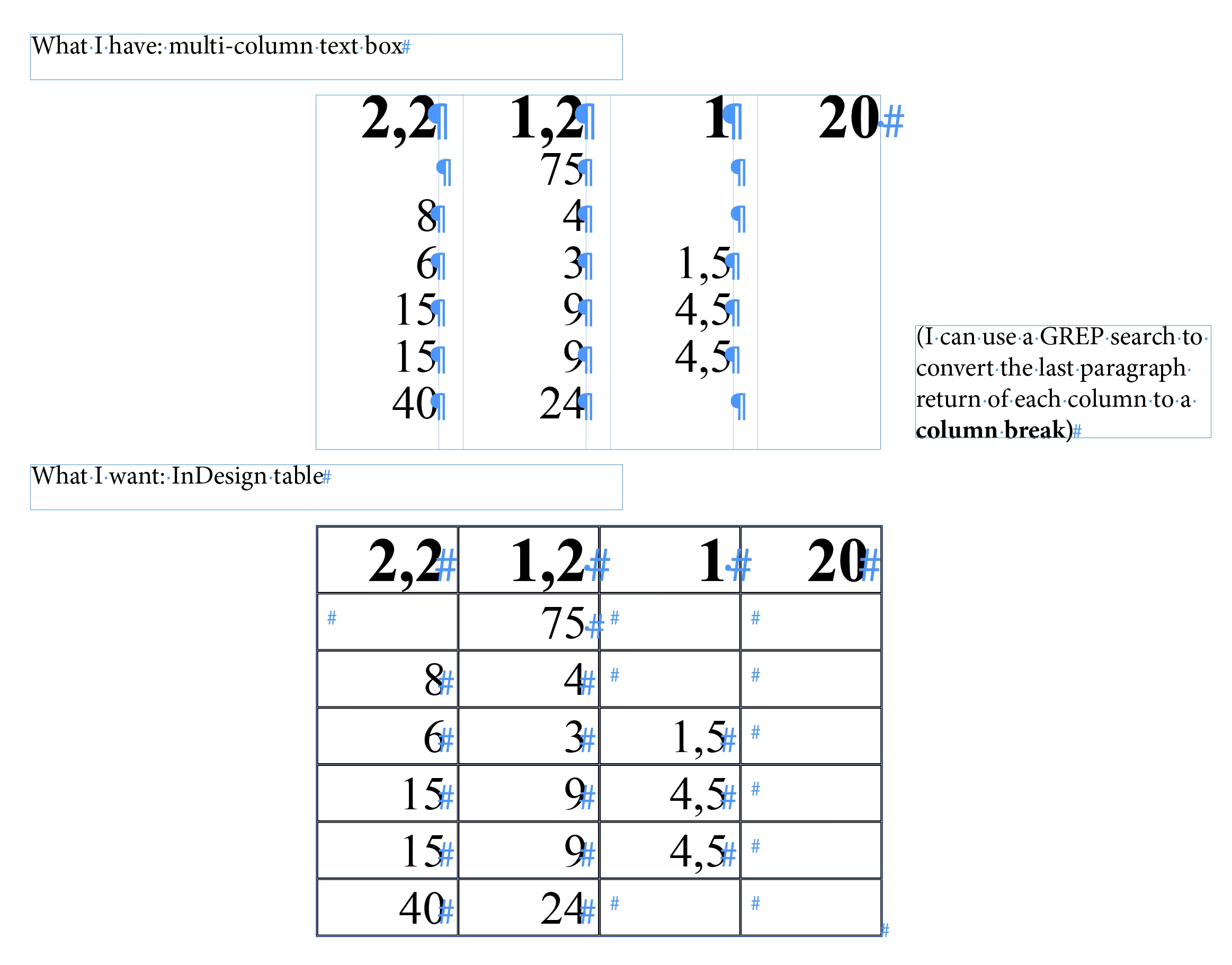
Is it possible to make a multi-column text box into a table in InDesign CC 2017? I feel I'm missing something obvious.

Maybe there's a script to handle this? (See screenshot)
This topic has been closed for replies.

3 replies

Community Expert
May 13, 2017

Hi,

it's relative easy to do this by script.

Here the steps in the UI:

1. Add a textframe with a table of four columns.
The number of rows will be the maximum number of paragraphs you have in one of your text frame columns.

2. Select the text in column 1 of your 4-column text frame.

3. Copy to the clipboard.

4. Select cell 1 of column 1 of your table.

5. Paste.

Now the cells of column 1 of your table contain one paragraph each.

Repeat with columns 2 to 4.

That will preserve all the formatting details of your text and removes the paragraph signs at the end of the pasted paragraphs.

Regards,
Uwe

Erica Gamet
Inspiring
May 13, 2017

Yes, I think Uwe has the simplest solution: Copy and paste each column of text into a column of a table. Sometimes simple is the best...unless you have hundreds to do.

FRIdNGE
January 12, 2018

Hi all,

Imho, the simplest way is to click "OK"!

Using this "light version" script (without UI) [link to download below], the user will need to previously create (or modify style names):

• a table style, named "TestTable"

• "Red" and "Blue" cell styles, associated to "Red" and "Blue" para styles

• "Table_Anchoring" para style.

When done, just select the text of the future table [without taking in account in the selection the last carriage-return] …

and play the script. Last screenshot, after 4 clicks!

[No need to add blank paras for the column last cells if empty]

The "Pro" version has an UI to choose several kinds of settings (para styles and Table style, table columns width adjustment (on contents), and especially various "batch treatments" (doc, story, text selection, condition)!, useful if hundreds of tables to be treated!

In this last case, the op will just need one click!

Best,

Greg, from FRIdNGE

Link:  Dropbox - TableBuilder_FRIdNGE.jsxbin

MW Design
Inspiring
May 13, 2017

It is an interesting problem.

One can export to PDF, in Acrobat, Save as Other, save as a Word document or an Excel spreadsheet, open and copy the text and paste into a frame in ID and convert text to table as well.

Legend
May 13, 2017

Hmmm... tricky one. The quickest way I can think of is to first create a 7 column table, then transpose this to 4 columns (swapping rows/ columns):

E.g.

  1. Choose Object > Text Frame Options, and in the General tab, change Number of columns to 1. Click OK.
  2. Select all the text (Ctrl/Cmd-A) and choose Table > Convert Text to Table
  3. Set Column and Row Separator to Paragraph and Number of Columns to 7. Click OK.  (note: sadly setting the number of columns here to 4 gives a very muddled up table as it uses the text thread order, so it's better to first of all build the 7 column table based on).
  4. Select the Table and Copy the text (Ctrl/Cmd-C)
  5. Launch Microsoft Excel, and click in the top left cell and Paste (Ctrl/Cmd-V). And use the following technique to transpose the rows and columns: Transpose (rotate) data from rows to columns or vice versa - Excel
  6. You can now either Place the Excel spreadsheet as a Table, or else copy and paste the text into an empty text frame and then use Convert Text to Table (with Column set to Tab, and Row to Paragraph in the Convert Text to Table dialog box).

If you do this a LOT, it'll indeed be good to see if someone is willing to develop a Transpose Rows/Columns script for InDesign CC (2017), which means you'd not need to jump out of InDesign into Excel to perform the transpose.  There might already be a plug-in around that includes this feature, one of the other forum support crew might be able to supply a link for that one.
