Totally get that you’re on a tight deadline we’ve all been there but I also hear that you really want to get to the bottom of this issue.
It might sound like “messing around”, but something as quick as Packaging or exporting to IDML and reopening the file might resolve the glitch. It usually takes under a minute and can clear up all sorts of weird link behaviour.
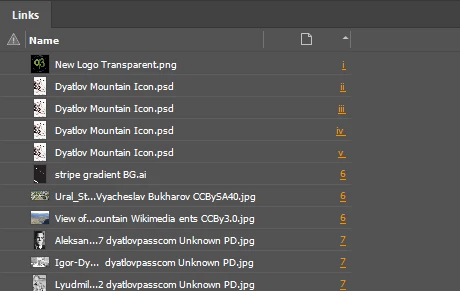
Also, it’s absolutely worth double-checking that all instances of the image are pulling from the exact same file path. Even one located copy with a different path (or if one was pasted from another doc) can break the grouping in the Links panel.
Might be faster than replacing them all manually and could save you time on future projects too.
If you end up replacing all the images anyway, you might try the Links panel dropdown > Relink to Folder feature. If the filenames are identical, it'll relink all instances in one go much quicker than manual replacement.
I've double and triple checked that they are not pulling from other paths.
The relink to Folder feature did NOT work. That's how I discovered this was an issue.
I'm 99% sure the issue is that I cut-and-pasted because I'm working on a new file and not cut and pasting. It's a pain having to recreate all the effects and sizing but at least I can replace them quickly!
Thanks!




 AdChoices