

Multiple Language options (Farsi and English) in InDesign CC 2017
Hello all,
I'll keep this short and sweet.
I need a way to imput farsi into InDesign CC 2017 but still keep the english settings, the one thread I could find on this mentioned the following:
You have to install additional to your installation a MENA version.
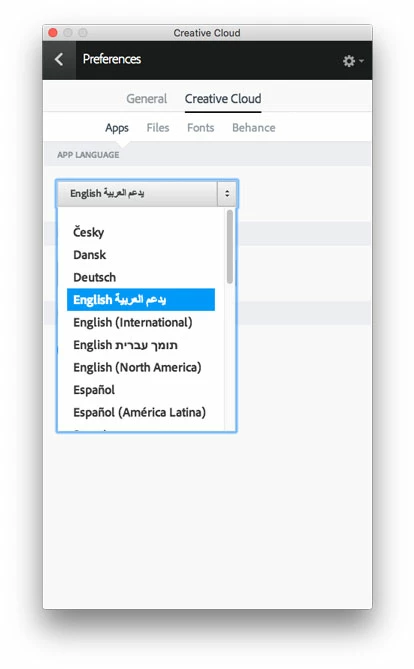
After installing your primary language (e.g. English or German), open the CC application, change the Application Language to somethng which supports RTL like Arabic.
When you set up a new document now, you can change the binding, set up the paragraph styles with farsi (fonts and othr features)
Work with it.
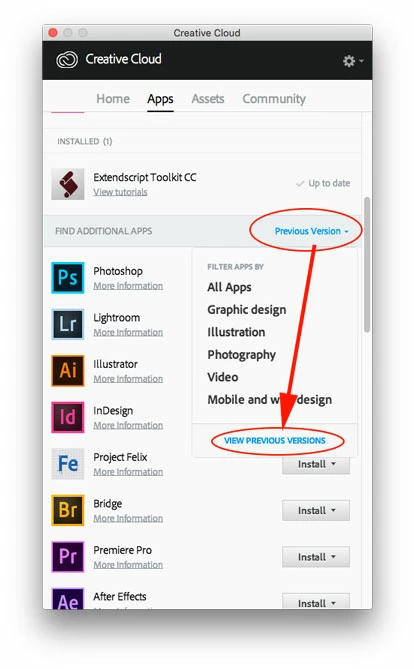
However I am unsure as to what it means to open the CC application. Can someone help with some more specific instructions as to where I will find this option or indeed if they have another work around without me needing to outline in Illustrator as its proving to be time consuming and I cant get my text to flow as a result.
Please keep in mind that I need to keep the app in English.
Fingers crossed
Joni
[Moved from non-technical Forum Lounge to specific Program forum... Mod]
[Here is the list of all Adobe forums... https://forums.adobe.com/welcome]


 AdChoices