Known Participant
January 8, 2020
Answered

My for loop isn't working

  • January 8, 2020
  • 4 replies
  • 1298 views

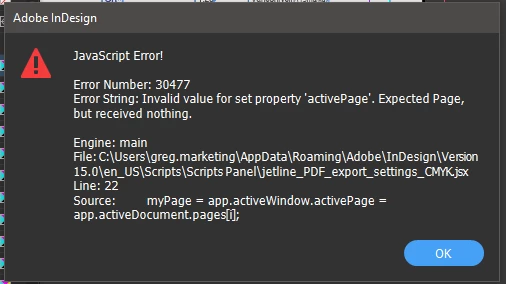
Hi my for loop doesn't seem to be working. Not too sure what I'm doing wrong, I want to go through all the pages in a document and convert the text frames to outlines. It is converting them, but only on the active page.
 

//JETLINE: INDESIGN PDF EXPORT SETTINGS SCRIPT VERSION 0.1//


alert("This script is designed configure you PDF export settings, to reduce the chances any issues getting through")

alert("Jetline InDesign PDF Export Configuration Script 08/01/2020")

Main();

function Main() {
	// Check to see whether any InDesign documents are open.
	// If no documents are open, display an error message.
	if (app.documents.length > 0) {
		var myDoc = app.activeDocument;
        
        ///DOCUMENT SETTINGS///
        myDoc.documentPreferences.intent = DocumentIntentOptions.PRINT_INTENT;
        
        ///FIND EACH TEXT FRAME ON EACH PAGE AND CREATE OUTLINES///   
        var i;
        for (i = 1; i < 250; i++);
        myPage = app.activeWindow.activePage = app.activeDocument.pages[i];
        for (j=myPage.textFrames.length- 1; j >= 0; j--)
        {try{myPage.textFrames[j].createOutlines();
             myPage.textFrames[j].remove();}catch(e){}}
        
        ///PDF EXPORT SETTINGS///
        app.pdfExportPreferences.acrobatCompatibility = AcrobatCompatibility.ACROBAT_4;
        app.pdfExportPreferences.standardsCompliance = PDFXStandards.PDFX1A2001_STANDARD;
        app.pdfExportPreferences.pdfColorSpace = PDFColorSpace.CMYK;
        app.pdfExportPreferences.subsetFontsBelow = 0;
        app.pdfExportPreferences.useDocumentBleedWithPDF = true;
        
            // Flatener Settings //
            app.pdfExportPreferences.appliedFlattenerPreset.convertAllStrokesToOutlines = true;
            app.pdfExportPreferences.appliedFlattenerPreset.convertAllTextToOutlines = true;
            app.pdfExportPreferences.appliedFlattenerPreset.gradientAndMeshResolution = 600;
            app.pdfExportPreferences.appliedFlattenerPreset.lineArtAndTextResolution = 1200;
        
            // Marks //
            app.pdfExportPreferences.colorBars = false;
            app.pdfExportPreferences.cropMarks = false;
            app.pdfExportPreferences.registrationMarks = false;
            app.pdfExportPreferences.pageInformationMarks = false;
        
            // Bitmap Settings //
            app.pdfExportPreferences.colorBitmapCompression = BitmapCompression.ZIP;
            app.pdfExportPreferences.colorBitmapQuality = CompressionQuality.MAXIMUM;
            app.pdfExportPreferences.colorBitmapSampling = Sampling.NONE;
            app.pdfExportPreferences.grayscaleBitmapCompression = BitmapCompression.ZIP;
            app.pdfExportPreferences.grayscaleBitmapQuality = CompressionQuality.MAXIMUM;
            app.pdfExportPreferences.grayscaleBitmapSampling = Sampling.NONE;
            app.pdfExportPreferences.monochromeBitmapSampling = Sampling.NONE;
        
            // Document Elements //
            app.pdfExportPreferences.compressTextAndLineArt = false;
            app.pdfExportPreferences.exportLayers = false;
            app.pdfExportPreferences.exportNonprintingObjects =false;
            app.pdfExportPreferences.exportWhichLayers = ExportLayerOptions.EXPORT_VISIBLE_PRINTABLE_LAYERS;
            app.pdfExportPreferences.includeBookmarks = false;
            app.pdfExportPreferences.includeHyperlinks = false;
            app.pdfExportPreferences.interactiveElementsOption = InteractiveElementsOptions.APPEARANCE_ONLY;


        alert("Settings Configured!");
	}
	else {
		// No documents are open, so display an error message.
		alert("No InDesign file for the script to work on is open");
	}
}


This topic has been closed for replies.
Correct answer rob day

Maybe try targeting stories rather than the text frames. This worked for me and got nested frames and tables:


var s=app.activeDocument.stories;  
for (var i = 0; i < s.length; i++){
    try {
        s[i].createOutlines();
        $.writeln("execute")
    }catch(e) {
        $.writeln("error")
    }  
}; 

4 replies

rob day
Community Expert
rob dayCommunity ExpertCorrect answer
Community Expert
January 9, 2020

Maybe try targeting stories rather than the text frames. This worked for me and got nested frames and tables:


var s=app.activeDocument.stories;  
for (var i = 0; i < s.length; i++){
    try {
        s[i].createOutlines();
        $.writeln("execute")
    }catch(e) {
        $.writeln("error")
    }  
}; 
n0ugh7_zaAuthor
Known Participant
January 9, 2020

That works really well, selects text in groups too. but it seems to miss any overset text

Community Expert
January 9, 2020

Best run preflight and resolve any overset before trying to outline text.


Regards,
Uwe Laubender

( ACP )

Community Expert
January 9, 2020

Interesting. Tested the line on a little magazine with 4 pages and it ran flawless.


So: Is something special in your text frames? Are there empty text frames?

Or are there anchored objects? Tables perhaps?

Locked layers? InCopy assignments?


You could try this, but it will fail if text is in overset somewhere in the document:

app.documents[0].stories.everyItem().texts.everyItem().createOutlines();


If it will work, it will work on every text container.

Regardless if on page, pasteboard or master spread.


Regards,
Uwe Laubender

( ACP )

n0ugh7_zaAuthor
Known Participant
January 9, 2020

Strange, thats still giving me the same error. is there something wrong with my code?


Main();

function Main() {
	// Check to see whether any InDesign documents are open.
	// If no documents are open, display an error message.
	if (app.documents.length > 0) {
		var myDoc = app.activeDocument;
        
        
        app.documents[0].stories.everyItem().texts.everyItem().createOutlines();
        
        
        alert("THE SCRIPT HAS RUN SUCCESSFULLY.");
	}
	else {
		// No documents are open, so display an error message.

        alert("No InDesign file for the script to work on is open");

    }
}
n0ugh7_zaAuthor
Known Participant
January 9, 2020

This is working for the most part, but there are certain things its not changing, text frames with open type fonts for example.

var i;
for (i = 1; i < app.activeDocument.pages.length; i++)
{myPage = app.activeWindow.activePage = app.activeDocument.pages[i];
for (j=myPage.textFrames.length- 1; j >= 0; j--)
{try{myPage.textFrames[j].createOutlines();}catch(e){}}};
Community Expert
January 8, 2020

So your goal is to convert all text in all text frames on all pages of your document to outlines?

This can be made way better on a exported PDF with Acrobat Pro DC and a preflight rule:

https://community.adobe.com/t5/indesign/indesign-2020-convert-text-to-outline/m-p/10808712#M168367


For the scripting side with InDesign:

You can access all text frames on all pages directly without iterating through every page with:

app.documents[0].pages.everyItem().textFrames.everyItem()


And do something with them. If you absolutely have to, convert them to outlines.

Will not discuss the negative side of this process here.

app.documents[0].pages.everyItem().textFrames.everyItem().createOutlines();


Working like that will only catch text frames that are not nested.

Text frames that are not grouped for example.


Also text frames on masters are not addressed with that. And text frames that are positioned on the pasteboard.


Oh, and FWIW:

app.documents[0].layoutWindows[0].activeSpread
app.documents[0].layoutWindows[0].activePage


See DOM documentation compiled by Gregor Fellenz:

https://www.indesignjs.de/extendscriptAPI/indesign-latest/#LayoutWindow.html


Regards,
Uwe Laubender

( ACP )

n0ugh7_zaAuthor
Known Participant
January 9, 2020

Hi Uwe,

app.documents[0].pages.everyItem().textFrames.everyItem().createOutlines();

Is giving me this error


Legend
January 8, 2020

A common trap. This line:


        for (i = 1; i < 250; i++);

has no effect. At all.


A for statement makes a loop from one statement for example (with braces)


        for (i = 1; i < 250; i++) { do something involving i }

or (without braces)


        for (i = 1; i < 250; i++) total = total + i ;

but you have neither of these. Instead you have the infamous "empty statement" - which is what the semicolon at the end of your line sets up, and an empty statement does nothing. So you do nothing, 250 times. Then it continues and runs the following lines, just once.