
Participant
June 29, 2025
Answered

My S are switching my paragraphs to headings

  • June 29, 2025
  • 2 replies
  • 185 views

Hi, 


I downloaded a font online and created a few paragraph styles for my document. Everything was fine originally when I had placed placeholder text, now I am trying to add the words in now and everytime I try to add an S the letter does not appear and instantly turns the paragraph into the heading. 


I've tried looking at GREP, Nested, I can't override the paragraph styles. I am under a strong deadline; could anyone please offer any advice? 
Correct answer Barb Binder

Hi @Esther_Wangari5432:


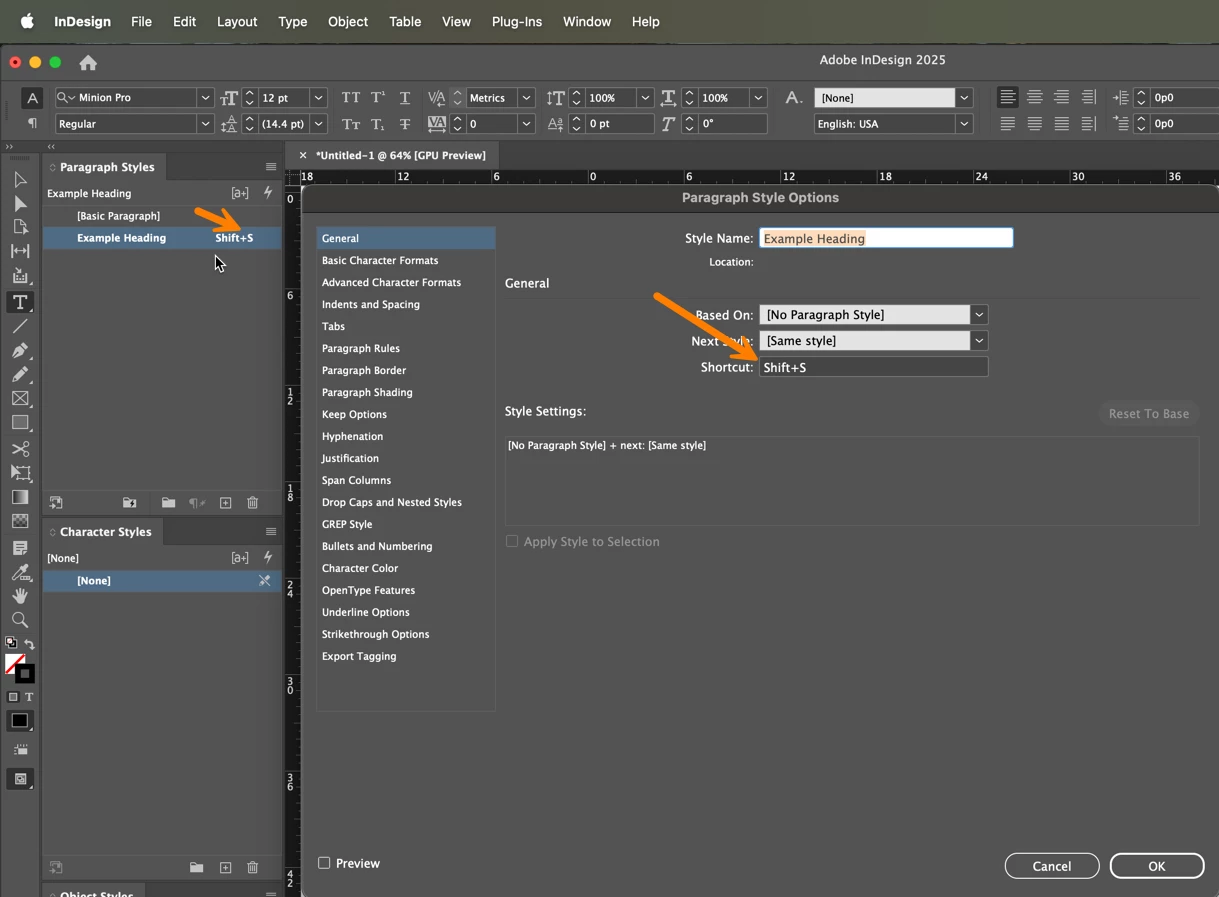
It sounds like the letter S was assigned as a keyboard shortcut for the heading style being assigned:

  1. Open the Paragraph styles panel
  2. Right click the heading style > Edit [your heading style name]
  3. Delete the shortcut


~Barb


2 replies

Participant
June 30, 2025

Hello,


Edit the Paragraph Style → Check GREP Style and Nested Styles.

Look for any rule that applies a style when "S" is typed → Delete it.

In the Paragraph Styles panel, click the style and choose Clear Overrides (remove the "+").

Also check if a Character Style is applied — set it to [None].


Best Regard,

Brian


ForemostPayOnline


Barb Binder
Community Expert
Barb BinderCommunity ExpertCorrect answer
Community Expert
June 30, 2025

Hi @Esther_Wangari5432:


It sounds like the letter S was assigned as a keyboard shortcut for the heading style being assigned:

  1. Open the Paragraph styles panel
  2. Right click the heading style > Edit [your heading style name]
  3. Delete the shortcut


~Barb


~Barb at Rocky Mountain Training