Participant
Nov 6, 2026 5:21 PM UTC
Question

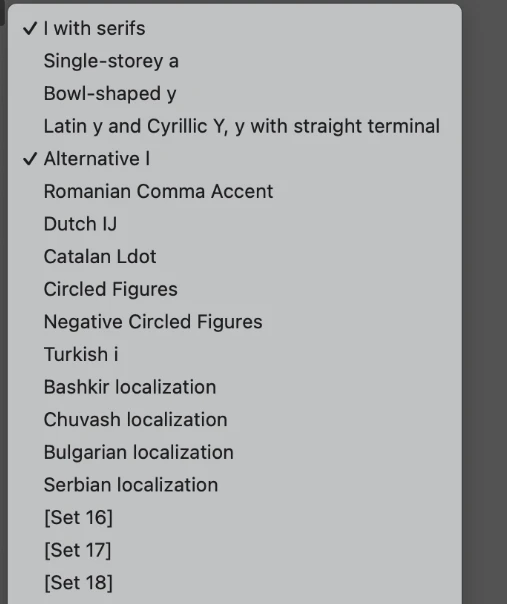
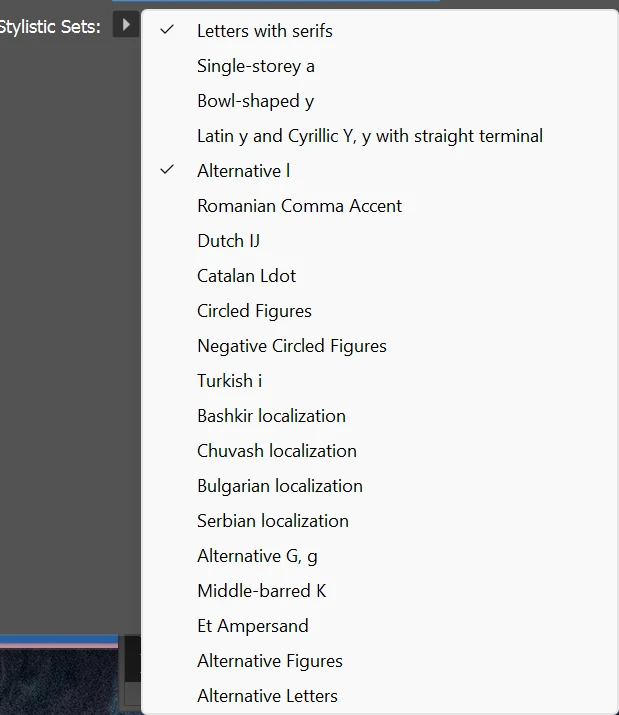
My stylistic sets are different than the other designer who activated their font a year ago. My files look different then hers now.

Another designer and I both activated the same font, TT Commons on different adobe accounts/devices. She activated hers over a year ago, so my version must be new. When I open her files that have paragraph styles, the font behaves differently for me. Under OpenType features in the Stylistic Sets, one of my options is slightly different than the other designers. She has the I's with serifs checked, which only applies to the uppercase I, but on my panel that option says "letters with serifs" which applies to lowercase i and l. If I turn that off, I lose the serifs on the uppercase I's. I have no idea why the same font would have different stylistic sets. 
 

    3 replies

    Dipangana Chatterjee
    Community Manager
    Community Manager
    Nov 8, 2026 6:00 AM UTC

    Hi ​@natural_force053e - could you please let us know on which version on ID you are facing this issue.

    Translate
    Scott Falkner
    Community Expert
    Community Expert
    Nov 7, 2026 8:12 PM UTC

    You can test to see if you have the same version of the font. Each of you package the job with fonts and compression the files. The files might have version info if you Get Info (Mac, don’t know about Windows). You can also look at the file size. If the sizes are different then you are using different versions.

    Translate
    Community Expert
    Nov 6, 2026 6:24 PM UTC

    I suspect you're both using different versions of the font.

    Your colleague could be using an older version of TT Commons, while you've activated a newer one.

    Looks like TypeType has updated TT Commons Pro over time, including changes to its stylistic sets, which would explain the differences you're seeing.

    I'd suggest the following:

    • Check that you're both using exactly the same font family and style, and compare the font version numbers if possible.
    • Check for any locally installed copies of TT Commons that might be conflicting with Adobe Fonts.
    • Have your colleague remove the font from their Adobe Fonts Added Fonts and then add it again from the Adobe Fonts website. According to Adobe, this downloads the latest version.

    Adobe explains the update process here:

    https://helpx.adobe.com/fonts/web/getting-and-using-fonts/update-font-version.html


    User Beware
    Before updating, save copies of the existing documents and export reference PDFs. Changing font versions can affect glyph substitutions, spacing and text flow, even when the font name and paragraph styles remain unchanged.

    Once you're both using the same version, you should have consistent stylistic set options.

    If maintaining the original appearance is essential, you may need access to the older font version rather than trying to recreate its appearance using the newer stylistic sets.


    What it looks like is that you’re using different versions of the same font and this could cause text reflow where it is unexpected when opening between you both for edits/changes.

    Translate