
Chris Panny
Inspiring
February 12, 2021
Answered

Need An Automated Method To Move Layer Assets To Another Layer For Large Document

  • February 12, 2021
  • 3 replies
  • 395 views

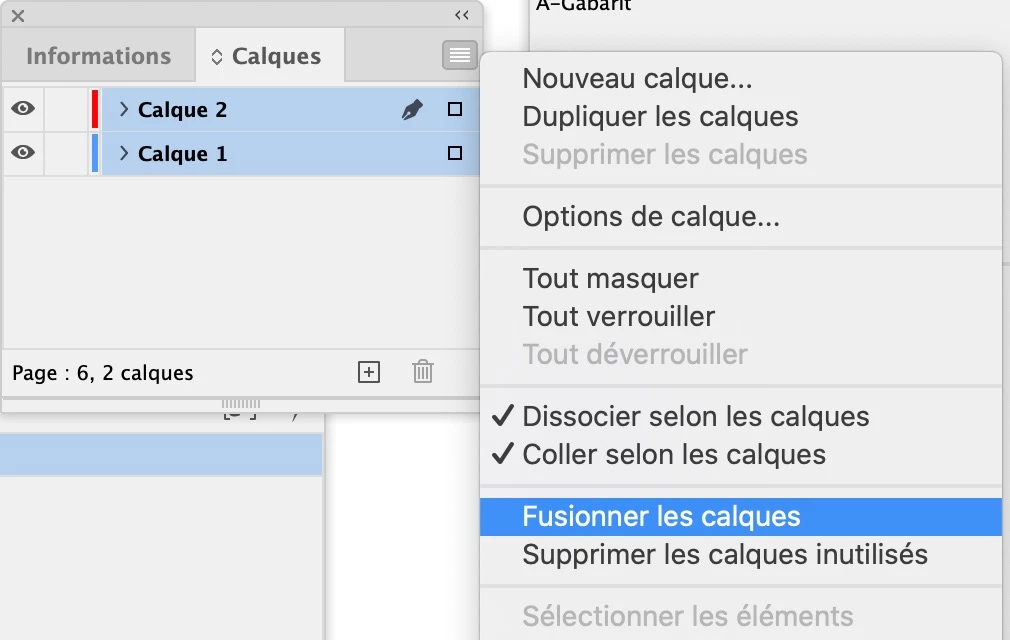
I have a big manual I'm working on that I received from another designer. It has text on two different layers and I want to consolidate them into one. Right now, I'm doing this manually as I edit each spread. Yes, it's getting old. Is there an automated way to move the contents of one layer to another?
This topic has been closed for replies.
Correct answer jmlevy

Well, maybe I misunderstand the question but it seems very easy to do: the “merge layers”  command (I am not sure of the English term) is exactly what you need.

3 replies

Chris Panny
Inspiring
February 12, 2021

Wow, there it was hiding in the Layers fly-out menu! Thanks for the suggestion. It worked!

It's only an island if you look at it from the water.
jmlevy
Community Expert
jmlevyCommunity ExpertCorrect answer
Community Expert
February 12, 2021

Well, maybe I misunderstand the question but it seems very easy to do: the “merge layers”  command (I am not sure of the English term) is exactly what you need.

Steve Werner
Community Expert
Community Expert
February 12, 2021

Thanks, jmlevy! I forget about that command because I never use it!


The command is Merge Layers:


Steve Werner
Community Expert
Community Expert
February 12, 2021

Maybe someone has developed a script for that. (There's no way built into InDesign that I know of.)