Known Participant
April 25, 2024
Question

Need entity code for "Ctrl + \" (Indent to Here) and alignment glossary terms

  • April 25, 2024
  • 3 replies
  • 1176 views

Dear Team,


Requirement 1: When I flow the XML file in InDesign the glossary terms' abbreviated text flows to the left side. For alignment purposes, I inserted the shortcut "Ctrl + \"  (Indent to Here) into the InDesign file. Each time I manually enter this "Ctrl + \" code in Indesign. I need the entity code to permanently fix this command in the XML stage.  See below the screenshot of my requirements. Please suggest.


Requirement 1:

Input:

Output:

 

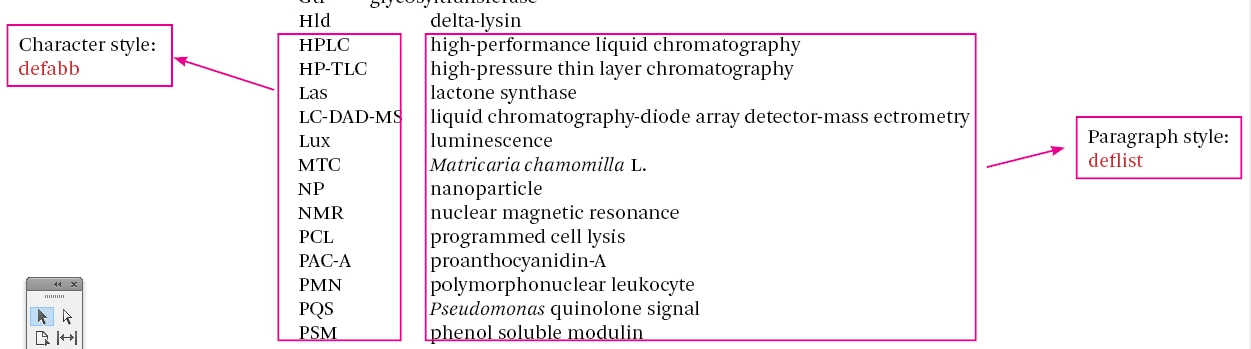
Requirement 2: I manually give the 1p2 visual space (tab) after measuring the longest entry glossary text. I need the longest glossary terms are automatically measured, and 1p2 of visual space is next given in the tab. Is it possible to execute the script to fix this comment?. Character style and paragraph style names given below screen shot for your reference.


Requirement 2:

Input:
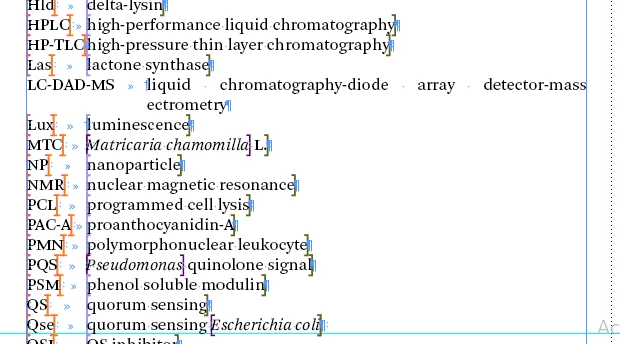
 

Output:
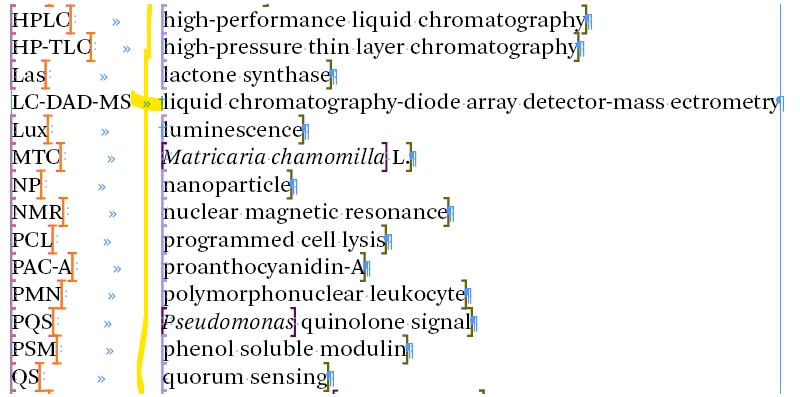


I'm spending more manual effort on this kind of work. Could someone help to reduce my manual work?


Thanks

kk

This topic has been closed for replies.

3 replies

Participant
May 2, 2024

Dear Team,


Still, i am waiting for your support.


Thanks

kk

Community Expert
May 2, 2024

Support for what? This is a user to user forums - and people have given their suggestions to get it to work for you.

If it's not working or you can't use the methods you need to elaborate on what is and isn't working for you and only then can the users of the forum help you.


Without further information on what you have tried and why you can't use a first line indent (as I asked but got no feedback from you) - well I guess we will be stuck if you cannot give us some clues.

Community Expert
April 26, 2024

Would it better to go back to basics here


Maybe instead of an indent to here - have paragraph styles setup for your XML import 


And the paragraph style should be 

Indent to 10mm

Negative first line indent -10mm


That would do ideally the same thing - you can adjust the 10mm and -10mm to what you need.


Just an idea.

Anantha Prabu G
Legend
April 25, 2024

Hi @kanagakumar 
Requirement 1:
This pattern should specifically find instances where a tab character is sandwiched between two text characters. Try using this pattern in Adobe InDesign's Find/Change dialog box.

Find: (?<=\S)\t(?=\S)
Change: $0~i


Design smarter, faster, and bolder with InDesign scripting.
Known Participant
April 25, 2024

Dear Anantha Prabu,


Thank you for your grep coding.


My actual requirement 1 is, i need entity code for "Indent to HereCtrl+\.

My workflow is xml background so i avoid manual find and replace work in indesign. If you provide entity coding for this comment (Ctrl+\) it is very useful for me. I will fix this issue in xml stage.


Thanks

kk


Robert at ID-Tasker
Legend
April 25, 2024

@kanagakumar


I'm on my phone so can't help you right now - but have you tried to export sample text and see how it will be encoded?