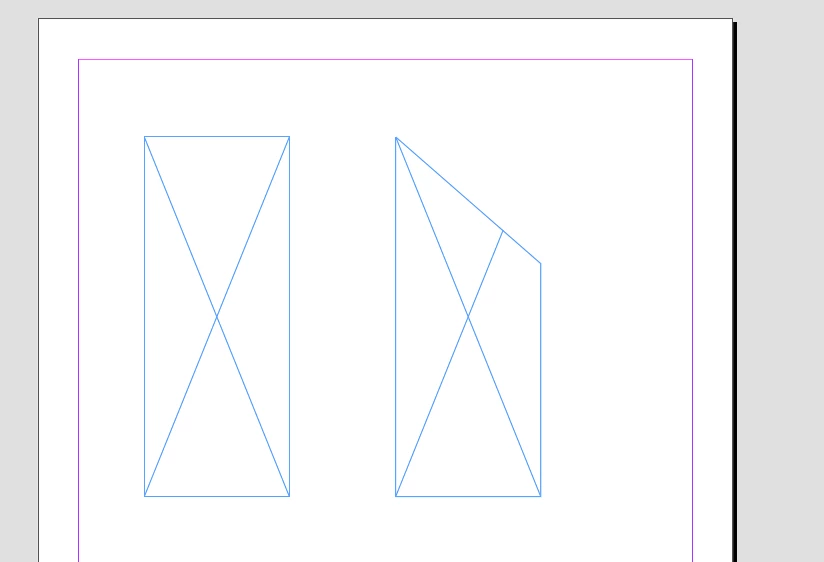
Hi @Matt276783077obu, an Indesign page item might have paths property, and if so, each path will have pathPoints. Each PathPoint has an anchor property. This is all we need to know for your example.
Here's a script example:
/**
 * Example showing moving a particular path point of the selected rectangle.
 * @author m1b
 * @version 2025-01-11
 * @discussion https://community.adobe.com/t5/indesign-discussions/need-help-moving-just-1-coordinate-of-a-rectangle-via-jsx/m-p/15082698
 */
function main() {

    app.scriptPreferences.measurementUnit = MeasurementUnits.POINTS;

    var doc = app.activeDocument,
        item = doc.selection[0];

    if (
        !item
        || !item.hasOwnProperty('paths')
        || item.paths[0].pathPoints.length !== 4
    )
        return alert('Please select a rectangle and try again.');

    // start with the first path point
    var targetPoint = item.paths[0].pathPoints[0];

    // loop over each point in item's path, to find the top right point
    for (var i = 0; i < item.paths[0].pathPoints.length; i++) {

        var point = item.paths[0].pathPoints[i];

        if (
            point.anchor[0] >= targetPoint.anchor[0]
            && point.anchor[1] <= targetPoint.anchor[1]
        )
            targetPoint = point;

    }

    // add an amount to the top right point's anchor's Y coordinate
    targetPoint.anchor = [
        targetPoint.anchor[0],
        targetPoint.anchor[1] + 50
    ];

};
app.doScript(main, ScriptLanguage.JAVASCRIPT, undefined, UndoModes.ENTIRE_SCRIPT, 'Move Top Right Path Point');
- Mark




 AdChoices