
Known Participant
September 5, 2016
Answered

[Need help] removing Menu item

  • September 5, 2016
  • 3 replies
  • 518 views

Hello!

Iam working on a little Menu for InDesign to make life easier for my colleagues.

Somehow i did not pay attention for a second and added a new Menue item that does not seem to have a name.
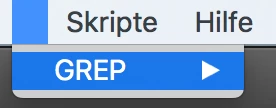
I use this code to remove old menu entrys / clear the one iam working one before reloading it:

main2();

function main2(){

        try{

            app.scriptMenuActions.item("Skripte").remove();

        }

    catch(myException){}


    try{

        app.menus.item("$ID/Main").submenus.item("Skripte").remove();

        }catch(e){}


}

The problem is that it does not seem to work if the Menu item does not have a name by itself.. any idea on this?

Maybe there is a way to do it by "ID"? Or am i just too blind to see the obvious?

Thanks in advance!

This topic has been closed for replies.
Correct answer Peter Kahrel

You can try deleting the sumenu by index, e.g.

app.menus.item("$ID/Main").submenus[3].remove()

if your nameless submenu is the fourth menu. To make sure you use the correct index, display all names of the submenus of the main menu. Your nameless menu name should appear as two commas, as in

File,Edit,Layout,Type,Object,,Table,View,Window,Help,Math

which shows that there is a nameless submenu between Object and Table, or submenu[5].

If that doesn't work you can always restart InDesign and remove the preferences (Ctrl+Alt+Del on Windows).

Peter

3 replies

Participant
December 20, 2023
Kindly use working function below for add or remove menus....

function
removeMenu(Rmenu) {
app.menus.item("Main").submenus.itemByName(Rmenu).remove();
}
function addMenu(Amenu, Asubmen) {
var myMainMenu = app.menus.item("Main");
var mySpecialFontMenu = myMainMenu.submenus.add(Amenu);
mySpecialFontMenu.submenus.add(Asubmen);
}
Known Participant
September 5, 2016

Thanks - that helped a lot!

first i used: alert(app.menus.item("$ID/Main").submenus[10].name)

to get the empty "name" and see which one is empty.

( where i manually increased the number by 1 each time... so i could be sure to get the right number - also didn't want to write a loop for this for the same reason. Also there are not that many Items..)

and then:

app.menus.item("$ID/Main").submenus[10].remove()

to remove it – Thanks a lot!

I know i could have reset my preferences but i wanted a better solution in case this happens again!

Peter Kahrel
Community Expert
Community Expert
September 5, 2016

> didn't want to write a loop

No need for that. everyItem() is your second-best friend:

app.menus.item("$ID/Main").submenus.everyItem().name

prints the names separated by a comma.

P.

Known Participant
September 5, 2016

Yeah i guess i could have done that and then count starting from 0... but i pretty much hit it first try so no big deal.

Thanks for the information though - maybe i should make it my second-best friend

I just started with JavaScript and InDesign turned out to be challenging sometimes..

I also have some other problems i could not solve yet - but i wanted to see if i can do it myself before posting it here.

Peter Kahrel
Community Expert
Peter KahrelCommunity ExpertCorrect answer
Community Expert
September 5, 2016

You can try deleting the sumenu by index, e.g.

app.menus.item("$ID/Main").submenus[3].remove()

if your nameless submenu is the fourth menu. To make sure you use the correct index, display all names of the submenus of the main menu. Your nameless menu name should appear as two commas, as in

File,Edit,Layout,Type,Object,,Table,View,Window,Help,Math

which shows that there is a nameless submenu between Object and Table, or submenu[5].

If that doesn't work you can always restart InDesign and remove the preferences (Ctrl+Alt+Del on Windows).

Peter