
Known Participant
October 21, 2025
Answered

Need help searching for a space character from a converted Quark doc

  • October 21, 2025
  • 4 replies
  • 716 views

Hello.  I am hoping someone hear has an answer for this. We have been converting our old Quark docs into Indesign using Markwarz Q to ID plug in.  Some of the Quark docs, someone used a standard non breaking space. When converted, we get a random character inserted where that space would be. It prints, so it's something we would like to remove faster than going page-by-page looking for it.


I have found no way to search for that space. It doesn't copy, and any variation of searching I do, it comes up with nothing. Tried GREP even.  See attachment. Circled in red.


Any help would be greatly appreciated.
Correct answer Joel Cherney

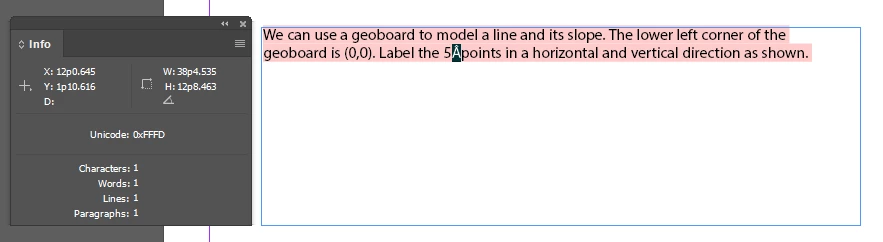
Also the home/end trick did not find anything.


Nope, I guessed wrong. But the true identity of the dropped glyph was actually in the Info panel:

4 replies

Scott Falkner
Community Expert
Community Expert
October 21, 2025

Can you edit the original QuarxPress files? You could replace the non-breaking spaces there with normal spaced then do the conversion in the modified docs. If you can't, perhaps because you don't have a compatible version of QuarkXpress, perhaps someone here can do it. 

Brad @ Roaring Mouse
Community Expert
Community Expert
October 21, 2025

What version are the Quark files?

Are you using the current markzware Omni/IDMarks, or is this an old Q2ID plugin?

BsmithMTPAuthor
Known Participant
October 21, 2025

Quark 9 or older and yes, it was the older Q2ID plugin. The new one I am using (QXPMarkz 2023) doesn't seem to have this issue, but since so many of our docs have already been converted over the years, it's becoming an issue with them getting in the final publications.

Brad @ Roaring Mouse
Community Expert
Community Expert
October 21, 2025

Looking at an IMDL file, it comes up as "CustomGlyph" and is indicated by a Question mark, indicating a #notdef character (i.e. U+FFFD)

This bears out in a PDF of the file as is, compared to a PDF I made with the proper Acircumflex character.

Unfortunately, as you have found, you can't search for an U+FFFD character, so I don't what you can do to automatically find these.

(and, no, searching for CID 194 didn't work either)

BsmithMTPAuthor
Known Participant
October 21, 2025

Here is an INDD file for you all to play with. The character in question is the A with a caret over it between the 5 and point.

BsmithMTPAuthor
Known Participant
October 21, 2025

It's in Helvetica.

Mike Witherell
Community Expert
Community Expert
October 21, 2025

Hi Bsmith,

Have you tried: using the Type tool to select the odd character; then right-click and choose "Load Selected Glyph in Find" ? 

Does doing so reveal the GID/CID or Unicode?

Mike Witherell
BsmithMTPAuthor
Known Participant
October 21, 2025

Yes. It shows nothing as if it doesn't exist.  It's very strange.  As far as Indesign is concerned, it's not there, even though it prints.