Participant
November 3, 2017
Question

Need HELP with a boton area

  • November 3, 2017
  • 3 replies
  • 461 views

I made a drawing with the pen and turned it into a button.

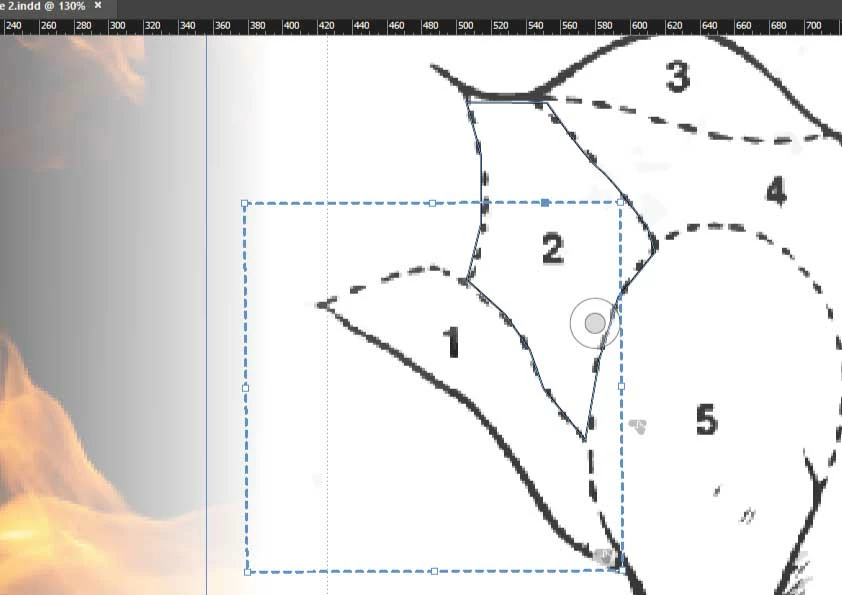
My problem is, the indicative area of the button in my drawing is a dotted square,

how do I adjust that square to get the closest to my created drawing and not interfere with other nearby buttons
This topic has been closed for replies.

3 replies

Di DonatoAuthor
Participant
November 6, 2017

I'll try to be more specific in my question.

The blue area is the one that I intend to use as the hot spot on the button, in the intensity of when the mouse is positioned over, change the color.

This I have already been able to do, my question is, how to edit the red dots and put that square closer to my goal and there is no interference in the other areas?

as you can see, the boundary area of the button invades area 2 and part of area 5 in the above drawing

Doug A Roberts
Community Expert
Community Expert
November 6, 2017

it isn't possible in indesign.

BobLevine
Community Expert
Community Expert
November 3, 2017

Just draw the buttons with no fill/no stroke frames.

Di DonatoAuthor
Participant
November 3, 2017

But the idea is that once the courses have been placed on the drawing, this drawing changes color and appears the name of the space that I have already defined with the layer

jane-e
Community Expert
Community Expert
November 3, 2017

PDF buttons cannot be irregular shapes. They have to be rectangles. You can't make "hot spots" as you can in HTML.

Sorry!

amaarora
Inspiring
November 3, 2017

Hi,

I agree with that. But...

how do I adjust that square to get the closest to my created drawing and not interfere with other nearby buttons

I am also trying to see why InDesign dint stick the frame edge to the nearest point.

-Aman