var doc = app.activeDocument;
var counter = 1;

if (!String.prototype.trim) {
    (function () {
        // Ensures trimming of BOM and non-breaking spaces (NBSP)
        var rtrim = /^[\s\uFEFF\xA0]+|[\s\uFEFF\xA0]+$/g;
        String.prototype.trim = function () {
            return this.replace(rtrim, '');
        };
    })();
}

for (var i = 0; i < doc.pages.length; i++) {
    var page = doc.pages[i];

    // Create a text frame on the page
    var tf = page.textFrames.add({
        geometricBounds: [20, 20, 100, 100] // Adjust as needed
    });

    // Find all footnotes on the page by iterating through all stories in the document
    var stories = doc.stories;
    // alert("Found " + stories.length + " stories.");
        var s = stories[0];
        // Check if any text frame of this story is on the current page
        var frames = s.textContainers;
        var isOnPage = false;
        for (var t = 0; t < frames.length; t++) {
            if (frames[t].parentPage && frames[t].parentPage == page) {
                isOnPage = true;
                break;
            }
        }
        if (!isOnPage) continue;

        var fns = s.footnotes;

        // Iterate through all footnotes in the story
        for (var f = fns.length - 1; f >= 0; f--) {
            var paras = fns[f].paragraphs;
            // for (var p = 0; p < paras.length; p++) {
            for (var p = paras.length-1; p >=0; p--) {
                var content = paras[p].contents;
                alert(content);
                if (endsWithArabicWord(content, "(حاشية)")) {
                    // Cut the paragraph text
                    var paraText = paras[p].contents;
                    // alert("Found footnote: " + paraText);
                    paras[p].remove();

                    // Replace footnote marker in main text with counter
                    var marker = fns[f].storyOffset;
                    marker.contents = counter.toString() + " ";
                    // delete the footnote marker
                    fns[f].remove();

                    // Insert counter and text in created text frame
                    tf.contents += counter + "- " + paraText;

                    counter++;
                }
            }
        }
}
alert("Finished processing footnotes.");

function endsWithArabicWord(text, word) {
  if (text == null || word == null) return false;

  // Fallback trim (remove leading/trailing spaces)
  text = text.replace(/^\s+|\s+$/g, '');

  // Escape special regex characters in the word
  var safeWord = word.replace(/[-\/\\^$*+?.()|[\]{}]/g, '\\$&');

  // Check for optional space or punctuation before the word
  var pattern = new RegExp("[\\s\\u060C\\u061B\\u061F\\u0640\\u200C\\u200F\\u202B\\u200E\\u202C\\u202D\\u202E]*" + safeWord + "$");

  return pattern.test(text);
}
I changed the strategy, now i process all paragraphs that end with particular word.
the above code works as expected.
now the issue is that the loops run backwards to avoid length errors.
because of that the marker numbers in body text are inserted in reverse order.
please provide your expert help and suggestions on this.
Hi @Moiz5FB2 I had a look at your script so far and I have re-written it the way I would like it. This can be just for your learning, it doesn't mean you must do it this way—there are many correct ways—but just that I prefer this approach.
Here are some notes to help:
1. The script starts by collecting all the footnotes matching the target text at the start using findGrep and stores the contents and a reference to the footnote marker in the main story.
It stores a {contents: 'my footnote string here', marker: FOOTNOTE_SYMBOL} object in an array, organised by in the footnoteDetailsByPage object accessed by the page's document offset. This is the most complex part I think if you haven't stored properties in plain Objects before. For example we can access it like this:
var secondFootnoteMarkerOnPageOne = footnoteDetailsByPage[0][1].marker;
var sixthFootnoteContentsOnPageThree = footnoteDetailsByPage[2][5].contents;
var countOfFootnotesProcessedOnPageFive = footnoteDetailsByPage[4].length;
This is what it looks like in the debugger, after running your sample document with my boxes added:
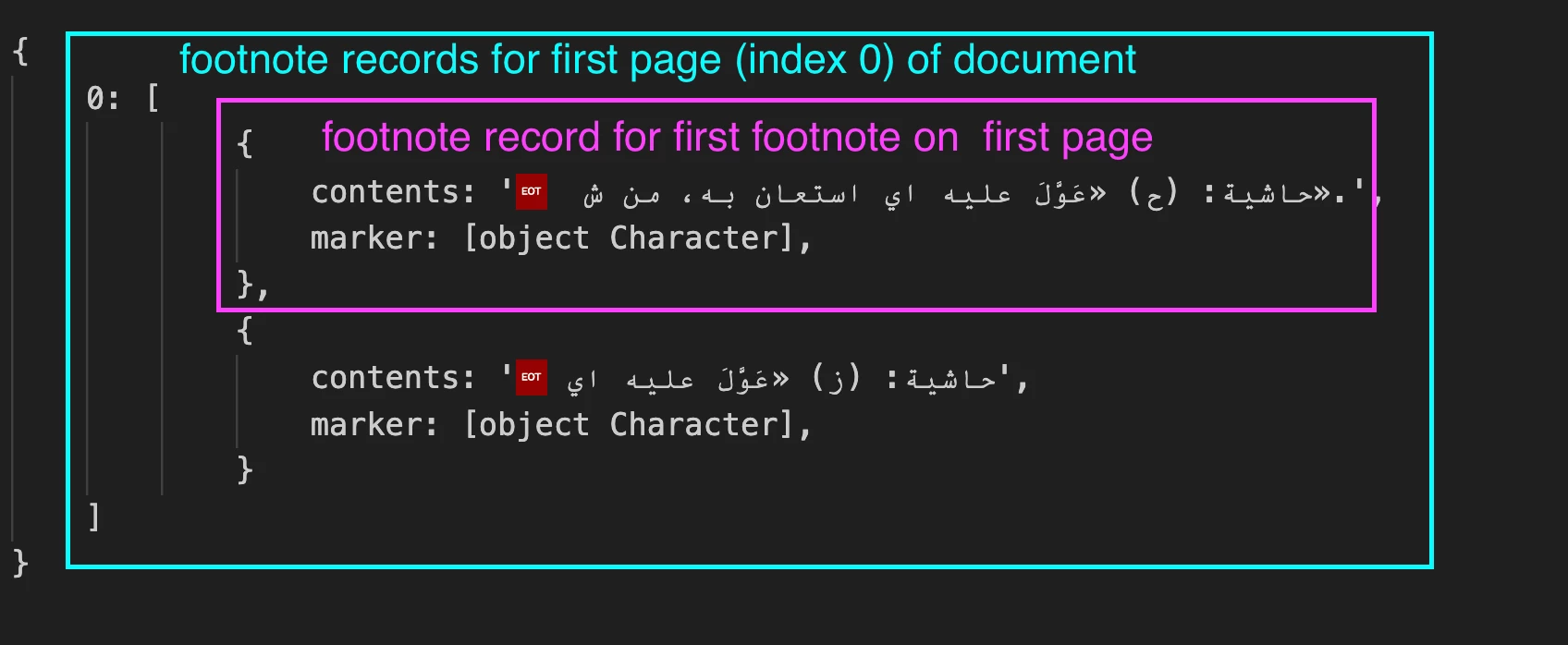
2. After collecting the info in footnoteDetailsByPage, we start a new loop, going over every page stored in footnoteDetailsByPage and then looping over every element of the array stored there. We go forwards so the indexing will be easier.
3. I've wrapped whole script in the app.doScript call.
app.doScript(main, ScriptLanguage.JAVASCRIPT, undefined, UndoModes.ENTIRE_SCRIPT, 'Process Footnotes');
This is very important for a script like this, because it means that you can undo the whole script's work in one go.
4. To see more of what is happening, I collect "results" and show them at the end.
I hope that can be useful to you.
- Mark
function main() {

    var doc = app.activeDocument;

    // set up the find grep
    app.findGrepPreferences = NothingEnum.NOTHING;
    app.findChangeGrepOptions.includeFootnotes = true;
    app.findChangeGrepOptions.includeHiddenLayers = false;
    app.findChangeGrepOptions.includeLockedLayersForFind = false;

    // find footnote texts starting with "footnote:"
    app.findGrepPreferences.findWhat = '^~F\\s*حاشية:';

    var footnoteTexts = doc.findGrep();

    if (!footnoteTexts)
        return alert('Could not find any footnotes.');

    // we will store all the contents here, organised by page index
    var footnoteDetailsByPage = {};

    // collect details for each matched footnote, then remove it
    for (var i = footnoteTexts.length - 1; i >= 0; i--) {

        var footnote = footnoteTexts[i].parent,
            page = footnote.characters[0].parentTextFrames[0].parentPage;

        if (!footnoteDetailsByPage[page.documentOffset])
            // initialize with a new array
            footnoteDetailsByPage[page.documentOffset] = [];

        // add details about this footnote
        footnoteDetailsByPage[page.documentOffset].unshift({
            // remove hidden LTR/RTL markers and trim whitespace
            contents: footnote.contents.replace(/^\s+|\s+$|[\u200E\u200F\u202A-\u202E\uFEFF]/g, ""),
            // we need this for later
            marker: footnote.storyOffset.parentStory.characters[footnote.storyOffset.index],
        });

        // remove the footnote
        footnoteTexts[i].remove();

    }

    var results = [];

    // process each page
    for (var pageOffset in footnoteDetailsByPage) {

        if (!footnoteDetailsByPage.hasOwnProperty(pageOffset))
            continue;

        var page = doc.pages[pageOffset];
        var footnoteDetailsForThisPage = footnoteDetailsByPage[pageOffset];
        var contents = [];

        for (var i = 0; i < footnoteDetailsForThisPage.length; i++) {

            var footnoteDetail = footnoteDetailsForThisPage[i];

            // replace the footnote marker with the current index
            footnoteDetail.marker.contents = String(i + 1);

            // add the contents to this page's contents list
            contents.push((i + 1) + '- ' + footnoteDetail.contents);

        }

        // create a text frame on the page, with contents from each processed footnote
        var tf = page.textFrames.add({
            geometricBounds: [20, 20, 100, 100], // Adjust as needed
            contents: contents.join('\r'),
        });

        results.push('Page ' + page.name + ': matched ' + contents.length + ' footnotes.')

    }

    alert("Finished processing footnotes.\n" + results.join('\n'));

};
app.doScript(main, ScriptLanguage.JAVASCRIPT, undefined, UndoModes.ENTIRE_SCRIPT, 'Process Footnotes');
Edit: added image for clarity.



 AdChoices