
Inspiring
May 14, 2024
Question

Need help with overset text in story editor but not in page layout (CS6)

  • May 14, 2024
  • 1 reply
  • 1476 views

We are building a very long book in InDesign CS6, running under Windows 10. The book is a dictionary of 500+ pages where every line of text is a paragraph; there are only 2 paragraph styles and each page has two columns. We are building this with an InDesign book file which has 3 indd’s in its build.


Today when performing some light edits, one of the indd’s developed a 4-page blank area in the layout, the headers and footers were also blank on those 4 pages, and any attempt to reflow the story results in the program crashing. In fact, anything we try to do now results in the program crashing.


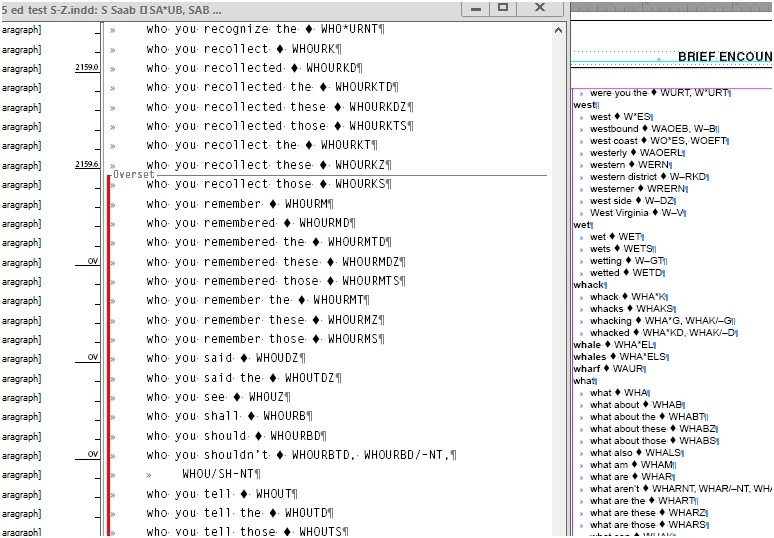
The entire text is present in the Story Editor but that part of the text that used to occupy the 4 blank pages is marked with a red line at the left and the word “overset”.  I attached a screenshot of this.


Rebooting the computer doesn’t help.


I read a similar thread posted a few years ago, but in that one reference was made to an "anchored object". No anchor appears in the Story Editor. of our book.


We wonder why this happened, how to avoid it happening again and most importantly, how to repair the document so we can continue working on it.


If anyone can offer any help or assistance in recovering from this devastating situation, we’d be most grateful.


This topic has been closed for replies.

1 reply

Scott Falkner
Community Expert
Community Expert
May 14, 2024

If you are able to open the file (or files) that are causing problems try immediately exporting to IDML. Open the IDML files are resave as INDD. This forces the file to be rebuilt and can solve unusual problems. You could also share the files here if you are willing to.

lekkerderAuthor
Inspiring
May 14, 2024

Just tried that and got an error message saying "Cannot open the file. InDesign may not support it . . . ."  What does that indicate?


Used these instructions: To create an IDML file with InDesign select File → Save As... and choose "InDesign CS4 or later (IDML)" from the "Format" dropdown list.. . To open an IDML file with InDesign, select File → Open..., choose the IDML file, and click Open.


Thanks.


Peter Spier
Community Expert
Community Expert
May 14, 2024

Where is the file stored? Local or network?

That error usually means either there is a .idlk lock file in the folder with the .indd which you should delete or the file is corrupt in which case you should try the tool at INDDRecovery — a program for restoring corrupted InDesign documents .

If you manage to get the file open, check the overset text for No Break applied to the text where the overset begins, or a series of words separated by non-breaking spaces with hyphenation turned off for the paragraph.