Participant
Dec 27, 2024 10:58 PM UTC
Answered

Need phrase/word/characters - mm2 - where the 2 always needs to be superscript

This unit of measure is copy/pasted from another doc - mm2. The 2 always needs to be superscript. I have tried looking up grep styles but haven't found a way to make it so that the 2 is superscript.


Basically, need to do a find/replace for all mm2 and make it be mm2 (superscripted 2)


Is this possible?

This topic is closed to new replies. Start a new post to keep the conversation going.
Barb Binder
Barb BinderCorrect answer
Community Expert
Dec 28, 2024 8:37 PM UTC

Hi @amandaj97527555:


I'm wondering if you are new to GREP styles and/or styles in general? You were asking for a find and change query, but the GREP style suggested by @jmlevy is the better solution.


Here are the steps:

  1. Create a Character style for superscript
  2. Create a Paragraph style for the paragraphs that will contain the mm2 and format as usual
  3. Edit the Paragraph style > GREP Styles
  4. Click Add GREP Style
  5. Apply the the superscript character style to (?<=mm)2. (See notes below.)


InDesign will then locate each occurrence of mm2 and apply superscript to the 2. An advantage of a GREP style is that if you ever type in mm2 and assign that paragraph style, InDesign will see it and assign the GREP style to the 2 automatically. 
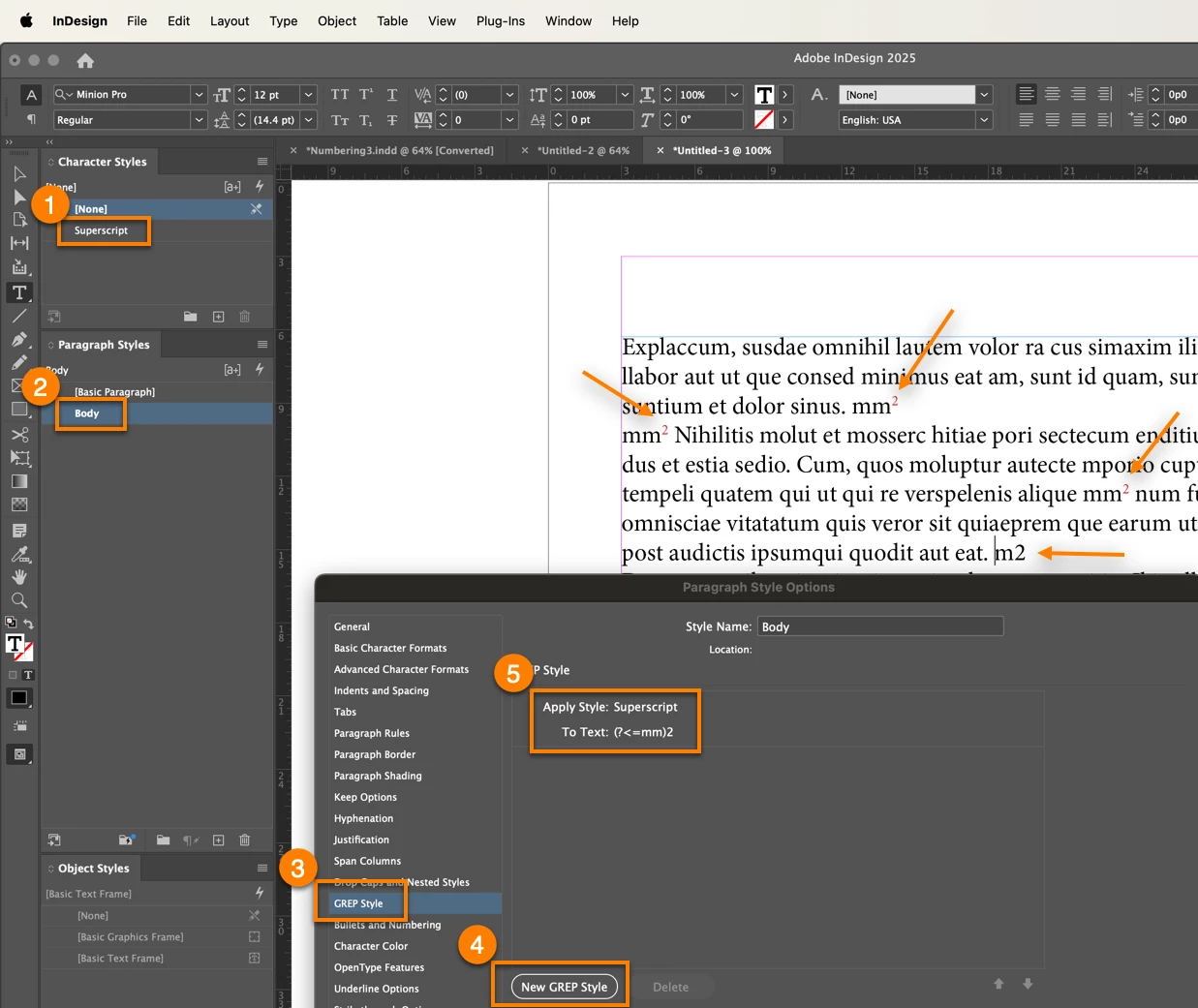


Note 1:  I added a second m to @jmlevy's expression just in case you have a single m followed by a 2 that should not be superscript. If that's never going to happen, then you can just leave it the way he showed you.

Note 2: @Eugene Tyson's solution will work equally well, and has the bonus of being a few less characters: just substitute mm\K2 for (?<=mm)2.


~Barb

~Barb at Rocky Mountain Training

9 replies

Barb Binder
Community Expert
Barb BinderCommunity ExpertCorrect answer
Community Expert
Dec 28, 2024 8:37 PM UTC

Hi @amandaj97527555:


I'm wondering if you are new to GREP styles and/or styles in general? You were asking for a find and change query, but the GREP style suggested by @jmlevy is the better solution.


Here are the steps:

  1. Create a Character style for superscript
  2. Create a Paragraph style for the paragraphs that will contain the mm2 and format as usual
  3. Edit the Paragraph style > GREP Styles
  4. Click Add GREP Style
  5. Apply the the superscript character style to (?<=mm)2. (See notes below.)


InDesign will then locate each occurrence of mm2 and apply superscript to the 2. An advantage of a GREP style is that if you ever type in mm2 and assign that paragraph style, InDesign will see it and assign the GREP style to the 2 automatically. 


Note 1:  I added a second m to @jmlevy's expression just in case you have a single m followed by a 2 that should not be superscript. If that's never going to happen, then you can just leave it the way he showed you.

Note 2: @Eugene Tyson's solution will work equally well, and has the bonus of being a few less characters: just substitute mm\K2 for (?<=mm)2.


~Barb

Translate
~Barb at Rocky Mountain Training
Participant
Dec 30, 2024 11:56 PM UTC

Hi Barb - you guessed correctly - I am new to GREP. I was afraid it was more of a find/replace because I didn't know if they used paragraph styles, but luckily it looks like they did and it's working!!! Thank you so much!!!

Translate
Barb Binder
Community Expert
Community Expert
Dec 31, 2024 8:39 PM UTC

We are always happy to help, Amanda. Come back and see us next time you get stuck. 


~Barb

Translate
~Barb at Rocky Mountain Training
Community Expert
Dec 28, 2024 9:34 AM UTC

Should be working 

Another GREP you could try is 


mm\K2 


Translate
Willi Adelberger
Community Expert
Community Expert
Dec 28, 2024 1:36 AM UTC

No scrpt needed use a GREP Style. 

  1. Create a character style for the 2 superscrpt
  2. Create in your basic style the GREP style: lokk behind mm (you can extend it for m, cm, dm and other length units) for 2 (and extend it for 3)


Any paragraph style based on this one will inherit it. 

I do not understand, why many want tongetba script for inbuilt functions. 

Translate
jmlevy
Community Expert
Community Expert
Dec 28, 2024 12:47 PM UTC

Hi @Willi Adelberger 

No scrpt needed use a GREP Style. 

Nobody has mentioned any script.

Translate
jmlevy
Community Expert
Community Expert
Dec 27, 2024 11:07 PM UTC

Use this GREP expression to apply a superscript character style.


Translate
Participant
Dec 27, 2024 11:38 PM UTC

I believe I copied this scenario, but it superscripted the entire phrase/word. 

Translate
Robert at ID-Tasker
Legend
Dec 28, 2024 1:16 AM UTC
quote

I believe I copied this scenario, but it superscripted the entire phrase/word. 


By @amandaj97527555


Would be best if you post a similar screenshot - of what you've copied. 


Translate