
Participant
December 7, 2022
Answered

need script to export pages with field from data merge

  • December 7, 2022
  • 2 replies
  • 814 views

I am trying to save 800+ certificates from a data merge with the first data cell (full name). I'm new to scripts so I might not have added this correctly. My excel file has the names in the 1st column. This is the script I added but it does not work. I only changed the text in red. These can either be jpg or pdf files.


I posted this as a reply to someone else's thread a couple of days ago but have not go any responses. These need to get done, so if I don't receive a response in the next day or so, I'll be spending several hours renaming over 800 files individually.


//http://www.scriptopedia.org/index.php?post/custompdfexport.jsx.html
//use some csv row to rename a bunch of pdf files accordingly:

var csv=File(Folder.desktop+"/Webinar_Stats_for_CE_Credits_221201 - Merge File for INDD.csv");

var myPDFFolder = Folder(Folder.desktop+"/pdfs");

var names = getNamesFromCSV(csv);

if(csv.exists && myPDFFolder.exists){
var files = myPDFFolder.getFiles();
if(files.length==names.length){
for(var i=0; i<files.length; i++){
files[i].rename(files[i].parent+"/"+names[i]+".pdf");
}
}
}

function getNamesFromCSV(csv){
if(csv.exists){
csv.open('r');
var content = csv.read();
var namesArr = [];
content=content.split("\n");
for(var j=0; j<content.length; j++){
namesArr.push(content[j].match(/^(.[^\n]+)/i)[1]);
}

csv.close();
return namesArr.slice(1,namesArr.length);
}
return false;
}


This is my error message:
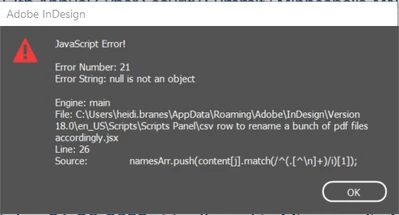


Thanks for any advice.

This topic has been closed for replies.
Correct answer Mike Bro

Hello @TEG Designer,


Take a look at the link below...The below script will export pdfs named by the contents of the text box/data field. Just follow the directions on how to setup the document.

https://community.adobe.com/t5/indesign-discussions/export-pdf-business-cards-sequentially/m-p/12969036#M478763


Regards,

Mike

2 replies

Mike BroCorrect answer
Legend
December 7, 2022

Hello @TEG Designer,


Take a look at the link below...The below script will export pdfs named by the contents of the text box/data field. Just follow the directions on how to setup the document.

https://community.adobe.com/t5/indesign-discussions/export-pdf-business-cards-sequentially/m-p/12969036#M478763


Regards,

Mike

Participant
December 7, 2022

Thank you!!!! for your responses. After I posted, I continued researching and found this script and it worked.

https://community.adobe.com/t5/indesign-discussions/unique-file-names/m-p/11965769?search-action-id=345737853954&search-result-uid=11965769


I have my individually named PDFs. Can this script be adjusted to export JPGs?

Loic.Aigon
Legend
December 7, 2022

Just change the export format enum to ExportFormat.JPG and the file reference so the file extension is jpg.

You will need to setup JPG Export preferences too prior to call the export function:

See: https://www.indesignjs.de/extendscriptAPI/indesign-latest/#JPEGExportPreference.html

rob day
Community Expert
Community Expert
December 7, 2022

Hi @TEG Designer , I can’t test without the .csv file, but it looks like the JS error happens when you split the contents and there’s a null item included in the split array.


Does it work if you add a try statement to the content loop:


for(var j=0; j<content.length; j++){
    try {
        namesArr.push(content[j].match(/^(.[^\n]+)/i)[1]);
    }catch(e) {}   
}