Participant
March 28, 2020
Question

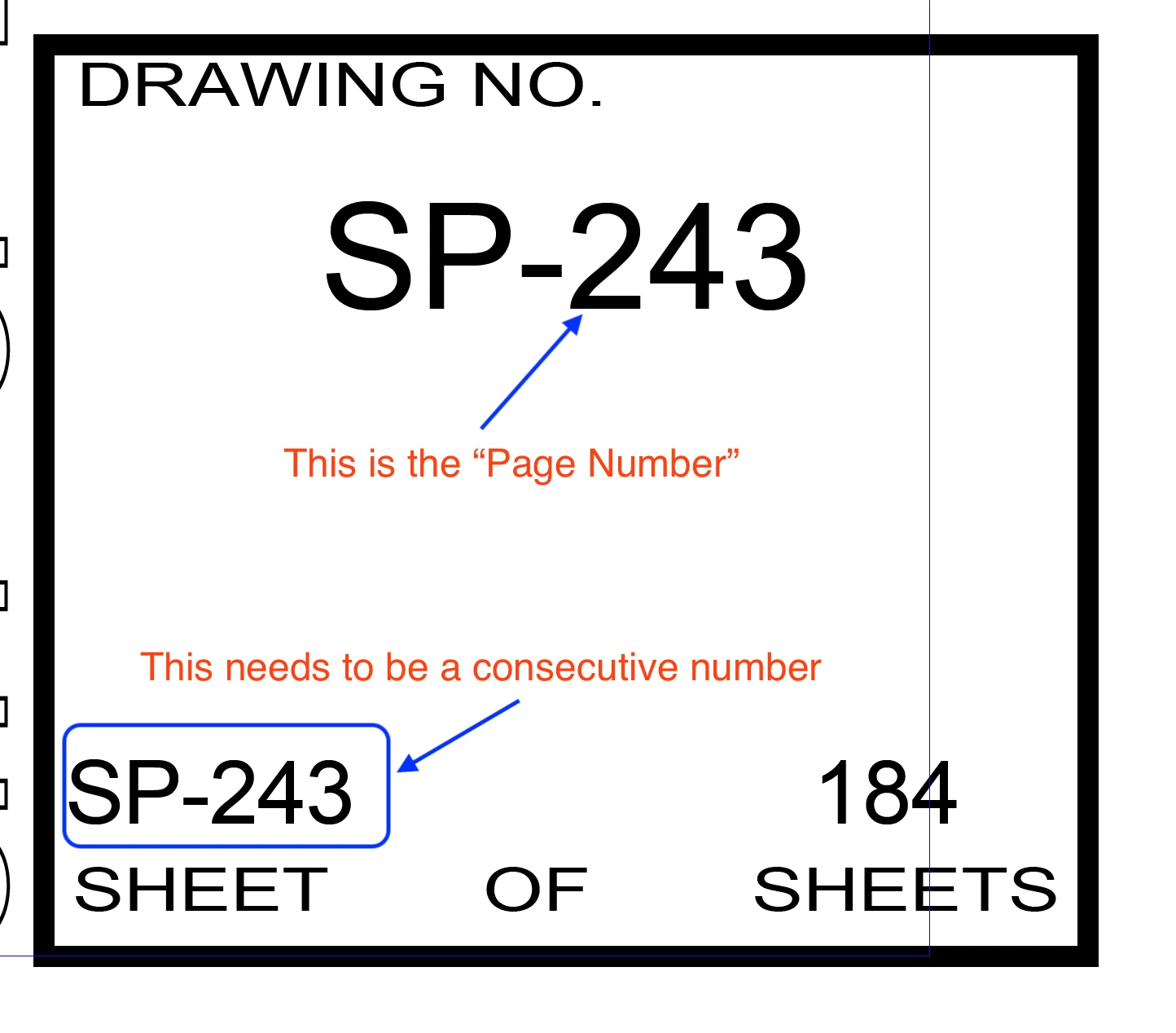
Need to add consecutive number field to a master page
  • March 28, 2020
  • 2 replies
  • 1362 views

I know how to use the page numbering, but that function is already being used to generate non-contiguous drawing ID numbers by section, which are needed for my index. What I need is an additional (scripted?) field to add consecutive numbering to my pages. Can anyone point me to a method of doing this, so if I remove pages from the document, the field will automatically renumber?


Thanks!

This topic has been closed for replies.

2 replies

brian_p_dts
Community Expert
Community Expert
March 28, 2020

Not sure if it can be done through text variables, but it could be done through script. Set up a paragraph style for the SP-243 line. Let's call it "PageNum". Then here's a script that you could run: 


app.findGrepPreferences = NothingEnum.NOTHING;
app.findGrepPreferences.appliedParagraphStyle = "PageNum";
var myFinds = app.findGrep();

for (var i = 0; i < myFinds.length; i++) {
   myFinds[i].contents = "SP-" + myFinds[i].parentTextFrames[0].parentPage.documentOffset;
}

app.findGrepPreferences = NothingEnum.NOTHING;


L TaylorAuthor
Participant
March 28, 2020

Thanks! I haven't tried using GREP scripting before, but this looks like the time to work out how.


If I am understanding this:

myFinds[i].contents = "SP-" + myFinds[i].parentTextFrames[0].parentPage.

it will add the text "SP-", and then a consecutive number (myFinds [i])? Does this need to be formatted differently if I don't need the text, but just the number? Final format should be ### of (Total Pages).


Do I put a text box on the master sheet and add a placeholder for the "PageNum"?

brian_p_dts
Community Expert
Community Expert
March 29, 2020

Yes, the way I wrote it, the script would replace with "SP-" plus the page number (section agnostic) that the find[i] is found on. Yes, you would want to add a frame with the paragraph styled with PageNum, and some kind of standnig text, to your master page.


app.findGrepPreferences = NothingEnum.NOTHING;
app.findGrepPreferences.appliedParagraphStyle = "PageNum";
var myFinds = app.findGrep();

for (var i = 0; i < myFinds.length; i++) {
   myFinds[i].contents = myFinds[i].parentTextFrames[0].parentPage.documentOffset;
}

app.findGrepPreferences = NothingEnum.NOTHING;


Dave Creamer of IDEAS
Community Expert
Community Expert
March 28, 2020

Can you clarify the page number: is it just the "2" or the entire number? For example, is the next page "343" or "244"? (Not sure if the number points the entire figure or just the first number.)


How to the sheet numbers increment from page to page?

David Creamer: Community Expert (ACI and ACE 1995-2023)
L TaylorAuthor
Participant
March 28, 2020

The document is broken into sections, with each section allocated a set number of pages as needed: SP-000 to 050, SP-100-299, SP-300-320, etc.  So, "General Information" sheets are 000-050, "Location Maps" are 100-299, and so on. Typically, there are fewer actual sheets than the page range allocated, to allow later additions. There are currently 184 actual pages in the document. In the example, the next sheet is SP-244.


Each section uses separate pagination, and that sheet number is linked back to the TOC, along with a sheet title.

Dave Creamer of IDEAS
Community Expert
Community Expert
March 28, 2020

Sorry for my mental density--not being as clever as most, I'm one of those "I have to see it in front of me to understand it" type of persons. 


If I understand it correctly, your book is set up like this:

  • Section 1: SP-001-029 could take up pages 1-29. (I'm skipping page 000 for this example.)
  • Section 2: SP-100-131 could take up pages 30-60.
  • Secton 3: SP-300-350 could take up pages 61-110. 
  • And so on...

Is that how it works? (I'm not worrying about even/odd pages for this example.)


It reads as if you have the page numbering under control. 

What about using a simple auto-fill spreadsheet number for the sheet numbering. It can be a small box that is linked from page to page; you can even use auto-flow if you set it up correctly. You can use named regions or separate worksheets in Excel. 

David Creamer: Community Expert (ACI and ACE 1995-2023)