Known Participant
August 18, 2022
Answered

Need to align decimal without making a list or a table

  • August 18, 2022
  • 1 reply
  • 667 views

Hi All,

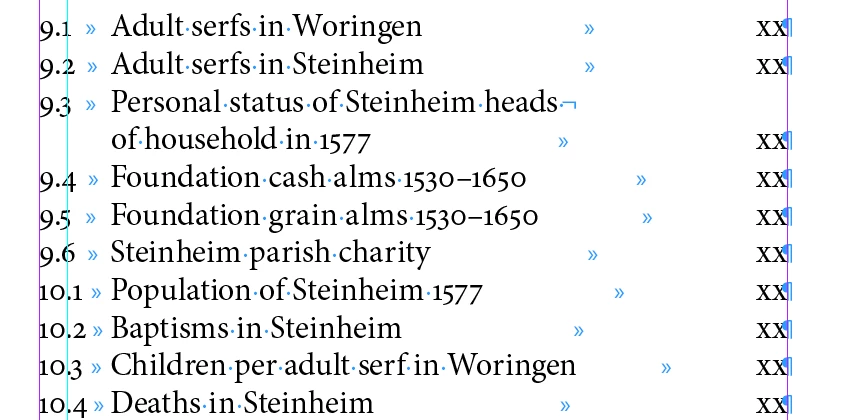
I have a list of illustration in a table of contents. I do not want to put this list in a table nor do I want to make an actual list. But I do want the decimals to line up. I have tried creating a paragraph style to do this but it doesn't seem to work. I can easily put the tabs where I want but not the decimal point. This will be clear when you look at the screenshot. I want the decimal points to line up on the green guideline.

Thanks,

Tom
This topic has been closed for replies.
Correct answer Robert at ID-Tasker

There is a tabstop with decimal point - you'd have to put it as a 1st tabstop and add "regular" tab character at the beginning of each line.


https://helpx.adobe.com/uk/indesign/using/tabs-indents.html


First screenshot - "A", 4th/last icon from the left . 

1 reply

Robert at ID-Tasker
Robert at ID-TaskerCorrect answer
Legend
August 19, 2022

There is a tabstop with decimal point - you'd have to put it as a 1st tabstop and add "regular" tab character at the beginning of each line.


https://helpx.adobe.com/uk/indesign/using/tabs-indents.html


First screenshot - "A", 4th/last icon from the left . 

James Gifford—NitroPress
Legend
August 19, 2022

If this list is generated as a TOC, you can't have a leading tab. (Huge and annoying oversight, IMO.)


But a tab could be put in manually, after list generation.