Inspiring
April 29, 2019
Answered

Need to chop my versions of colour books (Pantone books etc) - where are they kept?

  • April 29, 2019
  • 3 replies
  • 405 views

I'm in Indesign CS6.

When making a new Pantone colour swatch

Swatches/new colour swatch/colour type: Spot/colour mode: Pantone books

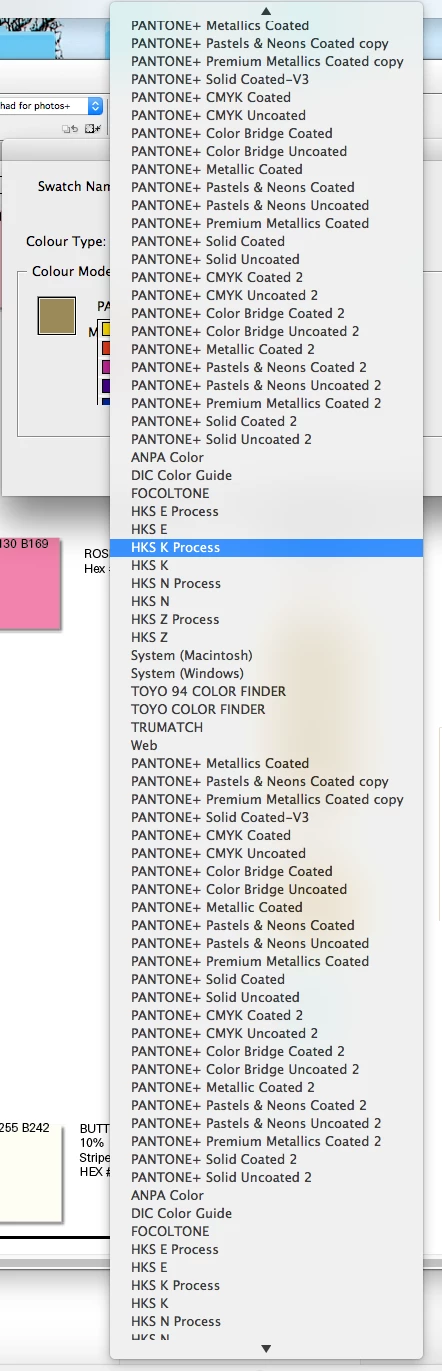
I have literally 37 versions of all the different Pantone books in there. ie 37 versions of Metallics Coated, 37 versions of CMYK coated etc. I can scroll down forever! I want to chop them down to the most recent, but I can't find where they are hiding to do this. Where are they? Can anyone help?
    This topic has been closed for replies.
    Correct answer Michael Bullo

    Have you tried resetting the InDesign preferences?

    Set preferences in Adobe InDesign

    • (Windows) Start InDesign, and then press Shift+Ctrl+Alt. Click Yes when asked if you want to delete preference files.
    • (Mac OS) While pressing Shift+Option+Command+Control, start InDesign. Click Yes when asked if you want to delete preference files.

    3 replies

    Inspiring
    April 29, 2019

    This solved it for me.

    rob day
    Community Expert
    Community Expert
    April 29, 2019

    The swatch books are in your CS6 application folder:

    /Applications/Adobe InDesign CS6/Presets/Swatch Libraries

    Inspiring
    April 29, 2019

    Yes, and I removed the ones I didn't want, but it wasn't until I reset prefs that they disappeared. Thanks

    Michael Bullo
    Community Expert
    Michael BulloCommunity ExpertCorrect answer
    Community Expert
    April 29, 2019

    Have you tried resetting the InDesign preferences?

    Set preferences in Adobe InDesign

    • (Windows) Start InDesign, and then press Shift+Ctrl+Alt. Click Yes when asked if you want to delete preference files.
    • (Mac OS) While pressing Shift+Option+Command+Control, start InDesign. Click Yes when asked if you want to delete preference files.