


Inspiring
April 7, 2023
Question

Need to identify, select and remove an unknown non-printing character

  • April 7, 2023
  • 2 replies
  • 790 views

I am working in the Story Editor window and have come across a non-printing character I can not identify. It seems to be an artifact from a Word doc that was formatted unusually and seems to be causing havoc with performance. See screenshot:
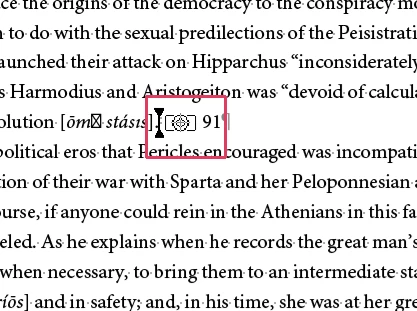


What is it, and how do I seach and replace it?


Thanks! CWS

This topic has been closed for replies.

2 replies

Joel Cherney
Community Expert
Community Expert
April 7, 2023

This is actually something that Uwe @Laubender has posted about a great deal. There's a good summary in this thread. The upshot is that you can use the Find tab of the Find/Change dialog (NOT the GREP tab) and search for <FEFF>. However, he advises against doing a Replace All, because there are acutally a number of possible things that a <FEFF> glyph can do besides being a text anchor.  

Peter Spier
Community Expert
Community Expert
April 7, 2023

Joel meand the TEXT tab...

Joel Cherney
Community Expert
Community Expert
April 7, 2023

Aw, jeez.  Thank you Peter, yes, I mean the TEXT tab. This one:


Steve Werner
Community Expert
Community Expert
April 7, 2023

CreativePro.com offers a number of publications. One of them is a "Guide to Special Characters in InDesign."


That appears to be a Cross-reference Destination. 


It would be used in InDesign if you are using the Cross-References panel. If you're not using cross-references you can probably just delete it.

Steve Werner
Community Expert
Community Expert
April 7, 2023

PS: The guide can be downloaded if you sign up for a CreativePro.com membership—which offers many benefits! (I don't work for them, but write for them occasionally.)

Inspiring
April 7, 2023

Thanks, Steve. I really appreciate the help. The guide actually says they’re a text anchor, something I’ve never used. What I can’t figure out is wjhat search expression to use for the character so I can use Find-and-Replace to delete all 300+ of them. CWS