Participating Frequently
January 23, 2019
Answered

Need to remove space left behind after removing footnotes

  • January 23, 2019
  • 2 replies
  • 997 views

In my layout, I cut two footnotes from the bottom of my text column and pasted them at the end of the document. After doing this, I am left with an empty space that cannot be deleted and when in Normal view, you can see lines. Please see my screen shot here:
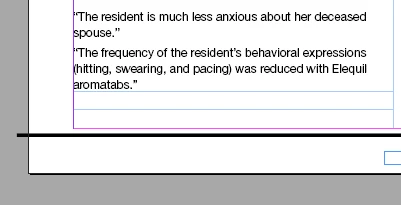
I cannot figure out for the life of me how to get rid of these lines/extra space. Please help!

Thank you!

This topic has been closed for replies.
Correct answer Laubender

Hm.

Remove the footnote reference numbers in the body text.

Add fake footnote numbers if you must.

What you currently have now is two footnotes on the page with no footnote texts.

The before or after values of the two footnotes dictate the space you are seeing.

How about continous numbering then?

Add one text frame to the pasteboard.

Thread it with the main story.

Add two footnotes there. Just like that:

Regards,
Uwe

2 replies

LaubenderCommunity ExpertCorrect answer
Community Expert
January 23, 2019

Hm.

Remove the footnote reference numbers in the body text.

Add fake footnote numbers if you must.

What you currently have now is two footnotes on the page with no footnote texts.

The before or after values of the two footnotes dictate the space you are seeing.

How about continous numbering then?

Add one text frame to the pasteboard.

Thread it with the main story.

Add two footnotes there. Just like that:

Regards,
Uwe

Participating Frequently
January 24, 2019

I removed the footnotes in the body, and that fixed it. Thank you!

winterm
Legend
January 23, 2019

Cutting and pasting at the end… it’s not the way to go, actually. If you use CC 2018 or later, check this thread for a solution.