matthewt9693551
Participant
June 6, 2020
Answered

Nested character styles

  • June 6, 2020
  • 5 replies
  • 1515 views

I want to apply a nested character style halfway through a line of text and would like to use a particular word as a prompt for this. It works for a single character but is there a way to make it work using a whole word?
This topic has been closed for replies.
Correct answer jmlevy

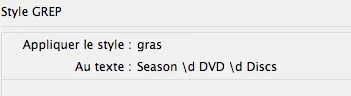
If I understand well, you want to bold “Season X DVD X Discs” where X are numbers. Is that right? You can easily do that using a single GREP style, like this (assuming that either season number and number of DVDs are under 10):

5 replies

matthewt9693551
Participant
June 7, 2020

Thanks for your responses, folks!

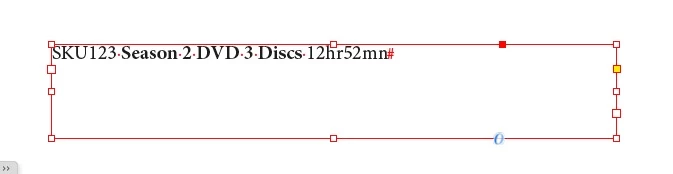
This is what I'm looking to achieve.

I've found a work-around, as described in this jpg but it means ading an extra rogue character in all of the copy lines. Is there a more elegant way to achieve this automated formatting?

jmlevy
Community Expert
jmlevyCommunity ExpertCorrect answer
Community Expert
June 7, 2020

If I understand well, you want to bold “Season X DVD X Discs” where X are numbers. Is that right? You can easily do that using a single GREP style, like this (assuming that either season number and number of DVDs are under 10):

matthewt9693551
Participant
June 8, 2020

Thanks! using the \d is the key!

rob day
Community Expert
Community Expert
June 6, 2020

There is the special End Nested Style character that might be useful Type>Insert Special Character>Other:


jane-e
Community Expert
Community Expert
June 6, 2020

Hi Matthew,

A couple of things:

  • To have a nested style in the middle of a paragraph, you will need two nested styles, each with a trigger.
  • The trigger can't be a word. If you try to make the trigger "Adobe", for example, it will look for an A or d or o or b or e, whichever it finds first. This is great for punctuation where you can use .,; for the trigger.
  • You can create a character style and apply it with GREP if the text fits a pattern.


Please tell us more about what your situation with that screen shot so we can give you the best approach.


~ Jane

Barb Binder
Community Expert
Community Expert
June 6, 2020

Hi Matthew:


We can help with this, but I am echoing the need for a screen shot. Otherwise we are just guessing at what you need.


~Barb 

~Barb at Rocky Mountain Training
Community Expert
June 6, 2020

There are no nested styles in InDesign. Are you taking about Grep Styles? If so then give an example of what you intend to find and apply the character style to, some screenshots of what you did, what works and what you intend to make it work will help


-Manan

[Edited]

-Manan
jmlevy
Community Expert
Community Expert
June 6, 2020

There are no nested styles in InDesign.

What? Of course, there are nested styles!

https://helpx.adobe.com/indesign/using/drop-caps-nested-styles.html


@Matthew

But as Manan said screenshot or examples would be helpful.

Community Expert
June 6, 2020

Ahh that was a big wrong statement, thanks for catching on this one. I may have had layers on my mind when i answered this, i totally mixed up Nested Styles and Grep Styles together. I have striked my response to correct the grossly wrong statment


-Manan

-Manan