Participant
September 18, 2024
Answered

Nested Line Style Issue: Small Caps Not Applying Consistently Across Text Boxes

  • September 18, 2024
  • 14 replies
  • 1826 views

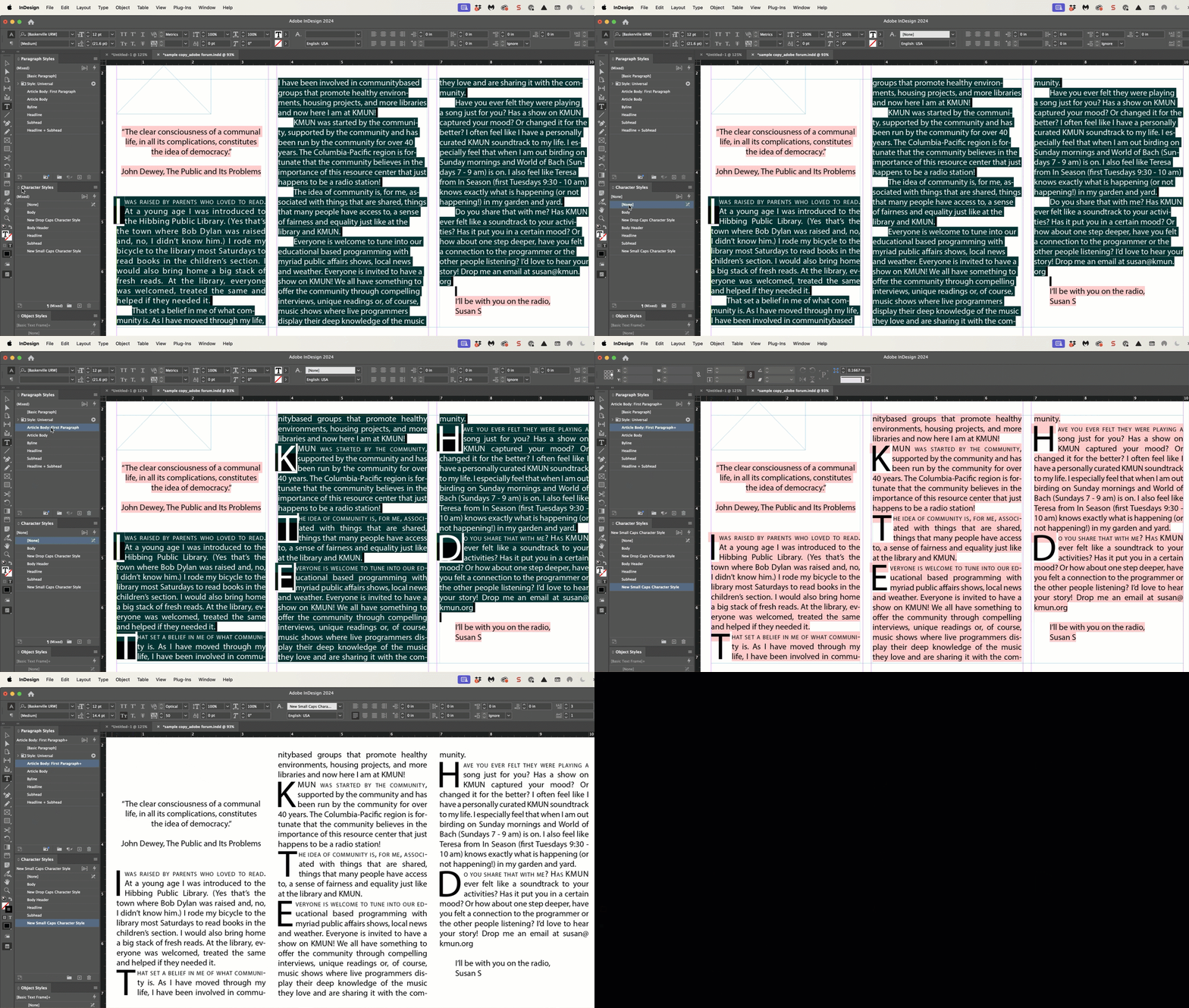
I have built a paragraph style with a drop cap and a nested line style with 1 line of small caps. However, when I try to apply this style, it only works on one text box I've created. The other text boxes throughout the document are only appyling the drop cap, and not the small caps nested line style.


I have reset the style and started from scratch multiple times, and it continues to only work once. What variables could be causing this?


Attached are the paragraph and character style settings, and the two different results. 


<Title renamed by MOD>

This topic has been closed for replies.
Correct answer Barb Binder

Hi Emma!


Thank you for trusting me with your file. It was an overrides issue, just not the one I addressed initally.


The first time I assigned the style it worked as you described. On closer look, the word (Mixed) appears at the top of the Character panel. I Alt/Opt clicked on [None] to remove character-level overides and reassigned the style. It worked exactly as you hoped. 😊


~Barb


14 replies

Barb Binder
Community Expert
Community Expert
September 20, 2024

Emma, we are always happy to help. Come back next time you get stuck!


~Barb

~Barb at Rocky Mountain Training
Participant
September 26, 2024

Hi Barb -- Would you mind explaining what the alt function does when alt-clicking [None] in the Character Styles menu for a selection? It's working great but I'm confused about why the alt-click is necessary, and what would be different if I just clicked w/no alt.


Thanks!

Barb Binder
Community Expert
Barb BinderCommunity ExpertCorrect answer
Community Expert
September 20, 2024

Hi Emma!


Thank you for trusting me with your file. It was an overrides issue, just not the one I addressed initally.


The first time I assigned the style it worked as you described. On closer look, the word (Mixed) appears at the top of the Character panel. I Alt/Opt clicked on [None] to remove character-level overides and reassigned the style. It worked exactly as you hoped. 😊


~Barb


~Barb at Rocky Mountain Training
Participant
September 20, 2024

Aha -- amazing! Thank you so much, Barb. 

Barb Binder
Community Expert
Community Expert
September 19, 2024

Hi @Susan21139511sv37:


I'm not having issues recreating your formatting either so I'm suspecting you have some overrides. Select all of the text, remove the overrides (click the ¶* button at the bottom of the paragraph styles panel) and reassign the paragraph style. And of course make sure you are adding hard returns between the paragaraphs and not line breaks.


~Barb


~Barb at Rocky Mountain Training
James Gifford—NitroPress
Legend
September 19, 2024

Barb, can you make a drop cap and a line style work simultaneously? It's my experience that only some of these 'automatic styles' work together at all, with most needing exclusive application.

Barb Binder
Community Expert
Community Expert
September 19, 2024

Yes, James—I am showing it in my answer. As did @jmlevy.


~Barb

~Barb at Rocky Mountain Training
James Gifford—NitroPress
Legend
September 19, 2024

It's working fine for me, albeit with a slightly different font (Baskerville Old Face). I didn't do anything tricky or fancy, just copied a body style, created the character style, and assigned the line style. That's for the line style alone, though. If I add a drop cap... it takes precedence.


With few exceptions, you can use only one (1) of these override styles on a single Paragraph Style. You can't combine Drop Cap, Line Style or GREP Style. I'm not sure there is any workaround for this "choose one" limitation.


That said, Drop Cap and Nested Style seem to work together, but it may be tricky to get it to apply the latter to just the first line. You may have to modify your style to drop cap + highlight 3 or 4 words following, or such. There are other alternatives for Nested Styles, but it will have to be managed manually on each paragraph.

jmlevy
Community Expert
Community Expert
September 19, 2024

You can't combine Drop Cap, Line Style or GREP Style. I'm not sure there is any workaround for this "choose one" limitation.

Hi @James Gifford—NitroPress I am not sure to understand what you mean: there is absolutely no problem to combine drop cap and line style: