
Inspiring
January 15, 2024
Answered

Nested style issue

  • January 15, 2024
  • 4 replies
  • 206 views

I am working on a historical booklet for a local historical society listing local WW II vets who were brothers. I'm including a short bio and a headshot photo of each vet in uniform.


Every paragraph starts with the rank and name of the veteran like this: Capt. John P. Doe, Jr., son of .......... which to me presents a consistency that will allow me to bold the name only as a nested style paragraph leader but I have not been able to make it work.


The normal paragraph type is Minion Pro Regular 12/14.5 and I selected Myriad Pro Bold as the leader type 12/14.5.


I tried to tell INDD to use the leader style up to the first incidence of the word son, but I have obviously told it wrong. It applys the the leader style to Capt. J only where the leader starts with Capt. John P. Doe, Jr., son of.


Can someone please help me get this right?

Thanks to those who know more than me,

Joe
This topic has been closed for replies.
Correct answer Barb Binder

Hi @camelbreath:


GREP styles are like Nested Styles, but more flexible.


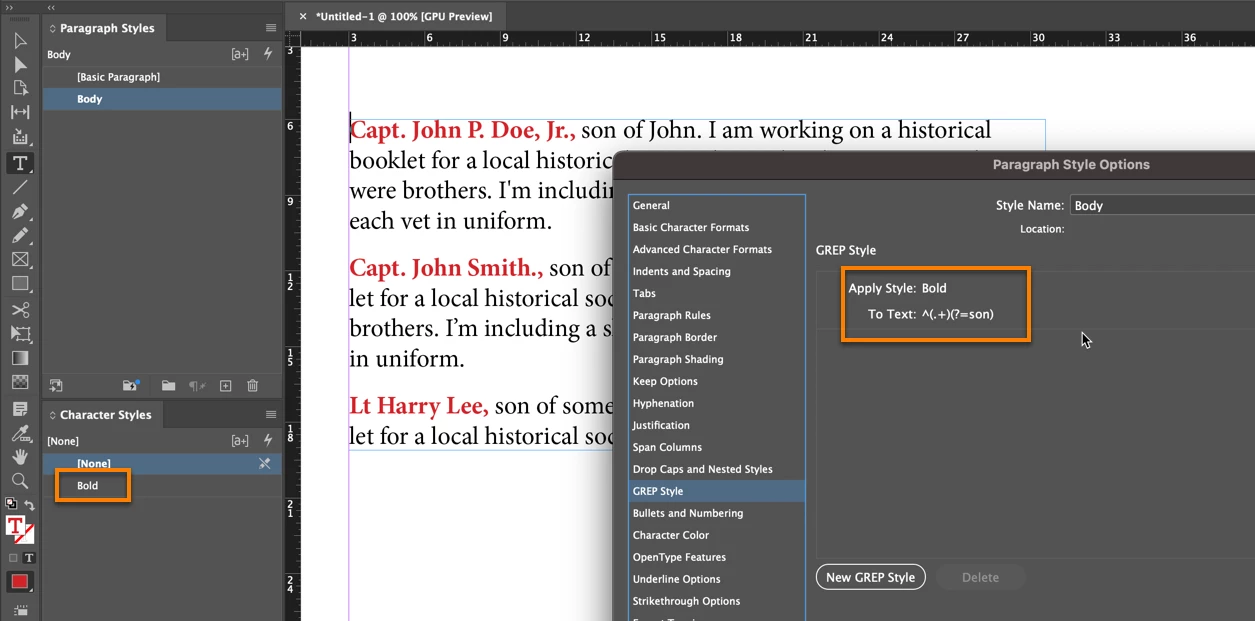
If this is what you want at left:


Then remove the nested style and add a GREP Style. Apply the character style name you were using for the nested style, but set the To Text: 


^(.+)(?=son)


Which says to apply the character style (mine is called Bold) to everything from the beginning of the paragraph up to the word son.


~Barb


4 replies

Barb Binder
Community Expert
Barb BinderCommunity ExpertCorrect answer
Community Expert
January 15, 2024

Hi @camelbreath:


GREP styles are like Nested Styles, but more flexible.


If this is what you want at left:


Then remove the nested style and add a GREP Style. Apply the character style name you were using for the nested style, but set the To Text: 


^(.+)(?=son)


Which says to apply the character style (mine is called Bold) to everything from the beginning of the paragraph up to the word son.


~Barb


~Barb at Rocky Mountain Training
Steve Werner
Community Expert
Community Expert
January 15, 2024

And here is another tutorial:


https://www.youtube.com/watch?v=pZpI64eCW9s


Steve Werner
Community Expert
Community Expert
January 15, 2024

If you're new to using nested styles, here's a YouTube video which gives a tutorial about how they can be used:


https://www.youtube.com/watch?v=lgkyEBmb7dk

Steve Werner
Community Expert
Community Expert
January 15, 2024

I don't think nested styles are able to change character styles based on an arbitrary string of letters (like "the first instance of the word 'son')


Look at the possible markers that can be selected to call out a new character style: