LightDream2
Known Participant
November 24, 2021
Answered

Nested Styles - Contents (TOC) how do I make the dot leader smaller that the numbers?

  • November 24, 2021
  • 2 replies
  • 1594 views

I have several levels in my Contents, some with larger type. I want to make the dot leaders the same size for all levels, and smaller than the page number. In other words, I don't want the dot leader to really stand out, just be a guide for the eyes.

In Nested Styles, I ask for None character style up to the tab character

I apply a Dot Leader character style up to digits

None character style applied for digits. 

My dot leader will be smaller, but I've tried everything I can think of, but my page numbers end up the same size as the dot leader nested style. 

Also, sometimes for fun, I would like the dotleader to be a different colour, as well as unobtrusive.

Love nested styles, but I wish it had more functions. Thank you 

 

Correct answer Dave Creamer of IDEAS

You don't use nested styles--just apply the character styles in the TOC Styles setup.

2 replies

LightDream2
Known Participant
November 24, 2021

Thanks for your reply. I don't really understand though. Yes, I know I can apply Character styles in the TOC, but I can't apply multiple character styles for one type of paragraph style.


I have the TOC paragraph styles listed in my paragraph styles, why can't we add a Nested style to them? It works partially. It is just getting the nested style instructions to work for me. I can apply the dot leader character style individually, but I would like to automate it. 


My Section Heads are larger than my Chapter Heads, but I want the dot leader to be the same size for both.

And the dot leader is smaller than the type. 


Section head 14 pts, dot leader 9 pts in a different colour, page numbers for the Section head 13 or 14 points.

Are you familiar with Robin Williams who wrote those wonderful books - the non-designer design series?

In her book called: The Non-Designer's InDesign book she says you can do it. She has a chapter on Nested styles but doesn't explain the dot leaders in the TOC specifically. 


I'm sure it can be done. I just don't know how to tell the nested style to switch from the smaller dot leader back to the larger page number. 

thanks, jane

Dave Creamer of IDEAS
Community Expert
Community Expert
February 4, 2025

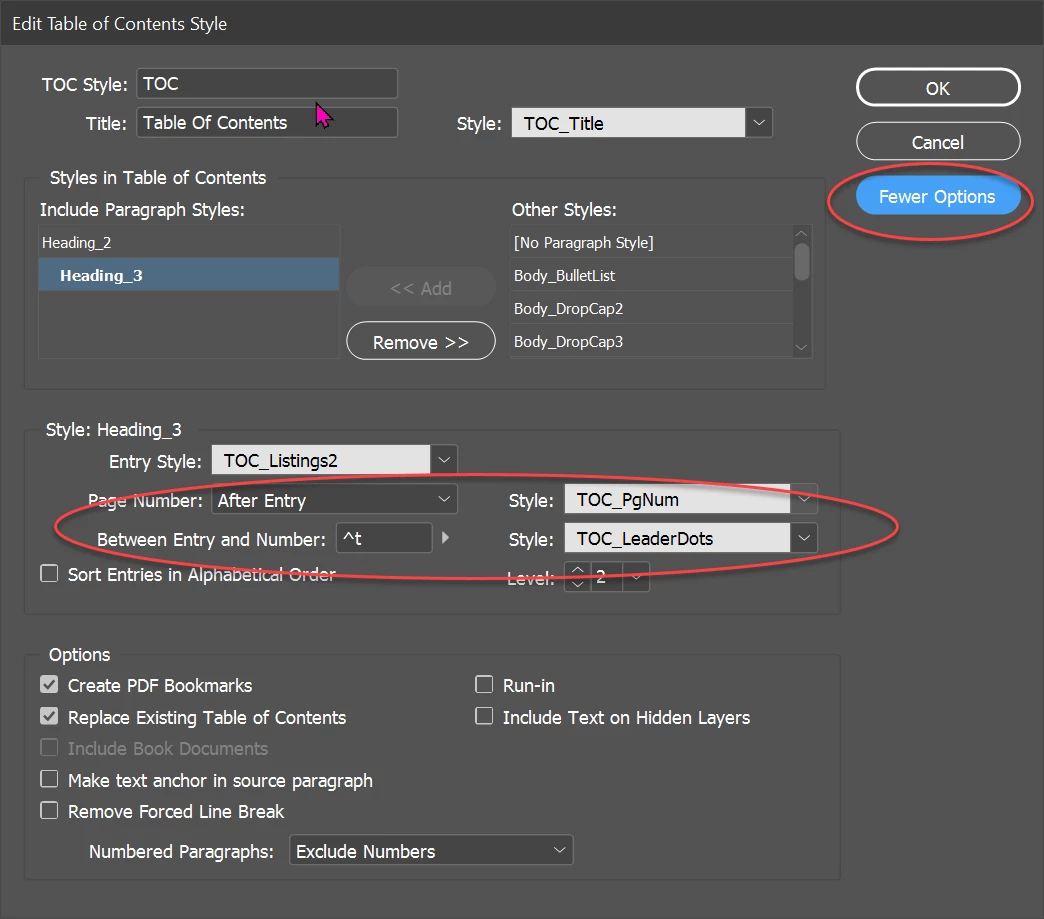
Here is how you would do it with the TOC Style:


This is with Nested Styles (manually created TOC). No character styles were manually applied.

Note the use of "up to" and "through".

David Creamer: Community Expert (ACI and ACE 1995-2023)
Dave Creamer of IDEAS
Community Expert
Dave Creamer of IDEASCommunity ExpertCorrect answer
Community Expert
November 24, 2021

You don't use nested styles--just apply the character styles in the TOC Styles setup.

David Creamer: Community Expert (ACI and ACE 1995-2023)
Bevi Chagnon - PubCom.com
Legend
November 24, 2021

In @Dave Creamer of IDEAS's screen cap, the TOC Dot Leader character style can set anything you like.

I like my dot leaders to be as unobtrusive as possible, while still giving a visual guideline for eye tracking. In addition to size, color, and tint, I also open the tracking a bit to space them out. +50 tracking works well in most of my designs.


|    Bevi Chagnon   |  Designer, Trainer, & Technologist for Accessible Documents ||    PubCom |    Classes & Books for Accessible InDesign, PDFs & MS Office |