
alexanderc71116090
Inspiring
February 10, 2020
Answered

New document in Indesign ... how can I fix it?

  • February 10, 2020
  • 4 replies
  • 1104 views

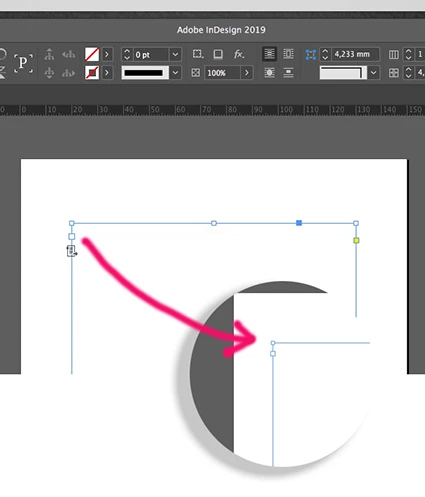
When I create a new document, the frame appears as if it had a text already linked, but it should appear as what is incised in the circle, how can I solve it? ... thanks!
 

This topic has been closed for replies.
Correct answer Barb Binder

I don't know, LOL! I think Bill and I are both confused by the question—you want that icon for primary frames. You can also auto-flow (different feature) but the advantage of a primary frame is that if you change the frame size/position, the body pages adapt automatically, which is great for books.


~Barb

4 replies

Barb Binder
Community Expert
Community Expert
February 10, 2020

I even uninstalled it and reinstalled it.

I'm sorry, but glad you got what you needed from us to get you back on track.


~Barb

~Barb at Rocky Mountain Training
alexanderc71116090
Inspiring
February 10, 2020

Thank you for helping me solve it!

Barb Binder
Community Expert
Community Expert
February 10, 2020

if I uncheck it, the text won't flow creating new pages automatically.

That's why we use primary frames. If you don't want to turn it off, maybe you want to try to restate the question.


~Barb

~Barb at Rocky Mountain Training
alexanderc71116090
Inspiring
February 10, 2020

I didn't really do anything different from what I do every day ... always books ... I thought it was a mistake in the program ... I even uninstalled it and reinstalled it.

Barb Binder
Community Expert
Community Expert
February 10, 2020

You can also disable the primary frame by clicking the icon under the out port on the master page.


~Barb

~Barb at Rocky Mountain Training
alexanderc71116090
Inspiring
February 10, 2020

Perfect Barb !!, it works .... but before I didn't have to do this ... did I mark something wrong?


Barb Binder
Community Expert
Barb BinderCommunity ExpertCorrect answer
Community Expert
February 10, 2020

I don't know, LOL! I think Bill and I are both confused by the question—you want that icon for primary frames. You can also auto-flow (different feature) but the advantage of a primary frame is that if you change the frame size/position, the body pages adapt automatically, which is great for books.


~Barb

~Barb at Rocky Mountain Training
Bill Silbert
Community Expert
Community Expert
February 10, 2020

The icon you are seeing means that the Text Frame is a Primary Text Frame which is part of the Master page and operates as part of Smart Text reflow (see: https://www.agitraining.com/design-news/indesign-training-news/indesign-primary-text-frames for more information). If you don't want a Primary Text Frame then make sure that the option is unchecked in the New Document dialog window.

alexanderc71116090
Inspiring
February 10, 2020

I think you mean this, but if I uncheck it, the text won't flow creating new pages automatically and I'm designing an extensive book.

Bill Silbert
Community Expert
Community Expert
February 10, 2020

If that's what you want then why are you disturbed by the icon? A Primary Text Frame is what you want.