Inspiring
February 11, 2017
Answered

New Pages in New Line on Main Panel

  • February 11, 2017
  • 3 replies
  • 274 views

Believe I may have placed inDesign into an odd,  inappropriate mode, perhaps by a weird combination of random keystrokes.

As a result, what is now happening is that an attempt to insert 1 or more pages results in their being appended to the page prior to or after the insertion point, rather than in a new row at that point.

Would appreciate an idea how I can adjust settings within the app and/or the document  so that I can again, as usual, place new pages where they need to be located.

Best
    This topic has been closed for replies.
    Correct answer Barb Binder

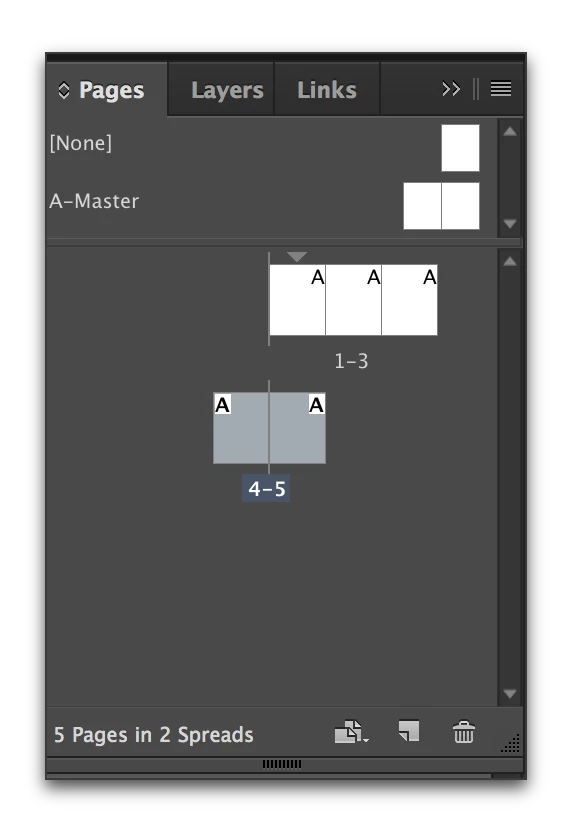
    Or do you mean something like this? If so, make sure you enable Allow Document Pages to Shuffle (seen in the screen shot above) and then answer no, when asked about keeping the current number of pages.

    3 replies

    Barb Binder
    Community Expert
    Barb BinderCommunity ExpertCorrect answer
    Community Expert
    February 11, 2017

    Or do you mean something like this? If so, make sure you enable Allow Document Pages to Shuffle (seen in the screen shot above) and then answer no, when asked about keeping the current number of pages.

    ~Barb at Rocky Mountain Training
    Barb Binder
    Community Expert
    Community Expert
    February 11, 2017

    Jack: Is the issue with the display in the InDesign Pages panel? You can change the page display as shown below. This is just a guess—if I missed the mark, please share a screen shot so that we can see what you mean.

    ~Barb at Rocky Mountain Training
    Nancy OShea
    Community Expert
    Community Expert
    February 11, 2017

    You've posted in the non-technical Lounge.  I will move your question to the InDesign Forum.

    Moderator's Edit:  I am unable to move your question at this time.  Please use the following link instead.

    InDesign

    Nancy

    Nancy O'Shea— Product User & Community Expert