Participant
October 26, 2020
Answered

New update of InDesign to 2021

  • October 26, 2020
  • 1 reply
  • 620 views

I am unable to open InDesign after updating to the latest received subscription update. It begins to open and then disappears. What can I do?


This topic has been closed for replies.
Correct answer SanyamTalwar

Hi,


Sorry about the trouble this issue has caused. It is currently under investigation and would need a few more details like:


  • NFO file (Open System Info > File > Save it Creative cloud and share the download link).
    Steps to share file via Creative Cloud are shared here.
  • Logs from Event Viewer. 
    Press Windows+R to open the Run dialog, enter eventvwr (or eventvwr.msc) and hit OK. 
    Go to Windows Logs > Application and check if you see any error related to InDesign.
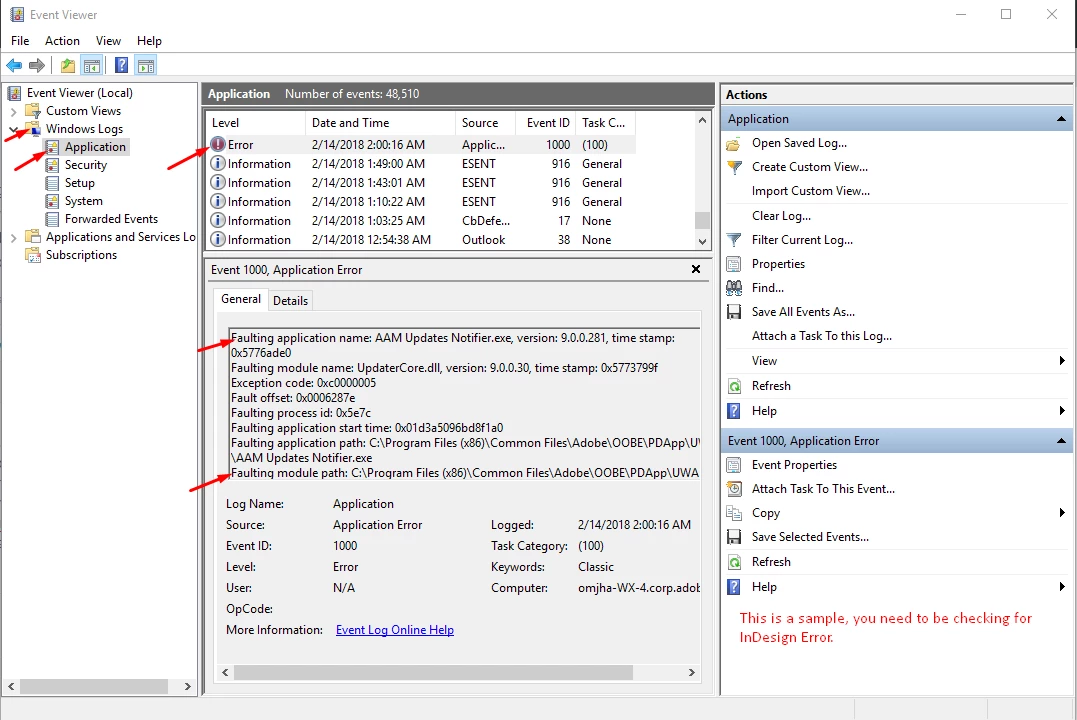
  • Share crash logs by following these steps: https://helpx.adobe.com/in/indesign/kb/submit-crash-reports.html 
    While submitting the crash report please use the same email address, with which you are signed in on this community. This will help us find the crash report and help accordingly. 


Once done, try following these steps one by one and let us know how it goes:

  • Remove third party plugins:
    Open the plug-in folder (Program Files > Adobe > Adobe InDesign > Plugins). 
    Remove third-party plug-ins and paste them to Desktop.
  • Remove corrupt fonts:
    Open Fonts folder in Control Panel.
    Select all the fonts, and copy and paste them in a folder on desktop.
    Trash the fonts from the Fonts folder.
    Copy and paste each batch of fonts from the desktop to Fonts folder and launch the application. If you are unable to launch the application, the damaged font exists in the Fonts folder.
    Identify and remove the damaged font, and relaunch the application.
  • If that doesn't help, try booting the system into Safe Mode (https://support.microsoft.com/en-in/help/12376/windows-10-start-your-pc-in-safe-mode) and check how it works there. It starts your system so that it performs certain checks and prevents third party software/ services from automatically loading or opening.
  • If that doesn't help either, login to Hidden Admin account (https://www.youtube.com/watch?v=EfbMs3w-Z3s&t=53s). Check how the application works there. If it works fine there, then it could be related to permission errors. Follow these steps to repair permission errors:  https://helpx.adobe.com/in/indesign/kb/preferences-folder-read-only-issue.html


We're here to help, just need more info.

1 reply

SanyamTalwar
SanyamTalwarCorrect answer
Participating Frequently
November 4, 2020

Hi,


Sorry about the trouble this issue has caused. It is currently under investigation and would need a few more details like:


  • NFO file (Open System Info > File > Save it Creative cloud and share the download link).
    Steps to share file via Creative Cloud are shared here.
  • Logs from Event Viewer. 
    Press Windows+R to open the Run dialog, enter eventvwr (or eventvwr.msc) and hit OK. 
    Go to Windows Logs > Application and check if you see any error related to InDesign.
  • Share crash logs by following these steps: https://helpx.adobe.com/in/indesign/kb/submit-crash-reports.html 
    While submitting the crash report please use the same email address, with which you are signed in on this community. This will help us find the crash report and help accordingly. 


Once done, try following these steps one by one and let us know how it goes:

  • Remove third party plugins:
    Open the plug-in folder (Program Files > Adobe > Adobe InDesign > Plugins). 
    Remove third-party plug-ins and paste them to Desktop.
  • Remove corrupt fonts:
    Open Fonts folder in Control Panel.
    Select all the fonts, and copy and paste them in a folder on desktop.
    Trash the fonts from the Fonts folder.
    Copy and paste each batch of fonts from the desktop to Fonts folder and launch the application. If you are unable to launch the application, the damaged font exists in the Fonts folder.
    Identify and remove the damaged font, and relaunch the application.
  • If that doesn't help, try booting the system into Safe Mode (https://support.microsoft.com/en-in/help/12376/windows-10-start-your-pc-in-safe-mode) and check how it works there. It starts your system so that it performs certain checks and prevents third party software/ services from automatically loading or opening.
  • If that doesn't help either, login to Hidden Admin account (https://www.youtube.com/watch?v=EfbMs3w-Z3s&t=53s). Check how the application works there. If it works fine there, then it could be related to permission errors. Follow these steps to repair permission errors:  https://helpx.adobe.com/in/indesign/kb/preferences-folder-read-only-issue.html


We're here to help, just need more info.

Participant
March 25, 2022

Our program says it is 2017 not 2015. and i have a MAC

BobLevine
Community Expert
Community Expert
March 26, 2022

Please start a new discussion and tell us what it exactly you need help with. This one doesn't seem to have anything to do with whatever it is you're asking about.