



JonathanArias
Legend
August 30, 2018
Answered

next style not working

  • August 30, 2018
  • 12 replies
  • 5402 views

Hello, i created a style called "Topic head-ShortArticle" i have to to apply next style called" Highlights from"
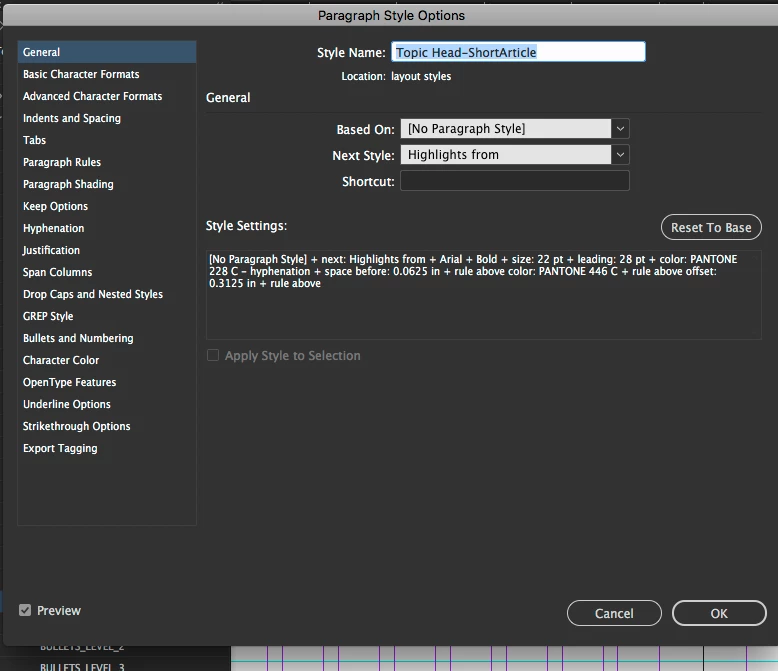
Here i have "highlights from" style to have a next style as "body copy:
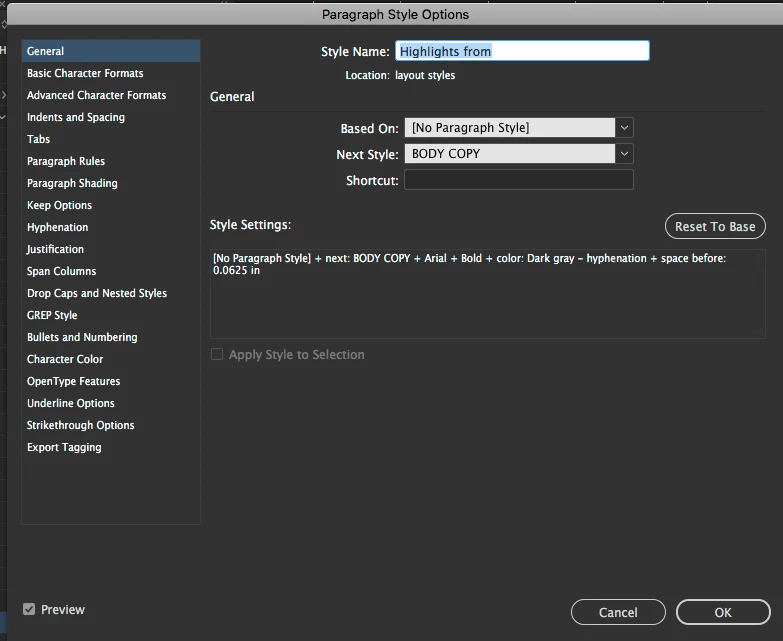
however, when i apply the first style in my chain (Topic head-ShortArticle), nothing happens. what am i dong wrong?

    Correct answer Barb Binder

    Select the three sequential paragraphs on the page, then right click Topic head-ShortArticle in the Styles panel and choose Apply Topic head-ShortArticle then Next Style.

    ~Barb

    12 replies

    Barb Binder
    Community Expert
    Community Expert
    October 23, 2020

    Hi @Grundoon Groundhog :


    My apologies—I linked to the wrong explantion. I have edited my reply with a simply step-by-step. 


    I am happy to continue to offer help—if you still need it—but we have taken this thread way off topic. If you want additional help:

    1. please start a new thread and
    2. show us exactly what you are doing, with screen shots. 


    ~Barb

    ~Barb at Rocky Mountain Training
    Barb Binder
    Community Expert
    Community Expert
    October 23, 2020

    Hi @Grundoon Groundhog :


    When I import Word docs, I use Style Mapping to map the Word styles to the equivalent InDesign styles:


    Alternatively, after importing, you could delete the Normal style and when prompted, map Normal to Extract Singular so that everytthing that was styled as Normal maps to Extract Singular. Then, when you press Enter/Return at the end of an Extract Singular paragraph to type in a new paragraph, it will automatically be assigned General Text Sans. 


    ~Barb 

    ~Barb at Rocky Mountain Training
    Inspiring
    October 23, 2020

    I am too technologically challenged to make head or tail of the video. It looked like it was an ID file being exported elsewhere, not a Word file to be imported in ID. Typically there was no explanation of where to find the initial menu for style mapping; he had it open already. Where is it found? Perhaps I don't understand what the options menu is?

     I've been replacing Normal with General Text, which is in the majority, and changing extracts as I need to. That's the point where the next style should be applied, and it's not.

    Barb Binder
    Community Expert
    Community Expert
    October 22, 2020

    In your scenario, you need two paragraph styles.

    1. Extract Singular (without an indent)
    2. General Text Sans (with an indent)
    3. Extract Singular should be set up with Next Style defined as General Text Sans

    ~Barb


    ~Barb at Rocky Mountain Training
    Inspiring
    October 22, 2020

    Yes, that's how it's set up.

    But I wonder if I'm making an earlier mistake. I flow in text from Word, which brings in a "normal" style. I've been deleting that and replacing it with General Text (which has an initial paragraph indent). Could that be overriding the "Next Style" option I've created? So it might be better to leave "normal" until I've gone through all the text formatting (at which point it's hopefully gone because it's been replaced).

    Barb Binder
    Community Expert
    Community Expert
    October 22, 2020

    Let's start here, @Grundoon Groundhog. Are you trying to assign the styles while typing by pressing Enter/Return or are you trying to assign the styles after the text was typed in? What are the names of the two styles you are using?


    ~Barb

    ~Barb at Rocky Mountain Training
    Inspiring
    October 22, 2020

    Yes. I style a single paragraph extract as "Extract Singular." Then I press return. The following style should be a return (as it were) to General Text Sans, general text WITHOUT a paragraph indent.

    Since it doesn't work, I have to go back by hand and assign General Text Sans to the paragraph. The same thing happens after heads.

    I appreciate your patience and responses.

    Barb Binder
    Community Expert
    Community Expert
    October 22, 2020

    Hi @Grundoon Groundhog :


    I've defined the "next style" after the last paragraph to fall flush left accordingly. It never works as a defined next paragraph style; the text is indented.

    Did you take a moment to watch my animations, above? I am demonstrating the three ways to use Next Style. 


    Again, if you are typing, then the next style is applied when you press Enter/Return. If the text is already typed in, select the two paragraphs, right click over the first paragarph style name and choose Apply XXXX, then next style.


    Both methods work, all of the time, if the styles are defined correctly in advance


    If it is not working for you:

    1.) You do not have Next Style defined correctly in you style definitions or

    2.) You are not assigning the styles correctly. 


    It really is that simple. We can help you:

    1.) Show the us your style definitions (General tab) and

    2.) How you are assigning the style—are you assigning while typing (see my first demo) or are you assigning after the text was typed in (see my second demo).


    ~Barb 

    ~Barb at Rocky Mountain Training
    Inspiring
    October 22, 2020

    Yes, I did watch them, and (a) it still doesn't workwhen I hit return and begin a new paragraph (b) I don't know what I'm doing wrong. Beyond putting the desired defined style in the "next style box" for style a when defining style b what can I do? Isn't the point of "next style" that redefinition is not required?

    Barb Binder
    Community Expert
    Community Expert
    October 21, 2020

    Hi @stevehall:


    Ask Adobe to sort this out. This seems so simple.

    There are three ways to use Next Style in a Paragraph Style:

    1. Automatically assign the next paragraph style when you press Enter/Return:

    2. Assign sequential styles to multiple selected paragraphs with a right+click:

    3. Assign paragraph styles (one or multiple, sequential styles when you assign an object style)


    All work as expected when defined correctly—I use all three on a regular basis. If you are struggling with this feature, please post your specific question in a new thread, with screen shots. We can help you straighten it out. 


    ~Barb 


    ~Barb at Rocky Mountain Training
    Inspiring
    October 21, 2020

    What is confusing is that the InDesign paragraph style option includes "next style." Defining the "next style" this way never works: the next style is not applied. For example, after an extract ends the following paragraph should be flush left, not indented. I've defined the "next style" after the last paragraph to fall flush left accordingly. It never works as a defined next paragraph style; the text is indented. If defining can work in "object style" why not in "paragraph style," which would be much simpler?

    Barb Binder
    Community Expert
    Community Expert
    April 23, 2020

    Like Jonathan, I set up a 3 paragraph styles. One follows the other. I should be able to hit a hard return and invoke the next style, and the nexyt. But it doesn't happen.

    Next style isn't broken—I think you may be misunderstanding how it works.


    I'm demo-ing three ways to use it, below. The first is while typing new text, the second is applying to existing text and the third is using a single click by assigning an object style. All work exactly as expected.


    If you are having issues making this work, please start a new thread and we will be happy to give you a hand.


    ~Barb

    ~Barb at Rocky Mountain Training
    Known Participant
    April 23, 2020

    With all due respect, what is the point of 'next style' if you have to do a workaround to get it to work?


    Like Jonathan, I set up a 3 paragraph styles. One follows the other. I should be able to hit a hard return and invoke the next style, and the nexyt. But it doesn't happen. If I right click on my para style, it tells me to clear my char styles! And i have no char styles associated with the para styles. To make matters even worst, I'm told to use object styles!


    I use [or try to use] the 'next style' feature with text generated within indesign from Photoshop 'File Info...'. Ideally, I could invoke the Caption > Generate Static Caption and it would produce text below the image that can be quickly formatted.


    Ask Adobe to sort this out. This seems so simple.

    Inspiring
    October 20, 2020

    I couldn't agree more. Why have "next style" available in the style definition panel if it does nothing? It should be automatic! 


    What is the "object style" as opposed to a "paragraph style?"

    BobLevine
    Community Expert
    Community Expert
    August 30, 2018

    You have to select all of the text you want formatted this way. Right click on the paragraph style that's first in the chain. From the contextual menu choose apply xxxxxxxxx and next.

    JonathanArias
    Legend
    August 30, 2018

    THANK YOU Bob!

    Barb Binder
    Community Expert
    Community Expert
    August 30, 2018

    If you have a bunch of body paras, set the Body Copy paragraph tag to Next Style: Same Style and then select all the paragraphs and follow my instructions from above.

    When that is working, you can automate this further with an object style—just call in Topic head-ShortArticle and enable Apply Next Style and the rest will work automatically.

    ~Barb

    ~Barb at Rocky Mountain Training
    BobLevine
    Community Expert
    Community Expert
    August 30, 2018

    Whoa...the whole page just refreshed while I was typing. Barb nailed it.