
No autosave, can't recover files
Hi, I'm using version 20.0.1
An indesign document I was just working on all day today crashed at the end of the day and I lost my work because nothing had autosaved.
When I relaunched and tried to open the file again I got a message saying the pages could not be found and do I want to postpone recovery. I clicked yes to recover the document later. I've not been able to recover the recent version. The file in the folder is showing last saved this morning.
I have gone into the file on my C drive where supposedly it is backing up to and I see DBT and DBS files from before the crash, but cannot work out how to open these to see if the work is in there? I have tried copying them to another location and trying to open them with indesign. I've also tried putting .indd at the end of them before doing this...
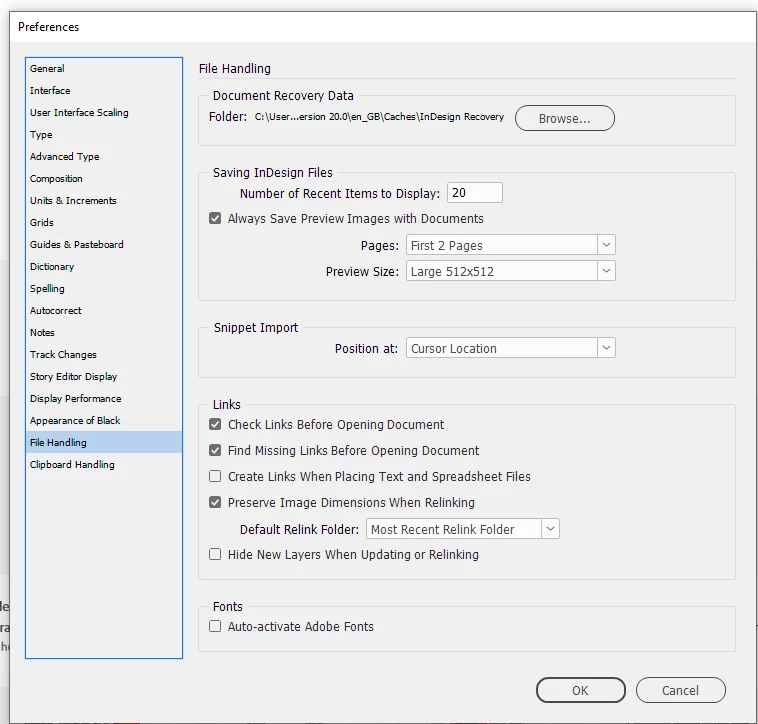
Also, I can't figure out why autosave is not working. I went into Edit>Preferences>File handling but there is nothing relevant in there that I can see? (Image below).
For info, if relevant, I have been working in indesign 2025 on a document that was originally created in 2022, so with an earlier version of indesign.
Thanks for any tips anyone can give.


 AdChoices