
Participating Frequently
June 7, 2025
Answered

No bleed area outside crop marks in PDF export

  • June 7, 2025
  • 3 replies
  • 1069 views

The attached screenshot shows the problem. The pink box is 4.25 inches by 6.25 inches, the blue-green box is 4 inches by 6 inches -- which is what I want for a 4 x 6 card. BUT when I export the file to a High Quality Print PDF, the bleed area outside the cut marks is gone -- so there is no bleed area. The office printing the card won't accept that. 


I have an M3 MacBook Pro with Sequoia 15.5.  What do I do???
Correct answer Brad @ Roaring Mouse

Something seem incorrect here. There are no page edges showing (usually black), and your cyan lines appear to be just guideline for margins. Also: Your zero point at top left should be on he top left corner of the actual page, not the bleed area as shown here.

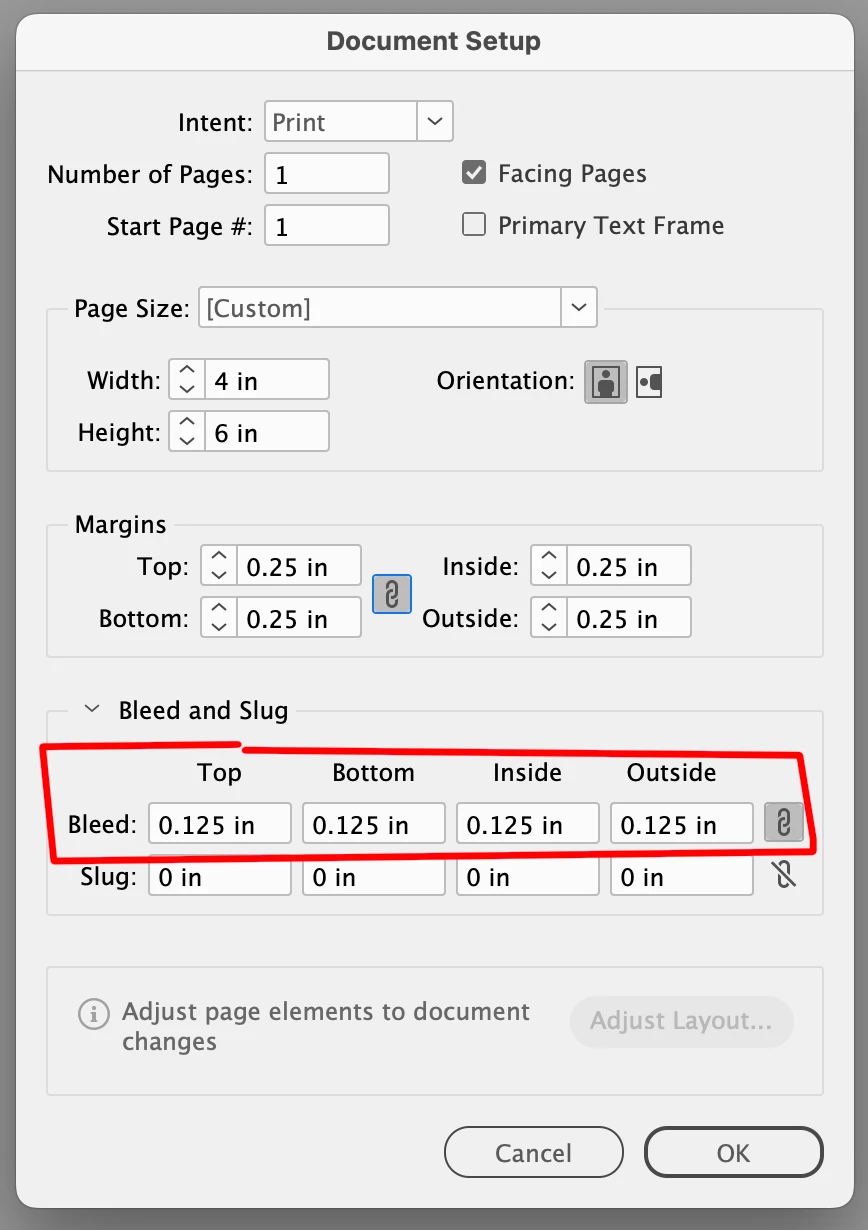
Are you sure you defined bleed in your Document Setup?


3 replies

tonks_the_auror
Community Expert
Community Expert
June 7, 2025

Hi,

I just want to check that you have the settings set up correctly.

You need to define the bleed in your InDesign document setup, and also in the PDF export settings.


Participating Frequently
June 7, 2025

Thank you all. I haven't used InDesign for a few years (and I never used it a lot) and I wasn't doing this right. And, I spent a considerable amount of time screen sharing with Adobe chat and phone support and we didn't get close to the answer. Thanks to this group, I have

  • set  .125" bleeds all around in Document Setup
  • changed the document size to 4 x 6 (not 4.25 x 6.25)

And it looks like I have what I want: 

Brad @ Roaring Mouse
Community Expert
Community Expert
June 7, 2025

That's better!  However, when you export your PDF, you don't need the bleed marks (the outer ones... printers don't need them at all), and the trim marks should be offset so they don't touch the corners of the artwork. The default is ually 6 pt (0.08333"), but printers would actually like it if it was more, so put 9 pt (0.125") in Offset.


Also, printers (I've worked for printers) do not need anything except the trim marks so you can deselect everything in Marks except for trim marks. In fact we don't REALLY need trim marks either, but it won't hurt to have them there. It's good visual reference.

Brad @ Roaring Mouse
Community Expert
Brad @ Roaring MouseCommunity ExpertCorrect answer
Community Expert
June 7, 2025

Something seem incorrect here. There are no page edges showing (usually black), and your cyan lines appear to be just guideline for margins. Also: Your zero point at top left should be on he top left corner of the actual page, not the bleed area as shown here.

Are you sure you defined bleed in your Document Setup?


Dave Creamer of IDEAS
Community Expert
Community Expert
June 7, 2025

Do you have the bleed area and crop marks selected in the PDF settings?

David Creamer: Community Expert (ACI and ACE 1995-2023)
Participating Frequently
June 7, 2025

Yes, .125” all around. I've tried every variation I can think of. I screen shared with Adobe phone support, and they watched while talked. 

Dave Creamer of IDEAS
Community Expert
Community Expert
June 7, 2025

Not if your document has a bleed. Does your output settings have the bleed turned on and set properly. 

The High Quality Print PDF settings does not have them turned on automatically. Look under the Marks and Bleeds section of the PDF settings.


David Creamer: Community Expert (ACI and ACE 1995-2023)