
Participant
December 9, 2020
Answered

No "GPU" setting in my Indesign

  • December 9, 2020
  • 2 replies
  • 8786 views

Hello,

I have a problem with my Indesign software: it does not display any settings regarding "GPU performance" in my "Preferences" panel. I don't know if my graphics card is unrecognized or if some file is missing in the software.
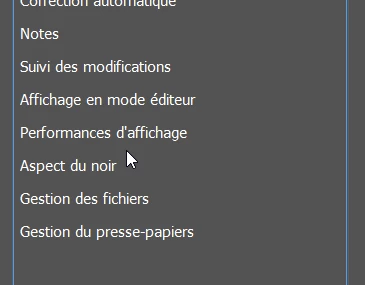
But in any case, it forces me to use only the "CPU", and prevents me from making animated zooms (Space + Ctrl + Click dragged), and to benefit from the best performances of my computer.

I want to point out that this problem is only encountered on Indesign: I can use my GPU on Illustrator and Photoshop, but not on Indesign.
And my graphics cards are also regularly updated (the one integrated in my processor, and the one that is separate from it).

Could you help me?

Thank you in advance

This topic has been closed for replies.
Correct answer Frans v.d. Geest

Are you in Windows or Mac? The GPU setting is Mac only.

2 replies

Ashutosh_Mishra
Inspiring
January 17, 2021

Hi there,


Thanks for reaching out. In addition to suggestions given above, I'd request you to check out this help article(https://helpx.adobe.com/in/indesign/using/gpu_performance.html) as well for more information about GPU Performance. 

Hope it helps.


Regards,

Ashutosh

Participating Frequently
February 24, 2023

I see that your reply is a year old but I just came across it.  He stated that he was on a Windows machine, not a Mac - this article does not help his situation, nor mine at this point.

James Gifford—NitroPress
Legend
February 24, 2023

So how does this not address your problem? Are you (1) on a Mac and (2) not seeing the GPU Acceleration option?


Frans v.d. Geest
Community Expert
Frans v.d. GeestCommunity ExpertCorrect answer
Community Expert
December 9, 2020

Are you in Windows or Mac? The GPU setting is Mac only.

Participant
December 9, 2020
Hi, i'm on a windows device
BobLevine
Community Expert
Community Expert
December 9, 2020
That is Mac Only.