Adrienne Grace
Known Participant
June 6, 2024
Answered

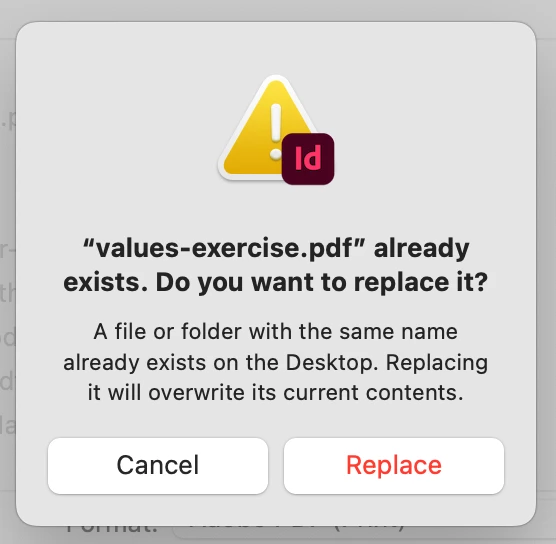
no keyboard access to cancel/replace modal

  • June 6, 2024
  • 3 replies
  • 466 views

Once I upgraded to the Sonoma operating system, I can't use my keyboard to tab through and select either cancel or replace. In Ventura (and all previous operating systems), the Cancel option had focus (indicated by bold text and a blue focus ring). 


I keep hoping each update to Sonoma and to InDesign will fix this issue, but we're now at Sonoma 14.5 and InDesign 19.4 and still no fix. I am having this issue on both my personal Mac and my work Mac. My husband, who is also running 19.4 but is still on Ventura, doesn't have this issue.

I'm fortunate in that I can use a mouse, but this is an accessibility issue for someone that might have a motor disability, carpal tunnel, etc. 
This topic has been closed for replies.
Correct answer leo.r

...here in Sonoma:


3 replies

Brad @ Roaring Mouse
Community Expert
Community Expert
June 7, 2024

Alternatively, You can also select it by pressing Command+"first letter of...", in this case, Command+R. Cancel is always Command+. (period)

leo.r
Community Expert
Community Expert
June 7, 2024
quote

Command+"first letter of...", in this case, Command+R


By @Brad @ Roaring Mouse


Ha. I didn't know about Cmd-R. Thanks for the tip!

Adrienne Grace
Known Participant
June 7, 2024

I didn't know this trick either — and yes @Brad @ Roaring Mouse  thanks for both of these tips!

Brad @ Roaring Mouse
Community Expert
Community Expert
June 7, 2024

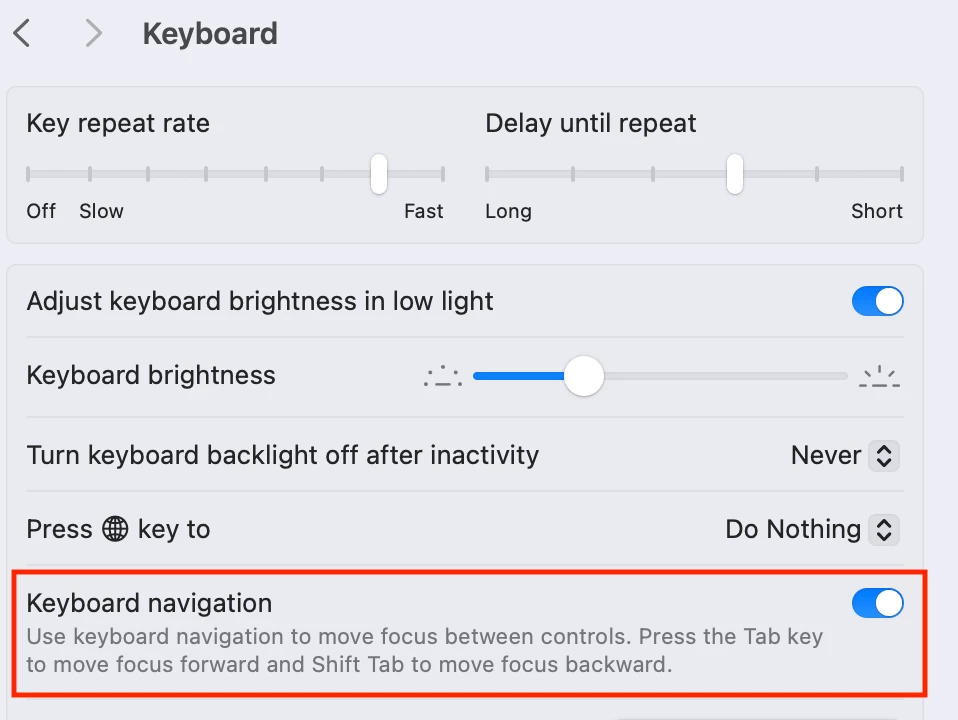
This is not limited to Sonoma. It is, however, a System Preference.:


leo.r
Community Expert
leo.rCommunity ExpertCorrect answer
Community Expert
June 7, 2024

...here in Sonoma:


Adrienne Grace
Known Participant
June 7, 2024

Wahoo —  thank you! I was able to change it on my personal Mac and this resolved the issue. I'll ask IT to unlock this setting on my work Mac.

I think it's odd to change this setting to default to off for Sonoma. I use a lot of keyboard commands and have never had an issue since I started using InDesign back in 2005 or 2006, so never knew there was a control for it.

leo.r
Community Expert
Community Expert
June 7, 2024

Do you have the appropriate setting selected in System Settings?


Frankly, I don't remember what exact setting is that as I have it always enabled (and yes, it works for me in Sonoma with InDesign 19.4).


It's buried in one of the Accessibility options in System Settings, or in Keyboard > Keyboard Shortcuts > Accessibility. I tried to look it up briefly but couldn't detect it. It's something related to "tabbing between controls" or something. If I eventually find it I'll post it here.

leo.r
Community Expert
Community Expert
June 7, 2024

Ok it's Keyboard > Keyboard Navigation