


Participating Frequently
July 25, 2024
Question

No puedo abrir InDesign!

  • July 25, 2024
  • 2 replies
  • 632 views

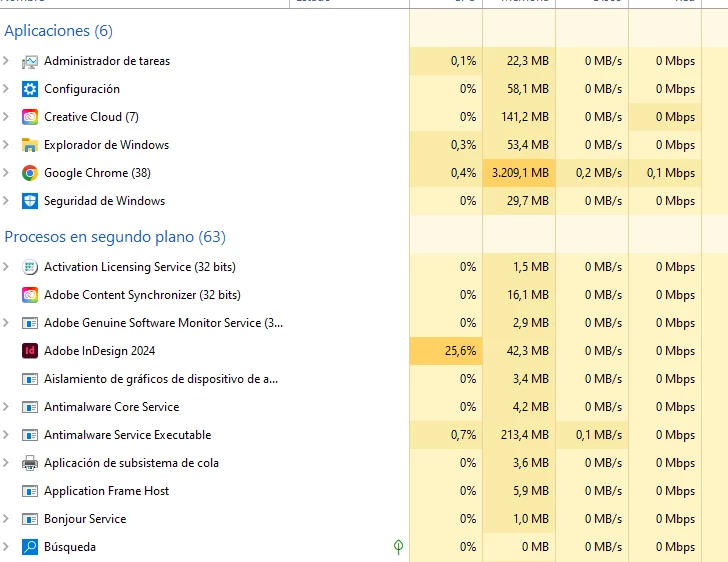
Lo tengo instalado en un ordenador con windows 10, los otros programas de adobe sí  funcionan pero InDesign queda como proceso en segundo plano, cargando y nunca llega a abrirse. No encuentro solución, ayuda, gracias.
 

This topic has been closed for replies.

2 replies

Participating Frequently
July 29, 2024

Confirmado, solo reinstalando windows pude solucionar el problema. Antes había probado todas las soluciones sugeridas del foro y no tuve éxito. Lo de esperar más de dos horas a que cargue no funcionó (es un proceso infructífero en el que queda, utilizando 25% de CPU pero nada de momoria). Llegué hasta dejarla toda la noche cargando y nada. Incluso después de hacer una limpieza profunda de disco y posibles virus.
Saludos.

Abhishek Rao
Community Manager
Community Manager
August 6, 2024

Hello @Rodrigo388088778xh2, 


Hope you are well. 


We are glad to hear that your issue is resolved by reinstalling the Operating system. 


If the problem occurs again, please feel free to reach out. We are here to assist further. 


Thank you, 

Abhishek Rao


Robert at ID-Tasker
Legend
July 25, 2024

If that's FIRST install on this machine - you'll have to give it some time - at least an hour - but most likely at least 2h or even more.


Participating Frequently
July 25, 2024

Two hours to open it once it is installed? How crazy! Photoshop and Premiere open without problems. I don't see any image of the program that tells me it is loading. I notice that there is a process only when entering the task manager. I'll try it anyway, thank you very much. Although it seems strange to me and a serious defect of the program, if that is the problem.

Robert at ID-Tasker
Legend
July 25, 2024

There has been a few threads - can't give you a link right now - with a similar problem - mostly people were able to open InDesign but practically couldn't work because of the slowness.