Participant
November 5, 2024
Question

no puedo abrir un documento en la nube de indesign

  • November 5, 2024
  • 1 reply
  • 188 views

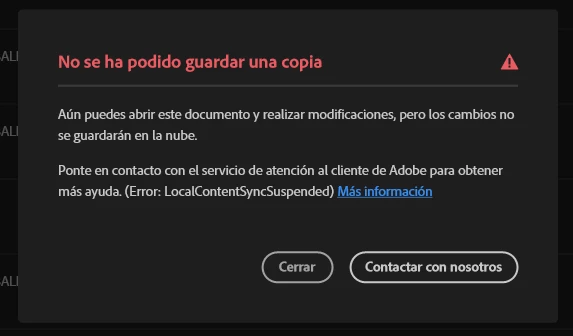
Se me cerro repentinamente mi archivo de indesign que estaba en la nueve al encender la pc de nuevo no puedo acceder a el me lo intenta abrir y me cierra todo el programa que puedo hacer?

This topic has been closed for replies.

1 reply

Abhishek Rao
Community Manager
Community Manager
November 6, 2024

Hi @glamorous_Eagle5CF9,


Thank you for reaching out. I understand how frustrating it is to face issues with accessing your cloud-based InDesign document.

To help you better, could you please provide:

  1. Your InDesign version and confirm whether it is up-to-date.
  2. Your operating system version.

Additionally:

  • Is this issue happening with this specific document only, or are you experiencing it with other cloud documents as well?
  • Just to clarify, is the main issue that you’re unable to save a copy of your InDesign document to the Cloud?

In the meantime, try the below:

  1. Clearing the Adobe Creative Cloud cache can help resolve sync issues. You can do this by going to Creative Cloud Settings > General > Account > Sign Out and then signing back in.

  2. Ensure you have enough storage available in your Adobe Cloud account, and verify that your sync settings are enabled in the Creative Cloud app.

  3. If the file appears in your Cloud storage, try downloading it to your local device, rename the file, and then re-upload it to the Cloud. This can sometimes bypass sync issues.

Please let me know if the issue persists or if you need further assistance!


Best,
Abhishek