

Ayandeh
Participating Frequently
February 13, 2022
Answered

Noto Sans Telugu font not displaying correctly in pdf after exporting from Indesign

  • February 13, 2022
  • 2 replies
  • 4060 views

Was wondering if anybody had any suggestions why the Noto Sans Telugu (variable) font may have problems when exporting from Indesign (17) to a pdf.  Everything looks perfect in Indesign, have tried exporting Interactive and Print, but in both cases some characters don't appear correctly. Can export to jpg and png formats with no problems.  


I have tried some other Telugu fonts and have no problem, but with only a limted range of fonts available and Notos Sans Telugu having 36 weights (and being variable also) makes it ideal to use, so I want to use it if possible. Can't see why it exports corretcly to jpg, png but not pdf?


Thanks in advance for any suggestions!


Screen shots of text in Indesign and the in pdf attached. 
This topic has been closed for replies.
Correct answer Eugene Tyson

Can you explain where you downloaded the font to use from?

Also - what PDF viewer you are using - is it Acrobat? 


There is an update to InDesign 17.01
https://community.adobe.com/t5/indesign-discussions/indesign-17-0-1-improved-performance-and-bug-fixes/td-p/12519413


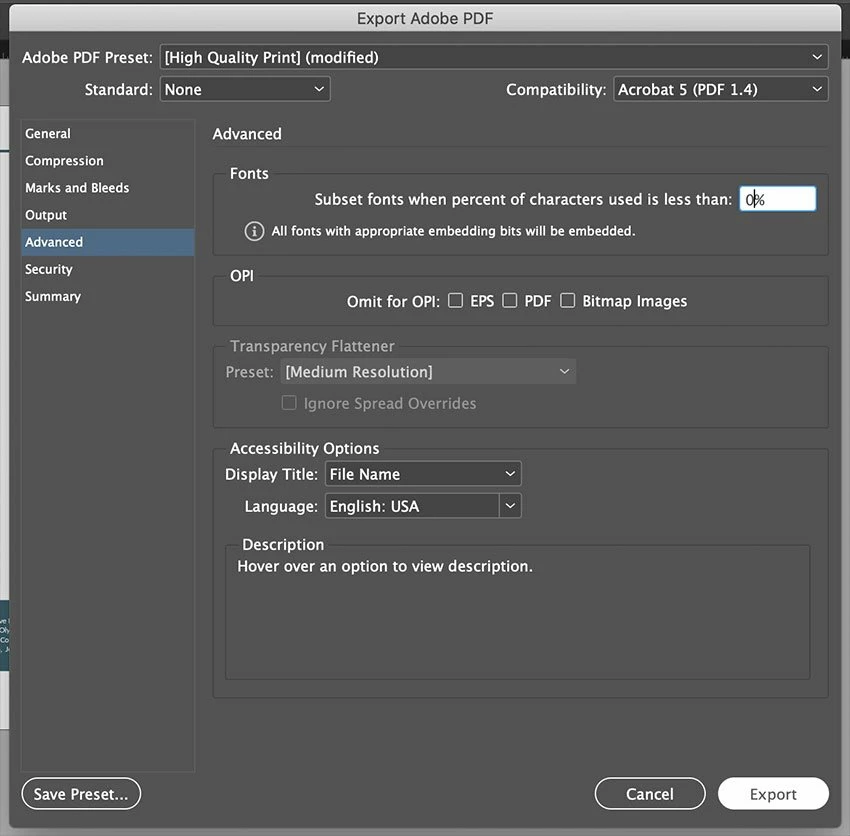
Also can you try setting this to 0% in the PDF export settings


2 replies

Community Expert
February 14, 2022

Ayandeh said: "I updated to the latest ID and it now works OK. "


Yes, that nasty bug was fixed with InDesign 17.1.0.50.

I counted around 15 threads before in this forum where that bug was discussed.


Regards,
Uwe Laubender

( ACP )

Ayandeh
AyandehAuthor
Participating Frequently
February 14, 2022

Thanks Uwe, I obviously need to get better at searching the forum.

Community Expert
February 15, 2022

Hi Ayandeh,

the issue came up with different fonts and the glyph that is showing as non-def glyph on the PDF pages could have different designs. A font designer's choice. See that nice collection of links I did:

https://community.adobe.com/t5/indesign-discussions/blank-box-over-colon-when-exporting-pdf-from-indesign/m-p/12640595#M460386


Regards,
Uwe Laubender

( ACP )

Eugene TysonCommunity ExpertCorrect answer
Community Expert
February 13, 2022

Can you explain where you downloaded the font to use from?

Also - what PDF viewer you are using - is it Acrobat? 


There is an update to InDesign 17.01
https://community.adobe.com/t5/indesign-discussions/indesign-17-0-1-improved-performance-and-bug-fixes/td-p/12519413


Also can you try setting this to 0% in the PDF export settings


Ayandeh
AyandehAuthor
Participating Frequently
February 13, 2022

Thanks Eugene, the font is a Google Font I downloaded (https://fonts.google.com/noto/specimen/Noto+Sans+Telugu?subset=telugu), Acrobat Pro DC.


I tried setting the subset fonts to 0% already, no difference.  


I updated to the latest ID and it now works OK.  Sorry, should have thought of that first but the previous upgrade was only a few weeks ago so I hadn't thought of checking for a new upgrade.


Community Expert
February 14, 2022

Great that you go it sorted. 

Thanks for the update.