

Paula.Vinagre
Known Participant
December 15, 2022
Answered

Number of pages vertically

  • December 15, 2022
  • 5 replies
  • 3462 views

Hi friends,

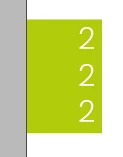
I need help, does anyone know how to get the number of pages vertically on the master pages?

I tried to make the text box smaller, but the numbers are on top of each other…

Example below.

Thank you for your help.


Thank you all so much for all your help.

Today I learned a little more. It was a productive day.

This topic has been closed for replies.
Correct answer denbykev

No worries - I might not have explained it well enough 😉 


If it's allowed on the forum, I have attached the InD file I made, as an .idml file, so you can see my method. Thanks. 


Didn't work - try again…

5 replies

FRIdNGE
December 17, 2022

That's what we could call something truly funny!


[TextFrame 1]  I create a simple text frame where I type "Funny" applying a "N.º pagina" para style.


[TextFrame 2]  I rotate this text frame at -90°.


[TextFrame 3]  I apply, for vertical-reading, my "N.º pagina 2" para style.


… So, sure, no need Script, just a "vertical-reading" para style!


It's the Magic of Christmas!  =D


(^/)

Paula.Vinagre
Known Participant
December 19, 2022

It's really funny!
With just one word you can do "magic".
InDesign does a lot, I really have a lot to learn… 😉

Peter Kahrel
Community Expert
Community Expert
December 16, 2022

@Paula.Vinagre 

Paula -- I don't think you saw @denbykev's solution. It's somewhere above: text on a path with the StairStep option enabled. Works fine with the page-number variable. No script required.

Paula.Vinagre
Known Participant
December 16, 2022

Peter, 

I tried to do exactly as requested, but it doesn't work on the master page.

Peter Kahrel
Community Expert
Community Expert
December 16, 2022

The page number is an InDesign variable, which in effect is a single character. Those variable don't break into multiple lines as you'd expect and/or want, which is why you see the digits printed on top of each other.


The only way probably is not to use InDesign's automatic page numbers, but use a script to insert the page numbers as plain text. That way they show up correctly. It's a pretty simple script, but must be run again when you add apages (or you could do it manually if you add just a couple of pages).

Paula.Vinagre
Known Participant
December 16, 2022

Hi Peter,
Thank you for your answer.


I work in a book publisher and normally the number of pages is usually more than 100 pages, whether general editions or school manuals. It is not feasible to put manual page numbering, only in books with few pages, as Peter suggested (I had already thought about that).

The company asked to solve this problem. I'm trying…

Is there any Grep Style that adapts to solve this question?

If you have any more ideas, please let me know.

Thanks

James Gifford—NitroPress
Legend
December 15, 2022

It looks as if the text box and/or the style associated with the page numbers has indent spacing preventing it from filling the box from the left edge.


Set a style for the page numbers if you don't already have one, and delete (zero out) all spacing. Then adjust the text box to comfortably fit at least 3 digits, and continue adjusting your layout from there.


Paula.Vinagre
Known Participant
December 16, 2022

Hi James,
Thank you for your answer.
I did exactly what you advised me.


I defined a paragraph style. Left alignment.
I adjusted the text box with enough space.
This was the result:

Did you do the experiment exactly as you told me and did it work?

Steve Werner
Community Expert
Community Expert
December 15, 2022

It's unclear to me what you want to happen. Is that page number 222, and you want it to be arrange sideways like one of these arrangements?


Paula.Vinagre
Known Participant
December 16, 2022

Hi Steve, 

No, I want the page numbers to be exactly in this position:

1

2

3


222 was just a 3 digit page example.

Thanks for the reply.