
Participating Frequently
August 2, 2025
Question

Numbered paragraph formatting is not exporting correctly

  • August 2, 2025
  • 3 replies
  • 322 views

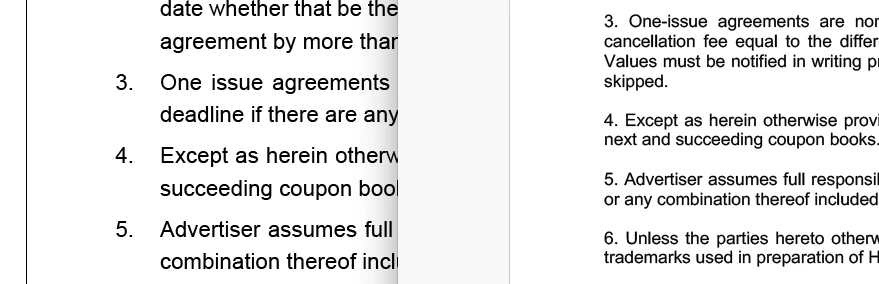
Just noticing for the first time (since updating to  ID 20.5) that numbered paragraphs are not exporting correctly to PDF. Here's an image showing the issue: on the left is the InDesign document, and on the right, the exported PDF. The indent formatting is stripped. I've tried various PDF settings, even exporting as EPS and importing into Acrobat; it remains incorrect.
3 replies

davecourtemanche
Inspiring
August 6, 2025

Does the other formatting hold? Looks like something is going on with the font - they don't look the same. Not just the hanging indent failing, the leading and kerning looks jacked.

Participating Frequently
August 7, 2025

The original font used, with formatting, is Avenir. When its exported out (doesn' matter if its PDF, PNG, EPS, JPG, etc) all the formatting is stripped, and the font is changed to the ever-generic Arial.

As I mentioned, the original text came from a MS Word document, and anything involving MS is problematic... lead me to think there was some underlying 'something' in the text that made it look like a Word doc when exported. But I took the text into TextEdit, converted it to Plain Text, hopefully stripping out any bad MS genes, and tried again ... but to no avail. I'm going to figure this out somehow.

Peter Kahrel
Community Expert
Community Expert
August 7, 2025

Try a new document, type s few paragraphs with some formatting, and with hanging indents. Start from scratch, no copy/paste. Still see the problem?

Peter Kahrel
Community Expert
Community Expert
August 4, 2025

Can you post a screenshot, showing Hidden Characters?

Participating Frequently
August 6, 2025

Here's the screenshot showing hidden characters and frames.

Peter Kahrel
Community Expert
Community Expert
August 6, 2025

It all looks good as far as I can see. I don't know what to say now. . .

Peter Kahrel
Community Expert
Community Expert
August 2, 2025

Works fine over here. How did you do those indents? I tried with left indent and negative first-line indent.

Participating Frequently
August 4, 2025

Standard bullet/number item button in the top toolbar, with the numbers adjusted (pic).

The original text came from MS Word, and I thought that might be the culprit somehow. I took the text into TextEdit and removed all formatting (convert to plain text), then back to InDesign ... same result.