Inspiring
January 29, 2025
Question

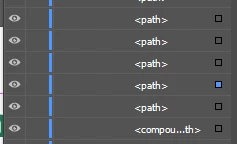
object disappear on artboard but shows on layers?
  • January 29, 2025
  • 6 replies
  • 413 views


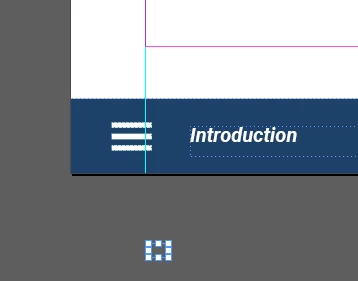
Hi all, looks like lots of the files are on my indesign layers panel, but i don't see what are they on my artboard but just a bounding boxes. do you know how i can fix it or how i can see those hidden item? Thank you so much.


6 replies

Abhishek Rao
Community Manager
Community Manager
February 27, 2025

Hi @burgerqing,


Were the expert suggestions helpful in resolving the issue, or are you still encountering the problem? If it's been resolved, we’d appreciate it if you could share the solution to assist others who might face a similar issue.

Looking forward to your update!


^

Abhishek

Community Expert
January 30, 2025

Very difficult to see from the screenshots, I don't have enough information. 


If they're not needed you could just delete them - perhaps - if it won't delete it might be part of a grouped anchored object or something. 


But would need to examine the file more closely. 


A more concerning issue is the lack of bleed for the document... just saying.

Dave Creamer of IDEAS
Community Expert
Community Expert
January 29, 2025

Change your Interface preferences to not match the background with your theme color. The background will show up as white, making everything easier to see. 

Then make sure "Hide Frame Edges" is not on. (If it is on, the menu would say "Show Frame Edges". 

David Creamer: Community Expert (ACI and ACE 1995-2023)
Robert at ID-Tasker
Legend
January 30, 2025
quote

[...]

Then make sure "Hide Frame Edges" is not on. (If it is on, the menu would say "Show Frame Edges". 


By @Dave Creamer of IDEAS


Dotted lines around the INTRODUCTION text - so Frames edges are set to be visible.


Robert at ID-Tasker
Legend
January 29, 2025

@burgerqing


Can you turn on View > Extras > Show Text Threads?


This should show a line where this object might be Anchored.


If it doesn't help - it's possible, that your document got corrupted - try IDMLing - export as IDML, open, save with a new name - do not overwrite your original file. 


Inspiring
January 30, 2025


i saw in my swatches, there are lot colors there but looks like they are being used but i couldent find where they are. and when i search it, it shows like it is in the artboard with boading box only....  

anyway, if i save it as IDML, all the animation and interactive button will be inactivated? and may i save it back to INDD file from IDML later?


Robert at ID-Tasker
Legend
January 30, 2025
quote

if i save it as IDML, all the animation and interactive button will be inactivated? and may i save it back to INDD file from IDML later?


By @burgerqing


Everything you've set up in your document - should survive - as long as isn't part of the corruption.


IDML is a "raw" version of your INDD document - if you change extension to ZIP - you can open it and you'll see a lot of XML files.


Yes, after opening IDML file you should save it as INDD.


Just in case - keep the backup copy of your original file.


Mike Witherell
Community Expert
Community Expert
January 29, 2025

At the bottom of your tool panel, change your view from Preview mode to Normal View. You can also press the W key as a shortcut for this. In Normal View, you should be able to see the objects on the pasteboard region.

Mike Witherell
Robert at ID-Tasker
Legend
January 29, 2025

@Mike Witherell


OP is already in Normal mode - margins and guides are visible.


Abhishek Rao
Community Manager
Community Manager
January 29, 2025

Hi @burgerqing,


Which version of InDesign do you encounter this issue on? Is it specific to existing files only or with newly created ones as well? In what version were the affected files originally created? Could you share a sample file with us for testing? If it's confidential, then you can share it via DM on the Community. 


Let me know the required details to work forward on this. 


^

Abhishek