

madnessgraphicspoland
Inspiring
July 22, 2022
Answered

object style - position relative to the outer edge of the page

  • July 22, 2022
  • 1 reply
  • 356 views

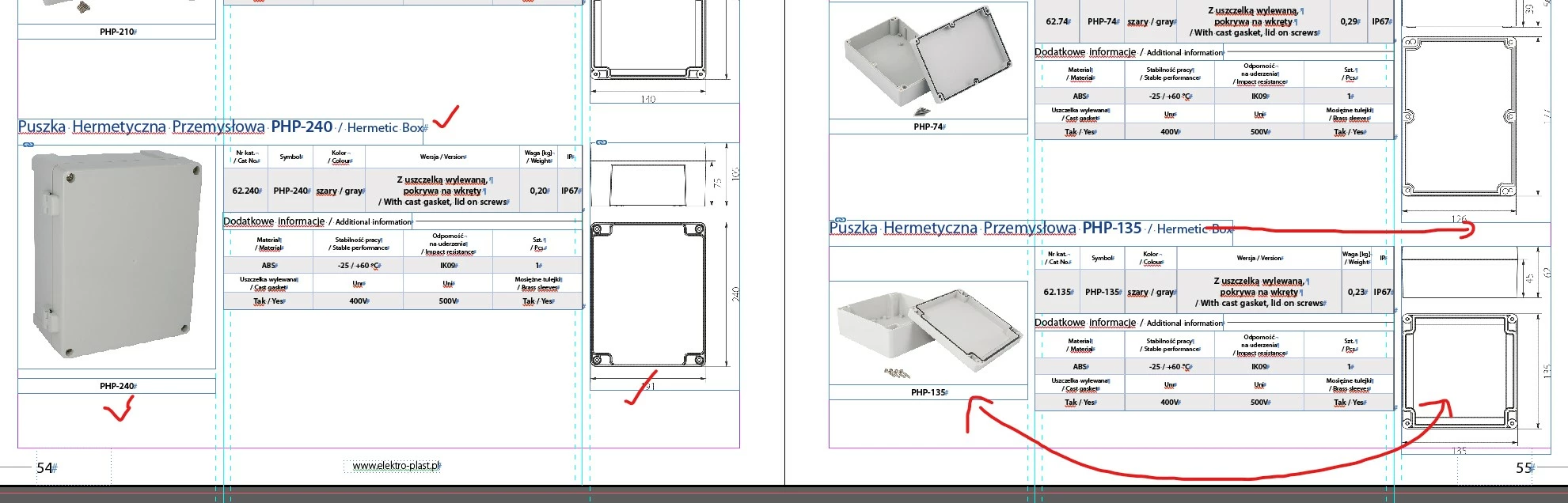
is there a style option for an object that allows you to specify the object's position relative to the outer edge of the page. I am designing a catalog and wondering how to make photos of products always at the outer edge of the page (automatically), regardless of whether it is the left or right side. The text options have such a handy option to choose from. Unfortunately, not in the styles of objects and text frames. Is there a hidden way?
This topic has been closed for replies.
Correct answer Geоrge

Add you  voice here - https://indesign.uservoice.com/forums/601021-adobe-indesign-feature-requests/suggestions/33862330-object-styles-size-and-position-relative-to-spine


There is no any real date when this feature will be added


1 reply

Geоrge
Legend
July 22, 2022

What about anchoring image in a text frame?


Remember, never say you can't do something in InDesign, it's always just a question of finding the right workaround to get the job done. © David Blatner
madnessgraphicspoland
Inspiring
July 22, 2022

thanks for the response, I don't know if it's too complicated. I would have to manually attach everything to a text frame, a photo, a drawing, a table, a photo description ... the catalog has 160 pages. I don't understand why there is no such option in object styles, it seems necessary, simple and logical (for me).

Geоrge
GeоrgeCorrect answer
Legend
July 22, 2022
Remember, never say you can't do something in InDesign, it's always just a question of finding the right workaround to get the job done. © David Blatner