
Participant
November 11, 2021
Question

Objects on master layer visible in spread, but not in layer panel

  • November 11, 2021
  • 4 replies
  • 498 views

Hello all!


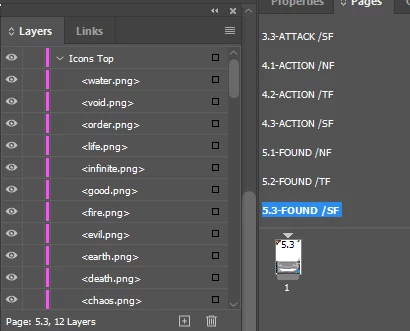
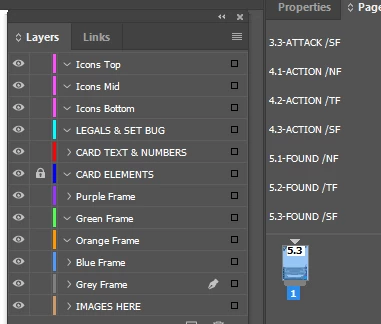
I am having a small issue with my files. Our old art director set our files up and I can't seem to figure out the issue. The objects all exist in out master pages, as shown below. But in the spreads we create, the objects may be visible in the spread, but I cannot see them in the layers panel. I'll add some images for example.


Master page:


In the first spread:


Is there a way to get all layers and objects in layers to show by default in the spread? 

This topic has been closed for replies.

4 replies

Willi Adelberger
Community Expert
Community Expert
November 12, 2021

I suppose that the parent pages are based on other parent pages and inherit these objects from there.

Legend
November 12, 2021

We may view the purpose of Master/Parent pages differenly, but I like to place items on the Parent Pages when I want them to appear on the document pages as they are on the Parent pages. If you want to edit them on the document pages, you could override them as Rob has suggested, but if you need to change something that is common to many pages, changing it on the Parent is the easiest, and any changes you have made to overridden Parent items on the document page won't respond to those edits on the Parent page. For example, move an item on a document page, and it will stop responding to movement on the Parent page. The same goes for geometry, fill, stroke, rotation, etc. And if you insert an odd number of pages before an overridden item's page, the parent will be reapplied, and you will have all of the parent items, plus the overridden ones.

I like to set it and forget it, but maybe that's just me. If it works for you, use it in good health.

rob day
Community Expert
Community Expert
November 12, 2021

Hi @Timothy5FE3, If you override the masterpage items on the pages they will become page items and show in the Layers panel when the spread is active—you could select a range of pages in the Pages panel and choose Override all Master/Parent Page Items:


The A-Master spread active:


Pages 2-3 active with no overrides


Page 2-3 after overrides (the Master/Parent Page items converted into Page Items)


John Mensinger
Community Expert
Community Expert
November 11, 2021
quote

Is there a way to get all layers and objects in layers to show by default in the spread? 


I don't think so. As far as I can tell, what you're seeing there is the default (and only) behavior. With the Parent page selected, each object on it is available as a sublayer (because they're available to select). When the document page is active, those objects are not available, and do not present as sublayers on that page. 


Participant
November 11, 2021

Is there a way to make that present on sublayers on the chosen page? It would make things much easier.

BobLevine
Community Expert
Community Expert
November 11, 2021

No. If you need to change them, you need to visit the parent page and change it there. And please note that it will change on all pages that the parent is applied to.


Correct me if I'm wrong but it sounds like you're a fairly recent convert from Quark.