

martinw51935614
Known Participant
December 2, 2019
Answered

Obvious Left alignment differences between headline and body text.

  • December 2, 2019
  • 3 replies
  • 2076 views

When sending drafts to my clients, some of them question if it isn't possible to get the heading and copy text to an exakt left justification. The latest request came today. It is very often, when i work with textframes for all kinds of content (heading, introduction, subs and copy).

I'm really no newby to InDesign, but when i get this questioning i feel like one. After nearly 20 years working with InDesign, i'm unable to give a satisfying answer to this issue.

I'm not shure if I'm able to describe my issue accurate, therefore I'm not shure if there are a lot of older threads on this topic.

I've attached an example of what i mean. Maybe there is really simple solution to this.
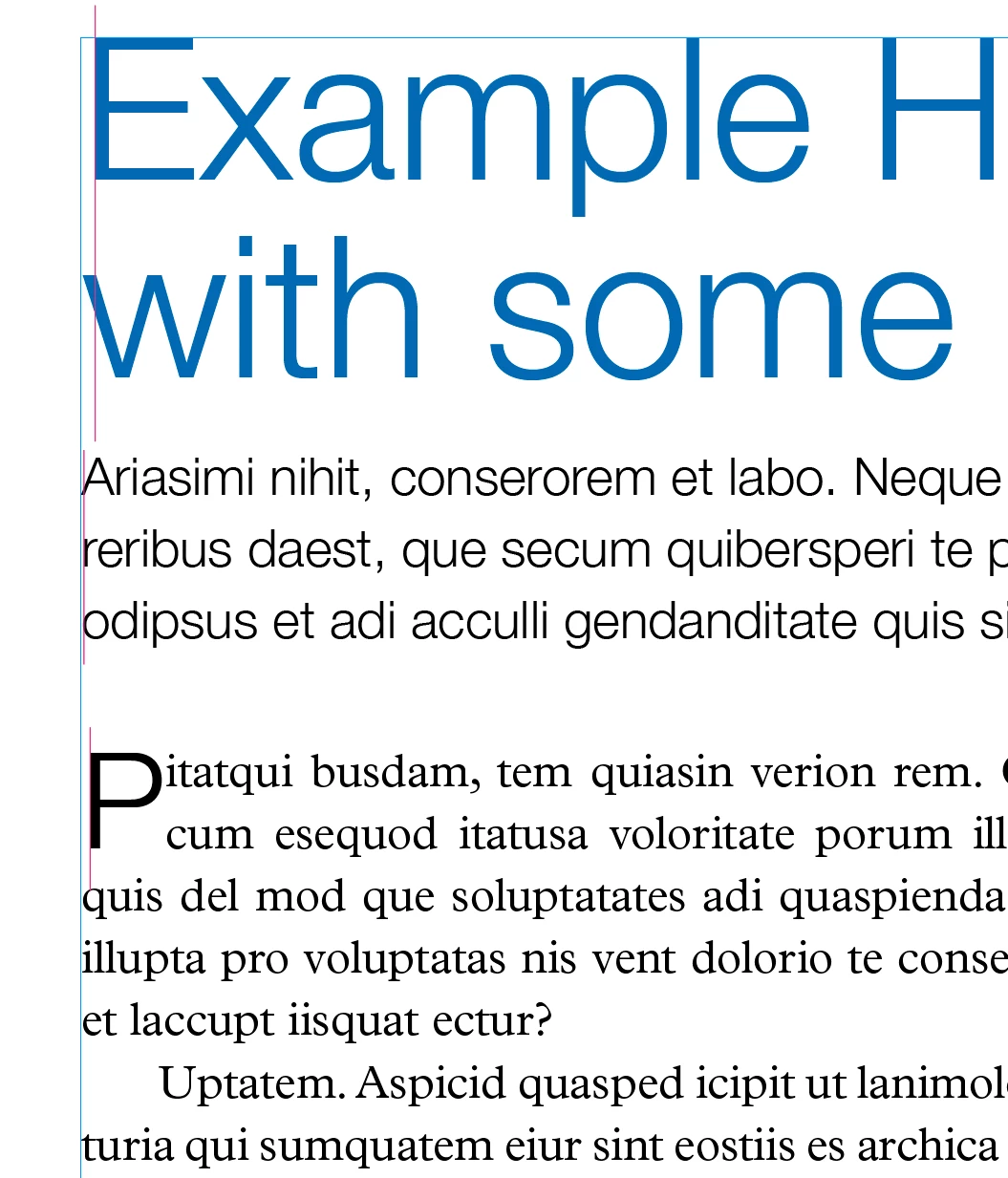


This topic has been closed for replies.
Correct answer Rob de Winter

Hey!


This is actually always the case with fonts (type designers place the font on a grid, that causes this underhang or overhang). 


There is actually a great script, written by Dave Saunders. In 2008, David Blattner wrote a great article about this, and in the comments below the article you can still find a link to this script named AlignLeftEdge.jsx. You can find the article here:

https://indesignsecrets.com/removing-space-along-left-edge.php


The script still works. Just download it, go to the InDesign folder in your applications, and add the script to the Scripts > Scripts Panel folder. When you open up the Scripts panel (Window > Utilities > Scripts) you can see the script AlignLeftEdge.jsx.


Just place the cursor just before the first word and double click this script. It'll automatically align it to the text frame. 😄


I hope this helps!

3 replies

Sean5CF1
Inspiring
May 15, 2023

Hi All


Is this really the best way to fix this issue? seems VERY sloppy


Rob de WinterCommunity ExpertCorrect answer
Community Expert
December 2, 2019

Hey!


This is actually always the case with fonts (type designers place the font on a grid, that causes this underhang or overhang). 


There is actually a great script, written by Dave Saunders. In 2008, David Blattner wrote a great article about this, and in the comments below the article you can still find a link to this script named AlignLeftEdge.jsx. You can find the article here:

https://indesignsecrets.com/removing-space-along-left-edge.php


The script still works. Just download it, go to the InDesign folder in your applications, and add the script to the Scripts > Scripts Panel folder. When you open up the Scripts panel (Window > Utilities > Scripts) you can see the script AlignLeftEdge.jsx.


Just place the cursor just before the first word and double click this script. It'll automatically align it to the text frame. 😄


I hope this helps!

martinw51935614
Known Participant
December 2, 2019

Thanx for your quick help. I will give it a try and post my experiences.

martinw51935614
Known Participant
December 3, 2019

Double Post. Please delete (if possible). Thought this one wasn't published.

Eric Dumas
Community Expert
Community Expert
December 2, 2019

Hi,

Can you confirm the version of your software and the operating system you are using?

Also, can you indicate what composer and fonts you are using, this will have an impact on the alignment.


martinw51935614
Known Participant
December 2, 2019

It's the actual version 15.0.

Therefore i used some postscript type 1 fonts and also true type, but in anonther case i used only true type, with the same results.