
yesman_85
Participant
November 3, 2017
Question

Odd border when printing as PDF

  • November 3, 2017
  • 1 reply
  • 2587 views

Hi guys,

I have a document which exports to PDF fine, but when I print as a booklet 1 image (illustrator EPS) gets a dashed border, see here:
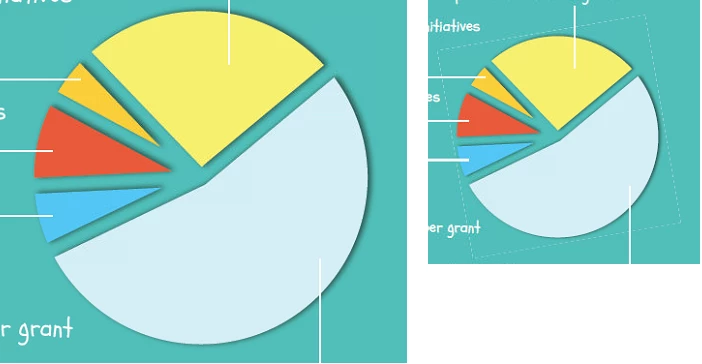
(sorry didn't scale them right), so left is the intended version, right the printed.

All other images are good in the booklet.

What could be causing this?

    This topic has been closed for replies.

    1 reply

    Community Expert
    November 3, 2017

    The export setting is most likely not flattening the transparency. And when you print Postscript or export EPS, this will flattened transparency. The results of flattening is an image broken into abutting separate pieces, known as stitching, and seen as the dashed line in your example.

    yesman_85
    yesman_85Author
    Participant
    November 3, 2017

    Thanks Jeffrey,

    I "print" my file as a booklet, then I select Press Quality print from the PDF printer, what would be the way to get rid of this behaviour?

    rob day
    Community Expert
    Community Expert
    November 3, 2017

    You can't.

    Printing to PDF via postscript always flattens transparency which can result in the stitching artifacts you are showing. The artifacts will only show at low resolutions (screens and low res composite prints).

    The Flattener prest you use in the Print>Advanced tab can affect stitching. You could try experimenting with a custom flattener preset. Try an all raster Raster/Vector balance with increased resolution.