
Inspiring
March 11, 2025
Question

One style with different leadings for paragraphs and line breaks

  • March 11, 2025
  • 4 replies
  • 179 views

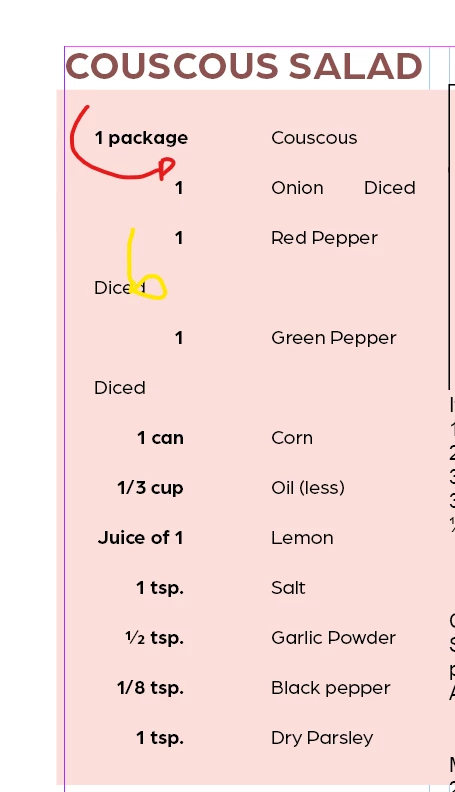
What would be the simplest way to get the red arrow (when entering) to have a different leading and indent at the yellow arrow (when I shift+enter)


with the same paragraph style of course
 

4 replies

James Gifford—NitroPress
Legend
March 11, 2025

Soft returns/line breaks are almost always something to avoid. At most, they are a spot/local fix when there is no better or efficient solution.


They should absolutely not be used as part of a regular formatting flow, as you intend.

Dave Creamer of IDEAS
Community Expert
Community Expert
March 11, 2025

Use a combination of paragraph space and leading.

Paragraph space is applied when typing a return (keyboard enter).

Leading is applied when typing a line break (shift-return). Note: DON'T use auto leading; always type in an absolute amount.


David Creamer: Community Expert (ACI and ACE 1995-2023)
Robert at ID-Tasker
Legend
March 11, 2025

@hendy_5450 


You can change Leading using CharStyle:


Then, you could use GREP / Line / Nested Styles - which might automate things.


But the main question is - how do you get your text?


Is it from some kind of a DataBase or typed by someone manually?


Barb Binder
Community Expert
Community Expert
March 11, 2025

Hi @hendy_5450:


I would just avoid that workflow altogether and have multiple paragraph styles. 


I mean, you can certainly highlight each line and set the leading individually, but that is a problematic worklflow. It's going be much more of a headache (and time-consuming) than just setting up the paragraph styles from the beginning.


~Barb

~Barb at Rocky Mountain Training