
alank99101739
Legend
August 11, 2018
Answered

Online publishing resolution gets worse going down the page?

  • August 11, 2018
  • 2 replies
  • 2676 views

Hi all! I am relatively new to Indesign. I was trying to use Adobe Character Animator to pose characters, then create a comic book from the results (dropping in PNG screen grabs). The overall result is working pretty well so far (in my opinion anyway! 😉  But any advice or opinions always welcome! (I am not a professional - this is a hobby for me.)

But I was hitting an issue with the online publishing support in Indesign. If you zoom in on the screenshot below, on the left is a PDF file I exported. If you look at the characters the resolution is good. The right is the online published document. It seems like the resolution is getting worse going down the page - look at the face of the red clothing guy. The screen shots are all the same size and resolution. I understand that pixelization can occur - but not why the same image size and resolution is getting worse going down a page. Is there something I can do to fix it?
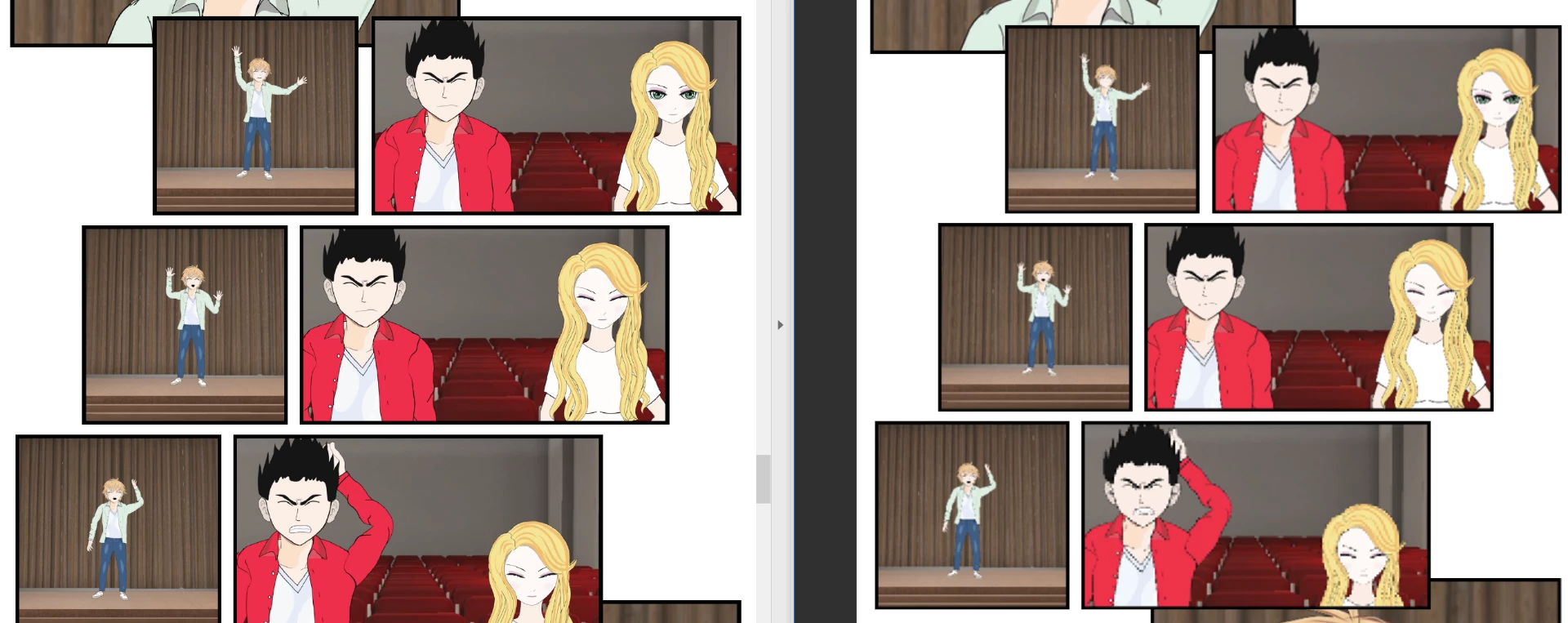
I will probably just publish the PDF document instead, but was curious if I am doing something wrong.

The current online draft of the comic is here https://indd.adobe.com/view/3902da7a-066a-448a-9e2c-de5b1295b9cd

    This topic has been closed for replies.
    Correct answer Diane Burns

    Can you try one more thing? Select the problem image, and go to Object menu > Object Export Options. Choose EPUB and HTML and set preserve appearance to "Rasterize Container" and Resultion to "300 ppi." Publish again via Publish Online and let us know the result.

    This is written up here: https://indesignsecrets.com/controlling-publish-online-image-resolution.php

    2 replies

    Diane Burns
    Diane BurnsCorrect answer
    Inspiring
    August 13, 2018

    Can you try one more thing? Select the problem image, and go to Object menu > Object Export Options. Choose EPUB and HTML and set preserve appearance to "Rasterize Container" and Resultion to "300 ppi." Publish again via Publish Online and let us know the result.

    This is written up here: https://indesignsecrets.com/controlling-publish-online-image-resolution.php

    Community Expert
    August 13, 2018

    Hi Diane,

    hm, don't know, but I see a lot of problem images.

    Like the two at the bottom of page 2:

    This screenshot is made by zooming to 200% in the browser ( Firefox on Mac OS X 10.11.6 ).

    I saved page 2 with my browser and can see that resolution of all the three images of my screenshot is the same 96 ppi but quality of the two images at the bottom of the page is inferior.

    Regards,
    Uwe

    Diane Burns
    Inspiring
    August 13, 2018

    Yes, Uwe, I see those now. I do think it's something in the file, though. I don't think the publishing process can be creating the resolution breakdown, or at least I've never seen it before. Let's see if adjusting Object Export Options helps. Thanks.

    Diane Burns
    Inspiring
    August 12, 2018

    Actually, the resolution of all look pretty good, EXCEPT the one image on that page, marked below. Can you check its resolution (Window > Info panel) compared to the others on that page? It's really different from all the others. Otherwise, looks good, you're not doing anything wrong.

    Recommend you go with Publish Online; it's much easier for folks to click a link than it is to download a PDF. Plus they can download a PDF from Publish Online if they choose.  Or perhaps you should publish both ways.

    alank99101739
    Legend
    August 13, 2018

    Thanks Diane. Here is the "Info" panel for the three images, top to bottom. The images are all 1080p (1920x1080) generated by Adobe Character Animator "export frame". Inside Indesign, even in editing mode (where you can see some pixelation on purpose for rendering speed) its not as bad as the online publishing mode.

    Top one:

    Middle one:

    Bottom one (the looks really blurry):

    The three highlighted files in Windows explorer also shows the files to be similar sizes:

    Shift-W in Indesign ("Presentation" view mode) also comes up cleanly.

    The "Download PDF" link downloads a PDF also looks good. So it just seems to be something funny with the online publishing mode. I might try fiddling with scale factors in case I am tickling some edge condition.

    The following is the downloaded PDF - looks good as well.

    The only time it comes out badly is the online publishing mode. Most of the images are fine, but there are other pages with problems as well. It seems like the more it scales down an image, the more it struggles to preserve the original quality. In this case the three images are pretty similar (same original size) yet the final result for the online publishing render is visually very different.