Inspiring
September 8, 2020
Answered

onSave Event Listener to prompt scaled images – Part 2

  • September 8, 2020
  • 3 replies
  • 860 views

Hi Manan,

Since the previous Post was successfully closed, I have created a new Post to address a new problem.

https://community.adobe.com/t5/indesign/onsave-event-listener-to-prompt-scaled-images/m-p/11408530?page=1#M394764


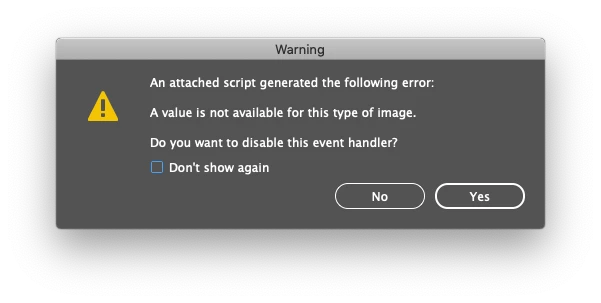
The script given by Manan, is working fine, but I noticed that if the InDesign file has Vector graphics like .eps or .pdf files, then it is giving an error regarding the event handler, see snapshot.

Can you please check if this can be fixed.

Thanks,

Masood


//DESCRIPTION: Event Listener to check if image is scaled <80% or >120%
#targetengine "save"
app.addEventListener("beforeSave", function(){
	for(var i = 0; i < app.documents[0].allGraphics.length; i++)
	{
		var img = app.documents[0].allGraphics[i]
		if((img.absoluteHorizontalScale < 80 || img.absoluteHorizontalScale > 120) || (img.absoluteVerticalScale < 80 || img.absoluteVerticalScale > 120))
		{
			alert("Scaling of Image(s) is below 80% and/or above 120%. Please Fix it!")
			break;
		}
	}
})


This topic has been closed for replies.
Correct answer Manan Joshi

Works fine for me with your document as well, see the screengrab of me testing your document

I tested on CC2020, but I am not sure why it would break on CC2019. Are you sure you have no other script installed that registers event handler for beforeSave event? If yes then try the following version with try catch, it will silently ignore the graphic that is crashing and move on to check the others

#targetengine "save"
app.addEventListener("beforeSave", function(){
	for(var i = 0; i < app.documents[0].allGraphics.length; i++)
	{
		try
		{
			var img = app.documents[0].allGraphics[i]
			if((img.absoluteHorizontalScale < 80 || img.absoluteHorizontalScale > 120) || (img.absoluteVerticalScale < 80 || img.absoluteVerticalScale > 120))
			{
				alert("Scaling of Image(s) is below 80% and/or above 120%. Please Fix it!")
				break;
			}
		}catch(e){}
	}
})

-Manan

3 replies

Community Expert
September 10, 2020

Hi Masood,

testing eventlisteners on object app can be a bit tricky.


Especially if you execute a modified script the second or third time without removing the listener first.

If you want to get a clean situation do a restart of InDesign before running the script again.

It's also a good idea to give the eventlistener a "unique" name and test if it is already running.


Warning! Do NEVER do something like this:

app.eventListeners.everyItem().remove();


You will be able to wreck other running scripts from other developers that are started at runtime or the user is currently using with a ScriptUI palette kind of window. Also note, that InDesign itself is using some scripts at start-up that are pre-installed.


Regards,
Uwe Laubender

( ACP )

Inspiring
September 11, 2020

Hi Uwe,

I always restart my InDesign after any changes to the script. So it's a teadious task, but I do it.

Thanks for your suggestions.

Masood

Manan JoshiCommunity ExpertCorrect answer
Community Expert
September 9, 2020

Works fine for me with your document as well, see the screengrab of me testing your document

I tested on CC2020, but I am not sure why it would break on CC2019. Are you sure you have no other script installed that registers event handler for beforeSave event? If yes then try the following version with try catch, it will silently ignore the graphic that is crashing and move on to check the others

#targetengine "save"
app.addEventListener("beforeSave", function(){
	for(var i = 0; i < app.documents[0].allGraphics.length; i++)
	{
		try
		{
			var img = app.documents[0].allGraphics[i]
			if((img.absoluteHorizontalScale < 80 || img.absoluteHorizontalScale > 120) || (img.absoluteVerticalScale < 80 || img.absoluteVerticalScale > 120))
			{
				alert("Scaling of Image(s) is below 80% and/or above 120%. Please Fix it!")
				break;
			}
		}catch(e){}
	}
})

-Manan

-Manan
Inspiring
September 9, 2020

Try & Catch did the magic. Thanks, Manan for your timely support.

Inspiring
September 9, 2020

Hi,

Is this the right code to alert Embedded/Pasted images in a document. An Add-On to the code, above.

if (img.itemLink.status == null) {
alert("Document has Embedded/Pasted Image(s).  Please Fix it!")
}


Community Expert
September 8, 2020

Can you share a small document that has this issue?

-Manan

-Manan
Inspiring
September 8, 2020

Hi Manan,

Here's the InDesign file for your review. Page one has vector graphics (resolution free) and page two has the raster image. You can test with or without the raster image.


https://www.dropbox.com/s/v4b5vfrk5cwlwdm/ScaledImage.zip?dl=0


Thanks,

Masood


PS: I'm on InDesign CC 2019.