


michaljanata
Inspiring
June 24, 2026
Answered

Open file dialog filter

  • June 24, 2026
  • 3 replies
  • 49 views

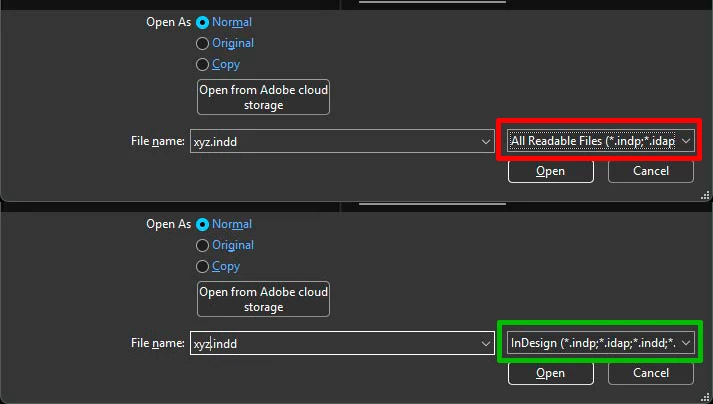
Is there a way how to change default filter in Open file dialog just to INDD files and not All readable? 
I would like to see only INDD files and not PDF and many others when opening files.


    Correct answer Peter Kahrel

    No, that’s not possible. But you can use a simple script for that. Place the following script in your Scripts folder and assign the shortcut Ctrl+O (or whatever) to the script in the Keyboard Shortcut editor. The script shows a File Open window with only InDesign files shown.

    (function () {
    var f = File.openDialog ('Select a file', 'Documents:*.indd', true);
    if (f) {
    app.open(f);
    }
    }());


    3 replies

    Peter Kahrel
    Community Expert
    Community Expert
    June 26, 2026

    I posted a customisable version of the script here:

    https://creativepro.com/files/kahrel/indesign/filtered-open-dialog.html

    Some examples included of how the filter can be customised.

    michaljanata
    Inspiring
    June 24, 2026

    thank you

    Peter Kahrel
    Community Expert
    Peter KahrelCommunity ExpertCorrect answer
    Community Expert
    June 24, 2026

    No, that’s not possible. But you can use a simple script for that. Place the following script in your Scripts folder and assign the shortcut Ctrl+O (or whatever) to the script in the Keyboard Shortcut editor. The script shows a File Open window with only InDesign files shown.

    (function () {
    var f = File.openDialog ('Select a file', 'Documents:*.indd', true);
    if (f) {
    app.open(f);
    }
    }());

